Exposing application on IPV6 Airtel Xstream for self hosting purpose

  • Thread starter Thread starter panic0
  • Start date Start date
  • Replies Replies 23
  • Views Views 2,781
Messages
11
Location
Chennai
ISP
Airtel
Using the ZTE F670LV9.0 for my airtel xstream broadband, Wanted to expose some local backend apps on ipv6. It seems to work in LAN but trying the ipv6 from WAN doesn't work. Even though my firewall is not enabled.
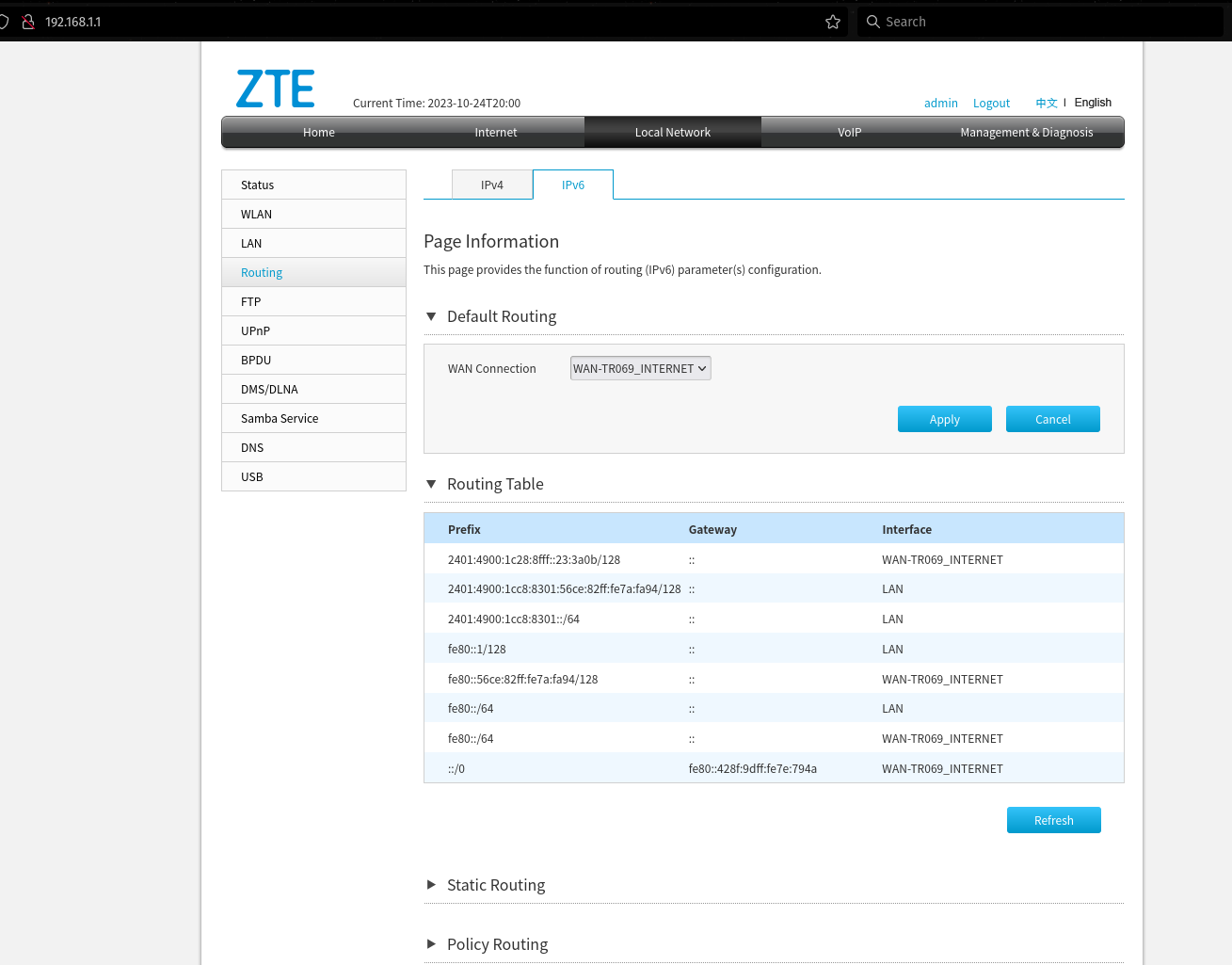
Unable to figure out what is wrong with my config, also there is no Gateway shown for the ipv6 in the routing table.

Location: Chennai
Here are some results of common network commands in linux -
#ip -6 address show#
Code:
1: lo: <LOOPBACK,UP,LOWER_UP> mtu 65536 state UNKNOWN qlen 1000
    inet6 ::1/128 scope host 
       valid_lft forever preferred_lft forever
3: wlo1: <BROADCAST,MULTICAST,UP,LOWER_UP> mtu 1500 state UP qlen 1000
    inet6 2401:4900:1cc8:c13c:62c7:9xxx:xxxx:xxxx/64 scope global temporary dynamic 
       valid_lft 56167sec preferred_lft 56167sec
    inet6 2401:4900:1cc8:c13c:7faf:1cxx:xxxx:xxxx/64 scope global dynamic mngtmpaddr noprefixroute 
       valid_lft 56167sec preferred_lft 56167sec
    inet6 fe80::65f6:e9f9:71f7:d5f5/64 scope link noprefixroute 
       valid_lft forever preferred_lft forever
#ip -6 route show default#
default via fe80::1 dev wlo1 proto ra metric 600 pref medium

#ping6 ipv6.google.com#
Code:
PING ipv6.google.com(maa03s45-in-x0e.1e100.net (2404:6800:4007:82a::200e)) 56 data bytes
64 bytes from maa03s45-in-x0e.1e100.net (2404:6800:4007:82a::200e): icmp_seq=1 ttl=59 time=6.26 ms
64 bytes from maa03s45-in-x0e.1e100.net (2404:6800:4007:82a::200e): icmp_seq=2 ttl=59 time=6.19 ms
64 bytes from maa03s45-in-x0e.1e100.net (2404:6800:4007:82a::200e): icmp_seq=3 ttl=59 time=7.07 ms
64 bytes from maa03s45-in-x0e.1e100.net (2404:6800:4007:82a::200e): icmp_seq=4 ttl=59 time=6.95 ms
64 bytes from maa03s45-in-x0e.1e100.net (2404:6800:4007:82a::200e): icmp_seq=5 ttl=59 time=6.23 ms
64 bytes from maa03s45-in-x0e.1e100.net (2404:6800:4007:82a::200e): icmp_seq=6 ttl=59 time=6.68 ms
^C
--- ipv6.google.com ping statistics ---
6 packets transmitted, 6 received, 0% packet loss, time 5006ms
rtt min/avg/max/mdev = 6.189/6.562/7.071/0.357 ms

#traceroute -6 -T -p 443 www.cisa.gov#
Code:
traceroute to www.cisa.gov (2600:140f:9800:19c::447a), 30 hops max, 80 byte packets
 1  2401:4900:1cc8:c13c:56ce:82ff:fe7a:fa94 (2401:4900:1cc8:c13c:56ce:82ff:fe7a:fa94)  1.948 ms  2.335 ms  2.300 ms
 2  2401:4900:1c28:8fff::1 (2401:4900:1c28:8fff::1)  9.284 ms  9.252 ms  9.213 ms
 3  2404:a800:3a00:1::4a5 (2404:a800:3a00:1::4a5)  7.706 ms 2404:a800:3a00:1::4a9 (2404:a800:3a00:1::4a9)  8.427 ms 2404:a800:3a00:1::4a5 (2404:a800:3a00:1::4a5)  9.097 ms
 4  * g2600-1417-0078-0000-0000-0000-0000-0001.deploy.static.akamaitechnologies.com (2600:1417:78::1)  13.156 ms *
 5  g2600-140f-9800-019c-0000-0000-0000-447a.deploy.static.akamaitechnologies.com (2600:140f:9800:19c::447a)  10.864 ms g2600-1417-0078-0000-0000-0000-0000-0001.deploy.static.akamaitechnologies.com (2600:1417:78::1)  24.494 ms g2600-140f-9800-019c-0000-0000-0000-447a.deploy.static.akamaitechnologies.com (2600:140f:9800:19c::447a)  11.668 ms
If someone has self-hosted on a similar setup please guide me as I am a noob when it comes to ipv6.
Let me know if any other configs I need to share.
 
Solution
@panic0 That means the application is only listening on the loopback interface and of course it won't be accessible from any where except that machine.

Lookup "bind" or "listen" setting in the configuration of the application you are running and set it to [::] from [::1] to listen on all interfaces.
Considering you have firewall disabled on your Linux Setup, you will need to allow inbound port on your Gateway Router.

Also, check if there are any block rules under iptables.
Code:
sudo iptables --list-rules
 
Last edited:
Upvote 0
yeah, ufw status is inactive on my linux.
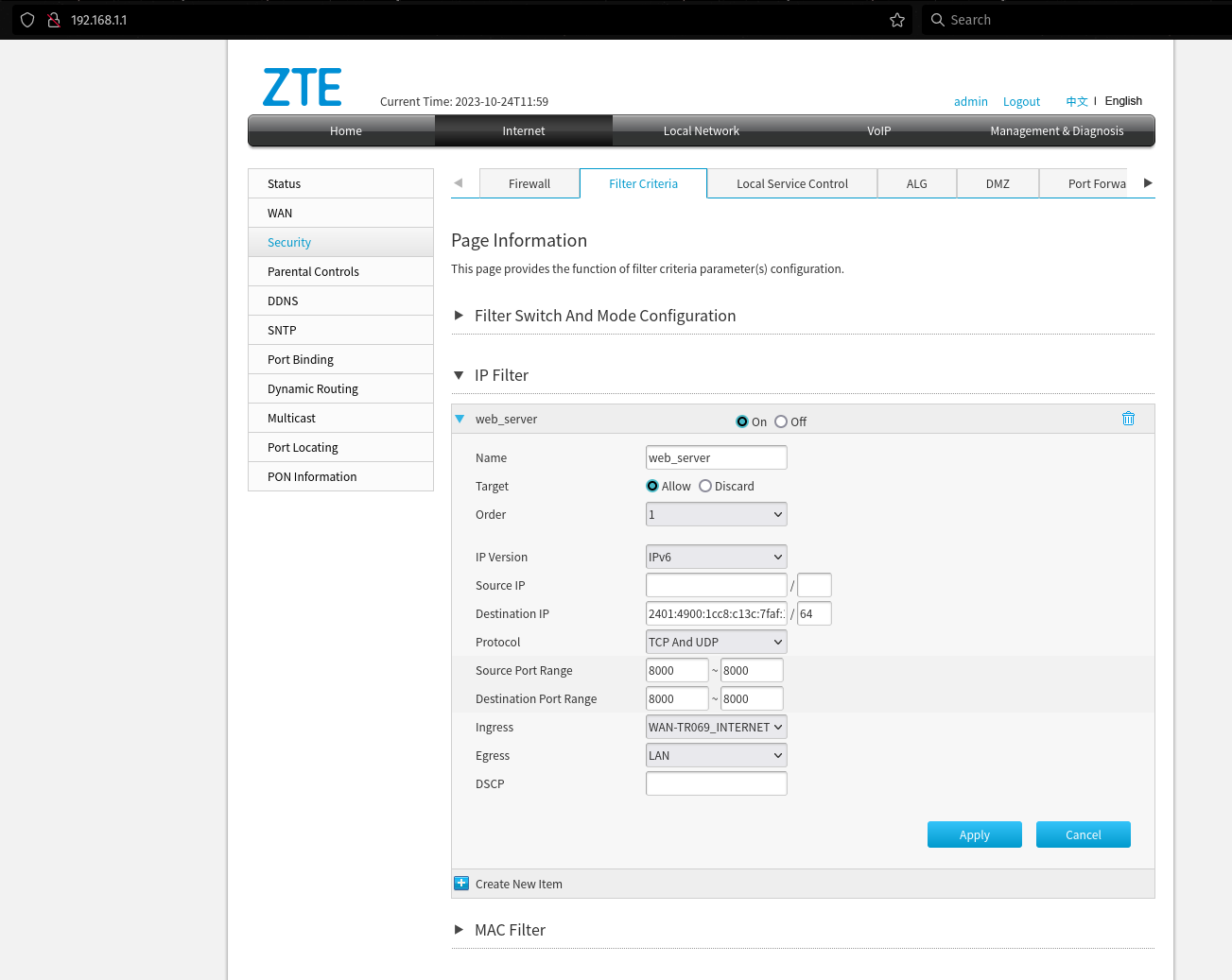
Assuming, for ipv6 allowing inbound port has to be done like this, let me know if I am wrong (FYI this doesn't work)

zte-router-config.png


iptables --list-rules
Code:
[/B]
-P INPUT ACCEPT
-P FORWARD DROP
-P OUTPUT ACCEPT
-N DOCKER
-N DOCKER-ISOLATION-STAGE-1
-N DOCKER-ISOLATION-STAGE-2
-N DOCKER-USER
-A FORWARD -j DOCKER-USER
-A FORWARD -j DOCKER-ISOLATION-STAGE-1
-A FORWARD -o docker0 -m conntrack --ctstate RELATED,ESTABLISHED -j ACCEPT
-A FORWARD -o docker0 -j DOCKER
-A FORWARD -i docker0 ! -o docker0 -j ACCEPT
-A FORWARD -i docker0 -o docker0 -j ACCEPT
-A DOCKER-ISOLATION-STAGE-1 -i docker0 ! -o docker0 -j DOCKER-ISOLATION-STAGE-2
-A DOCKER-ISOLATION-STAGE-1 -j RETURN
-A DOCKER-ISOLATION-STAGE-2 -o docker0 -j DROP
-A DOCKER-ISOLATION-STAGE-2 -j RETURN
-A DOCKER-USER -j RETURN

Thanks
 
Upvote 0
hey albonycal, do you mean instead of my IPv6 address, I should fill in ::/0 or something else? please let me know.
Also if nothing can be done from my configuration side, then should I ask Airtel to provide me with another prefix or is this a failed case and I should probably shift to another network?
Thanks
 
Last edited:
Upvote 0
Airtel's ZTE is a bit buggy to work with on IPV6.

Source port also needs to be blank and try again.
For the dynamic ip you'd need to keep destination as empty.
 
Upvote 0
They are doing nothing of that sort, you need to configure firewall correctly
or if you are comfortable withit, disable firewall completely and ensure firewall is enabled on the client side.
Mobile phones etc. don't really need a firewall.
 
Upvote 0
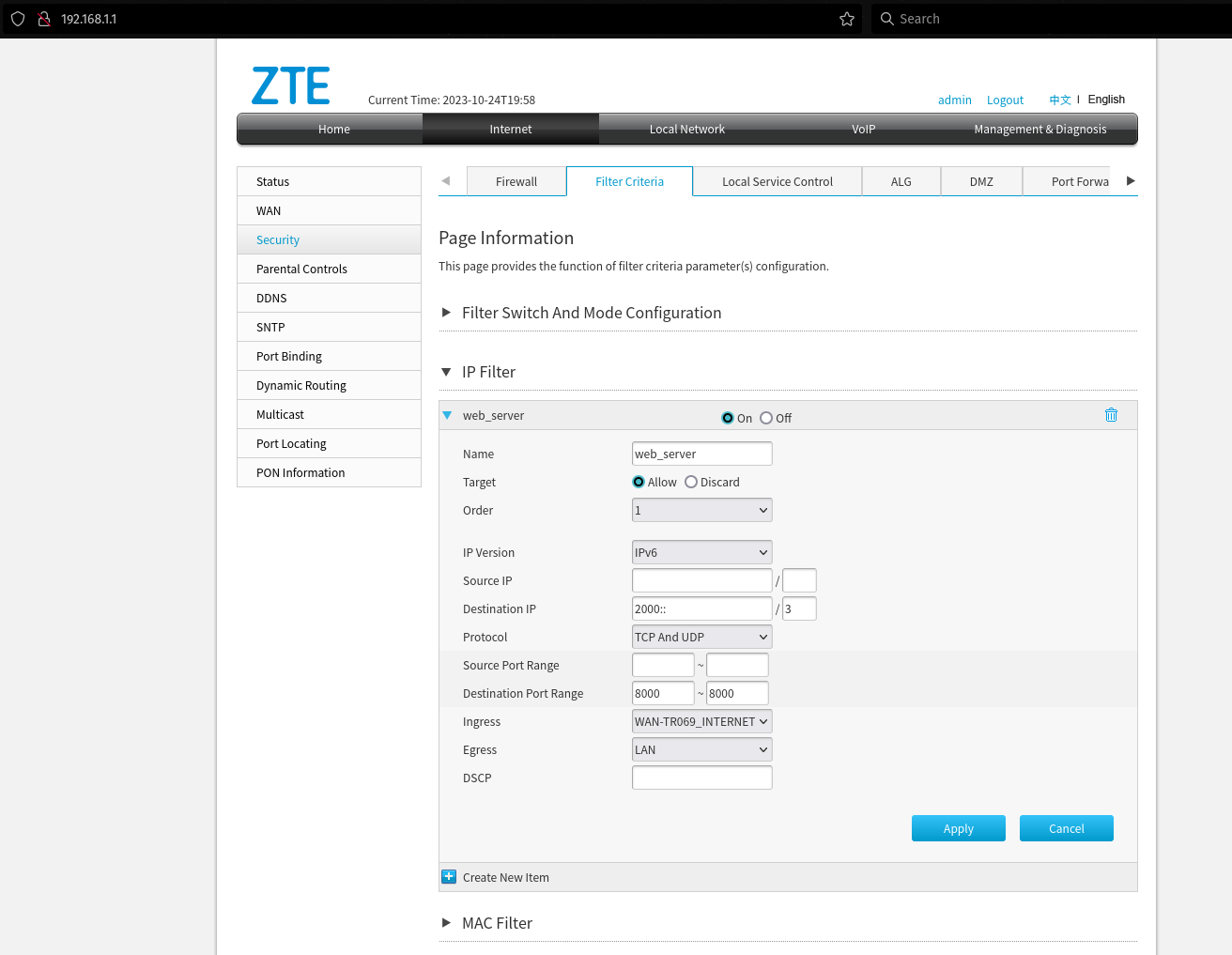
@panic0 set destination ip to 2000::/3 (2000:: and 3 in the two fields)

and then try again. If it still doesn't work then maybe there is a issue in the firewall on that device.

Also make sure you don't have another firewall on the host running the application and blocking traffic.
 
Upvote 0
  1. @albonycal I use Linux and I haven't enabled Firewall there.
    Running the command ufw status gives Status: inactive.
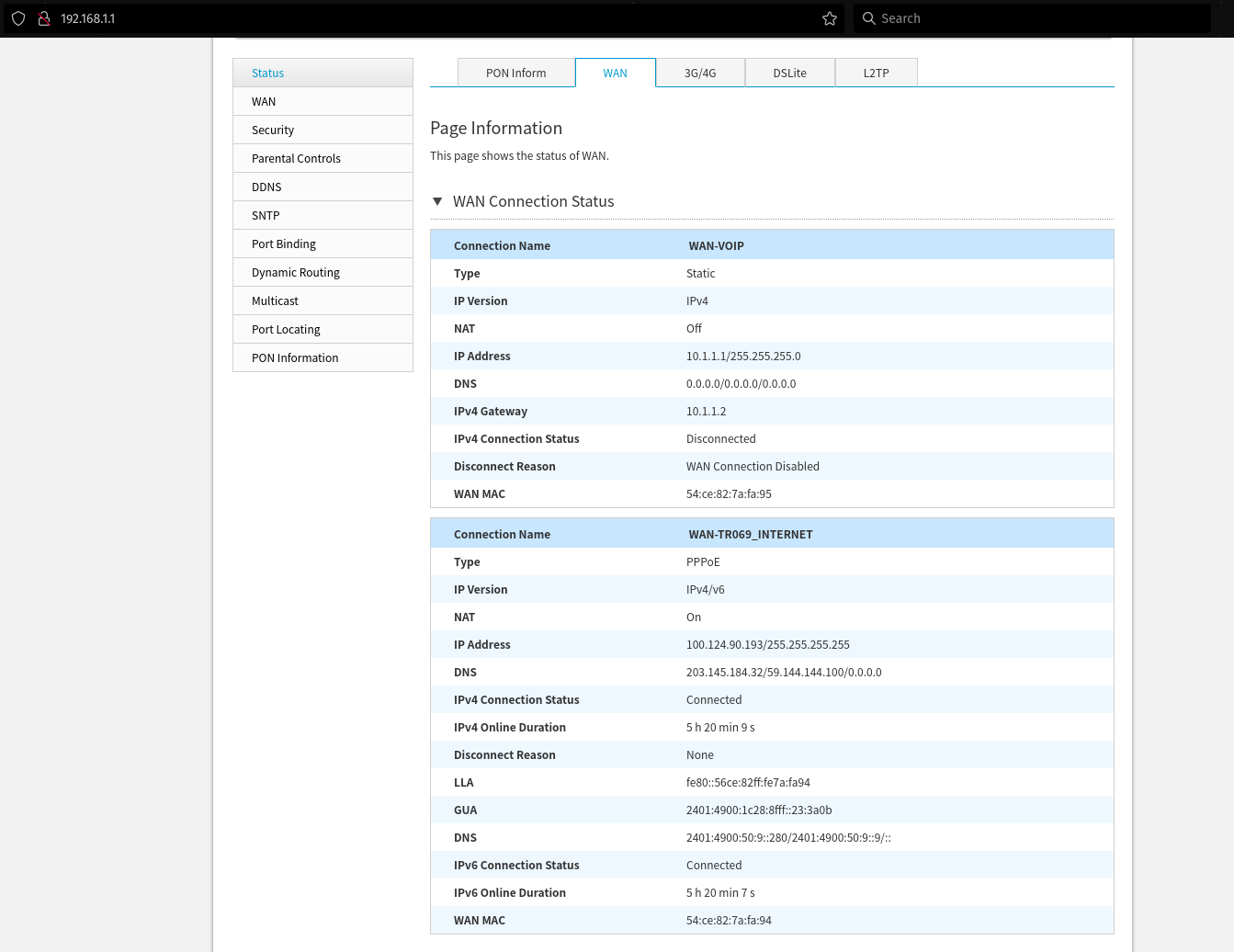
  2. Firewall on my ZTE is also disabled
    zte-wan-status.png

  3. I have changed the config to this @ishanjain28 but still not working, let me know if something is wrong.
    zte-router-config-2.png
  4. Just to be sure that I am not querying the wrong link or that the syntax is not wrong, here is what I am typing in my browser search bar -
    1. On the host computer, my server is running on port 8000, so querying this http://[::1]:8000/health returns "Ok".
    2. And to check wether config works or not, I type http://[2401:4900:1cc8:c13c:7faf:1cxx:xxxx:xxxx]:8000/health the ip used here is from the command ip -6 address show on linux, the scope global dynamic mngtmpaddr noprefixroute one.
  5. Some Additional context
    1. Routing table
      zte-routing-table.png
    2. WAN status
      zte-wan-status.png

      If this is a problem from my side(config) I would like to fix this anyhow. it's just that I am entry-level in networking (was doing port forwarding before cgnat), and may need a little more guidance than usual.
      Thanks
 
Upvote 0
Back