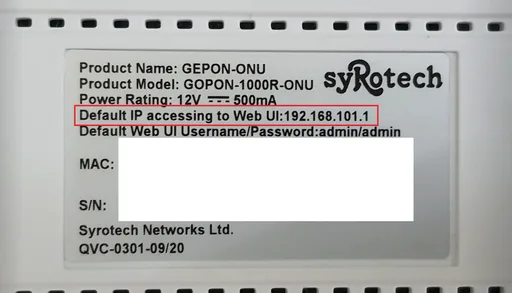
Yes, it is indeed possible ! I use this exact setup to monitor my optical power and line quality without the need to unplug and replug connections again and again.
1. Inspect your ONU. Specifically, look for the default management IP. Then set your computer in a similar range. For example, I connected my computer to my
router directly and set a static IP on my LAN adapter as 192.168.101.100 and verified that I can access the WebUI.
If you cannot access the webUI, there's no point in going further since most probably your ISP has locked your router (you can try resetting it in case someone else changed the default IP).
2. Now connect back everything as it was (ONU>ROUTER>PC).
Set your adapter to Dynamic IP again. Next, open your
router UI and go to WAN settings. Scroll down under PPPoE until you find something like "
Secondary Connection". Select "
Static IP". Fill in the same details you filled on your LAN adapter while accessing the webUI of the ONU.
3. Save settings, Reboot Router.
4. Try visiting 192.168.101.1 (or whatever your ONU is at). It should load up the ONU page.