Locked Nokia G-2425G-A settings

  • Thread starter Thread starter flame
  • Start date Start date
  • Replies Replies 37
  • Views Views 48,839
@bhupesh.tiwadi You will need to get Airtel to switch the ONT to bridge mode. Once done, U need to set up the PPPoE authentication on the router after plugging it into LAN port 4 of the Airtel ONT. I am not familiar with the specifics of your TPL router...please consult the manual for details on how to configure it for PPPoE. Please get the login ID and password for your account from the technician. You will not be dual NATted and the router may get a public IP. If you get a CGNAT on the TPL router (normally 100.xxx.xxx.xxx or similar) then you can opt for a static IP by paying 199 + GST extra/mth.
 
Has anyone tried hooking up their non wireless printer to their Nokia ONT?
In my case I have a HP Laser MFP, and a Nokia G-140W-F GPON Gateway.

My cousin has this old school printer which works perfectly well for her and is a decent enough printer for her day to day use if you ask me. I just want the hassle of connecting to usb cable everytime she wants to print some documents to the PC by just setting it up.

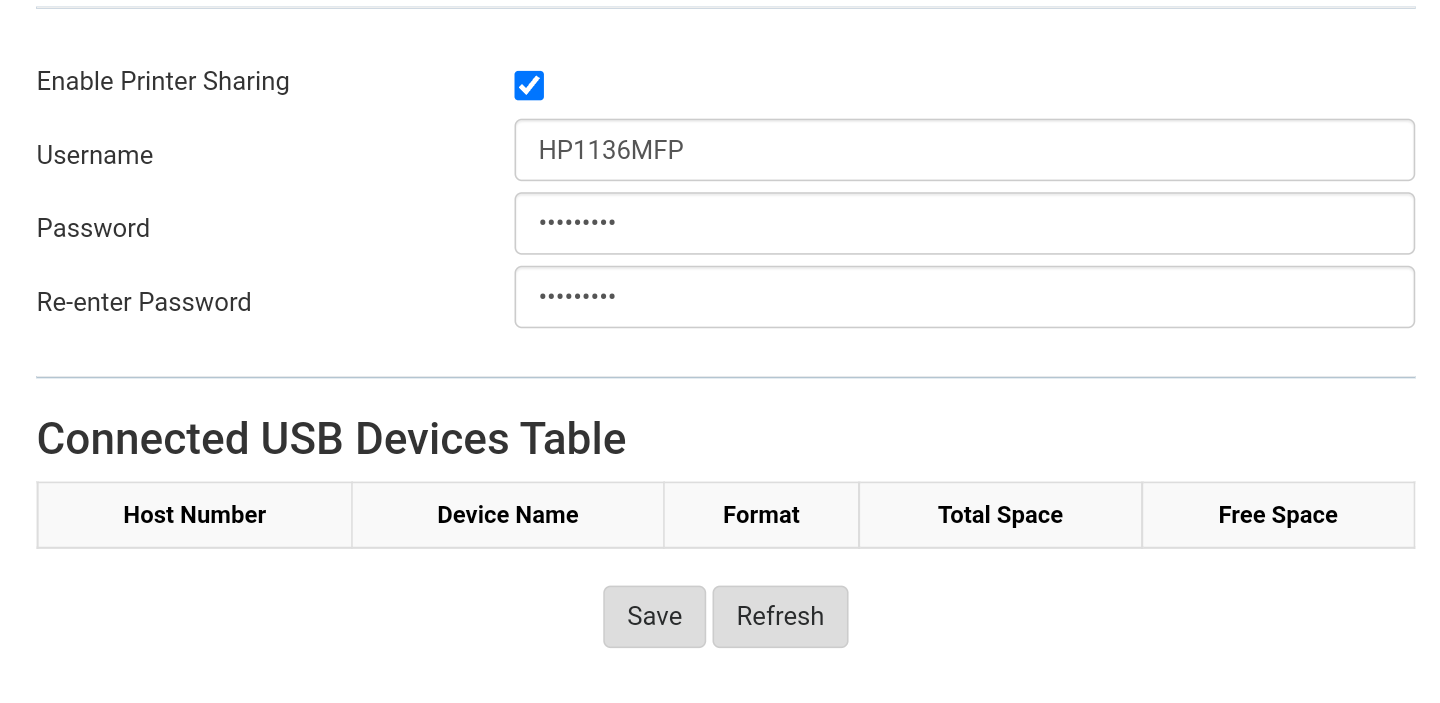
I have failed and it is not working. The printer is showing in the list of connected devices in the attached picture, but I am not able to set it up on the computer PC or Mac.
Can I get some assistance from the learned members of the forum or by someone who has successfully set a similar setup on the Nokia ONT on either of the above-mentioned operating systems.
Please help and guide me.!!
Screenshot-20220316-011007-2.png
How did you get this screen to enable Print sharing on Nokia G-2425G-A? I am not getting that option when I login to modem
 
I was trying to edit WAN settings (with an intention to enable bridge mode) in my G-2425G-A Nokia Router but instructions here or elsewhere were a little complicated to my understanding. I kept searching online and finally found steps that are easy to follow in this Youtube video: Unlock Nokia G 2425G A Alcatel GPON Router Modem Easily

Things to keep in mind before you follow:-

1. Backup router settings into a 'Config' file - google for instructions

2. Default username & password is admin

3. Password for shell is '; /bin/sh; # (needed when following the command instructions in MobaXterm application

4. Username/Password changes after we change Operator ID from 'BRTI' to 'ALCL'. New details below:
user: AdminGPON
pass: ALC#FGU

5. Video shows 'MobaXterm Pro' app but does not explain how to obtain or configure it. Instructions below:
a. Even the free version will do just fine. I used the portable version from here: MobaXterm free Xserver and tabbed SSH client for Windows
b. When you open 'MobxXterm Home' for the first time, click on 'Session' --> 'Telnet' --> enter "192.168.1.1" for 'Remote host' and then click on 'Ok' - then follow the instructions in the video

6. If you are trying to use this router with another ISP or enable bridge mode, there are other video instructions online. Example here: How to configure NOKIA G2425GA Fiber Router After Hard Reset | Netplus Fiber Setting In pc

Commands in MobaXterm Application (for easy Copy/Paste):-
AONT login: admin
Password: admin
user> enable
user# shell
Password2: '; /bin/sh; #
/configs/home/admin # exit
[root@AONT: admin]# pwd
[root@AONT: admin]# ls
[root@AONT: admin]# cd /
[root@AONT: /]# ls
[root@AONT: /]# ritool dump
[root@AONT: /]# ritool set OperatorID ALCL
[root@AONT: /]# ritool dump
[root@AONT: /]# exit

Disclaimer: Following these instructions may mess up your router. Always backup the 'config' file and only then follow the instructions.
Operator mode can always be changed back to 'BRTI' using the same instructions (replace BRTI with ALCL) in the command line.

Hope this helps others who are trying to play around with this particular Nokia router. Post here or DM me in case you any further info.
 
Last edited:
Back