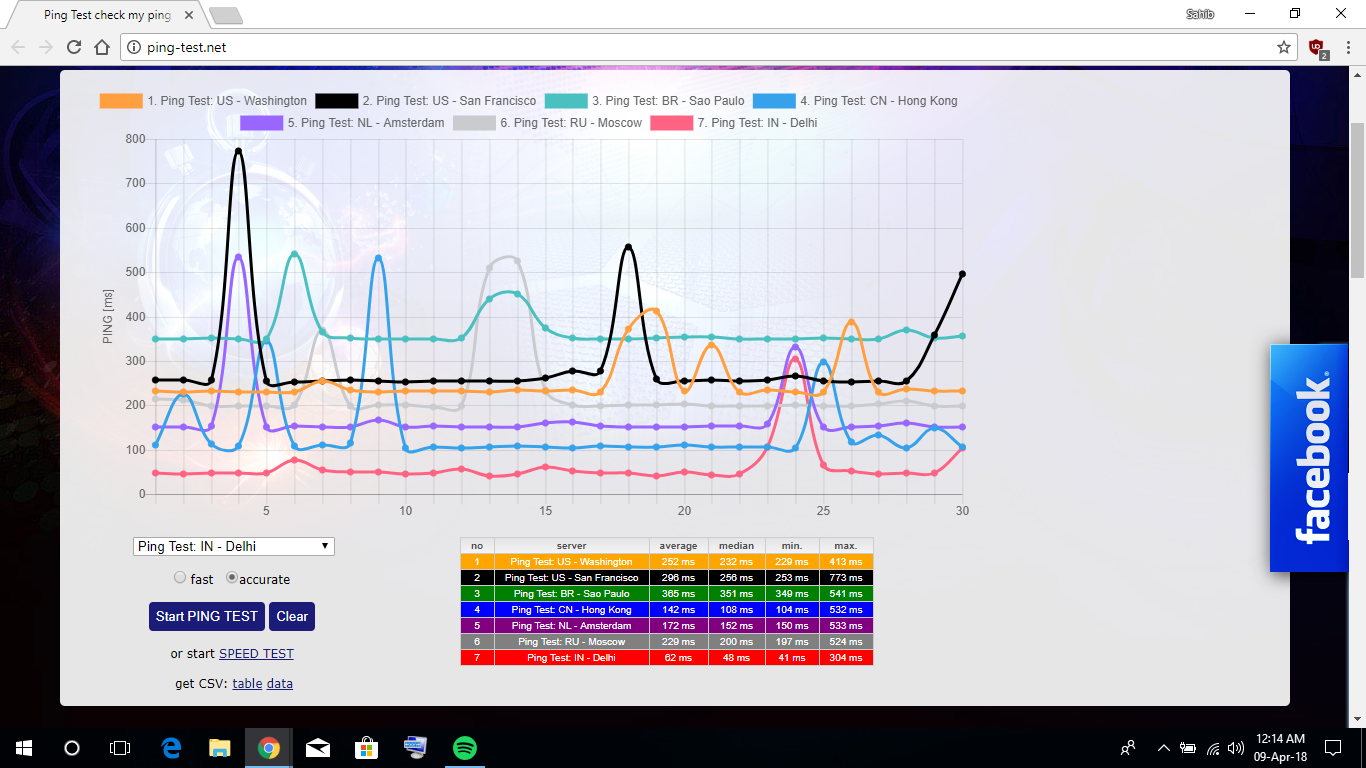
That looks ok but keep monitoring and post if you have spikes.

-
Amazon Deals - ToS - Like us?
You are using an out of date browser. It may not display this or other websites correctly.
You should upgrade or use an alternative browser.
You should upgrade or use an alternative browser.
Media Converter on One Broadband query
- Thread starter anonuser7
- Start date
- Replies 133
- Views 34,802

Those won't cause any major issues like constant ping spikes. Keep monitoring and post if ping increases after every 10-30 responses.
So last contact was 2 days ago by their NOC team, all I am getting is "NOC team knows about your issue". Contacted LCO but he is busy with fiber cut and there was a storm today around the time he was supposed to visit, can't blame him for not visiting today.
I have tried everything but I cannot get more than 10mbps from my seedbox. Speed all over Europe is half my connection speed, even in torrents from good private torrents sites the speed fluctuates a lot between 25-50mbps, averages around 32mbps.
Is this normal behavior for high speed internet because before this I had 16mbps and 20mbps connections and they always maxed out on private torrent sites.
@RS4 can you do a tracert
8.8.8.8
203.117.172.253
103.28.54.16
185.60.112.157
24.105.30.129
also pingtest on 8.8.8.8 and let it run 10mins while you do light tasks such as surfing websites? Check the 10mins log if there are ping spikes. If you don't have the issue then it will help pinpoint the problem.
Is this normal behavior for high speed internet because before this I had 16mbps and 20mbps connections and they always maxed out on private torrent sites.
@RS4 can you do a tracert
8.8.8.8
203.117.172.253
103.28.54.16
185.60.112.157
24.105.30.129
also pingtest on 8.8.8.8 and let it run 10mins while you do light tasks such as surfing websites? Check the 10mins log if there are ping spikes. If you don't have the issue then it will help pinpoint the problem.
Last edited:
@sahibunlimited My connection is down since yesterday, i am paying 50% more than standard prices for this stupid connection.
Cables are being cut because of metro, nothing can be done about it. My connection was down for the first day after installation for 12 hours.
Losing all hope for the connection to be fixed, this is the latest update from NCO.
Called LCO and told him about this, he said install teamviewer for remote desktop so he can check it out, didn't get a call back from him and he didn't pick up.
Losing all hope for the connection to be fixed, this is the latest update from NCO.
I:NOC TT (08 Apr 2018 03:05:35 PM) : RC: Link checked from backend, found no issue. So as discussed with Mr. Rajesh from field Nagpur H/E, he will check the link tomorrow.
Called LCO and told him about this, he said install teamviewer for remote desktop so he can check it out, didn't get a call back from him and he didn't pick up.
19 hops to AWS Singapore is bad right? IPL is buffering.
Code:
Tracing route to hotstar.com [52.219.32.14]
over a maximum of 30 hops:

  1     2 ms     2 ms     2 ms  192.168.1.1
  2     5 ms     5 ms     4 ms  dhcp-192-224-6.in2cable.com [203.192.224.6]
  3     6 ms     *       12 ms  dhcp-192-224-1.in2cable.com [203.192.224.1]
  4     *        *        *     Request timed out.
  5    24 ms    24 ms    24 ms  172.23.78.233
  6    31 ms    43 ms    33 ms  172.31.244.45
  7    29 ms    27 ms    30 ms  ix-ae-4-2.tcore2.CXR-Chennai.as6453.net [180.87.37.1]
  8   550 ms    99 ms    64 ms  if-ae-6-2.tcore2.SVW-Singapore.as6453.net [180.87.37.14]
  9    65 ms    67 ms    67 ms  180.87.15.206
10    65 ms    65 ms    66 ms  52.93.9.144
11    67 ms    64 ms    66 ms  52.93.9.159
12    68 ms    66 ms    87 ms  52.93.10.91
13     *        *        *     Request timed out.
14     *        *        *     Request timed out.
15     *        *        *     Request timed out.
16     *        *        *     Request timed out.
17     *        *        *     Request timed out.
18     *        *        *     Request timed out.
19    61 ms    61 ms    61 ms  s3-website-ap-southeast-1.amazonaws.com [52.219.32.14]

Trace complete.
Last edited: