Router selection info - beginners guide

Its usually confusing to decide which home router to buy. So I thought of listing down a few features (and a brief description) that could be helpful. A good document shared with some technical details below.

1. Wifi speed advertised (eg AC1200 vs AC 2300 etc). - Its usally a marketing gimmick describing total theoretical throughput of all bands used simultaneously. Best to ignore.

2. Bandwith size - eg 40 mhz channel width on 5 Ghz would give 433 mbps max, the same 5 Ghz with a 80 mhz channel width would give 866 mbps max. Go for higher spec one.

3. MIMO - Atleast 2x2 Mimo. Most wifi client devices only support that. Higher MIMO is better. But note that a 2x2 MIMO wifi device and wifi 5 router, on 80 mhz band on 5 Ghz wifi will give you actual speeds of <= 350 mbps at a close distance.
@yougotmehere ,It is possible to get 500mbps wifi speed for a 500 mbps internet connection. Wifi speeds are independent of internet connection speed.

I'm attaching an image of iperf test on my mobile. It's a OnePlus 5 with 2x2 mimo. Connected to an archer c6 on 5ghz, 80hz band. Distance from router is less though, about 10 feet only. The iperf 'server' is running on a raspberry pi on my network itself.
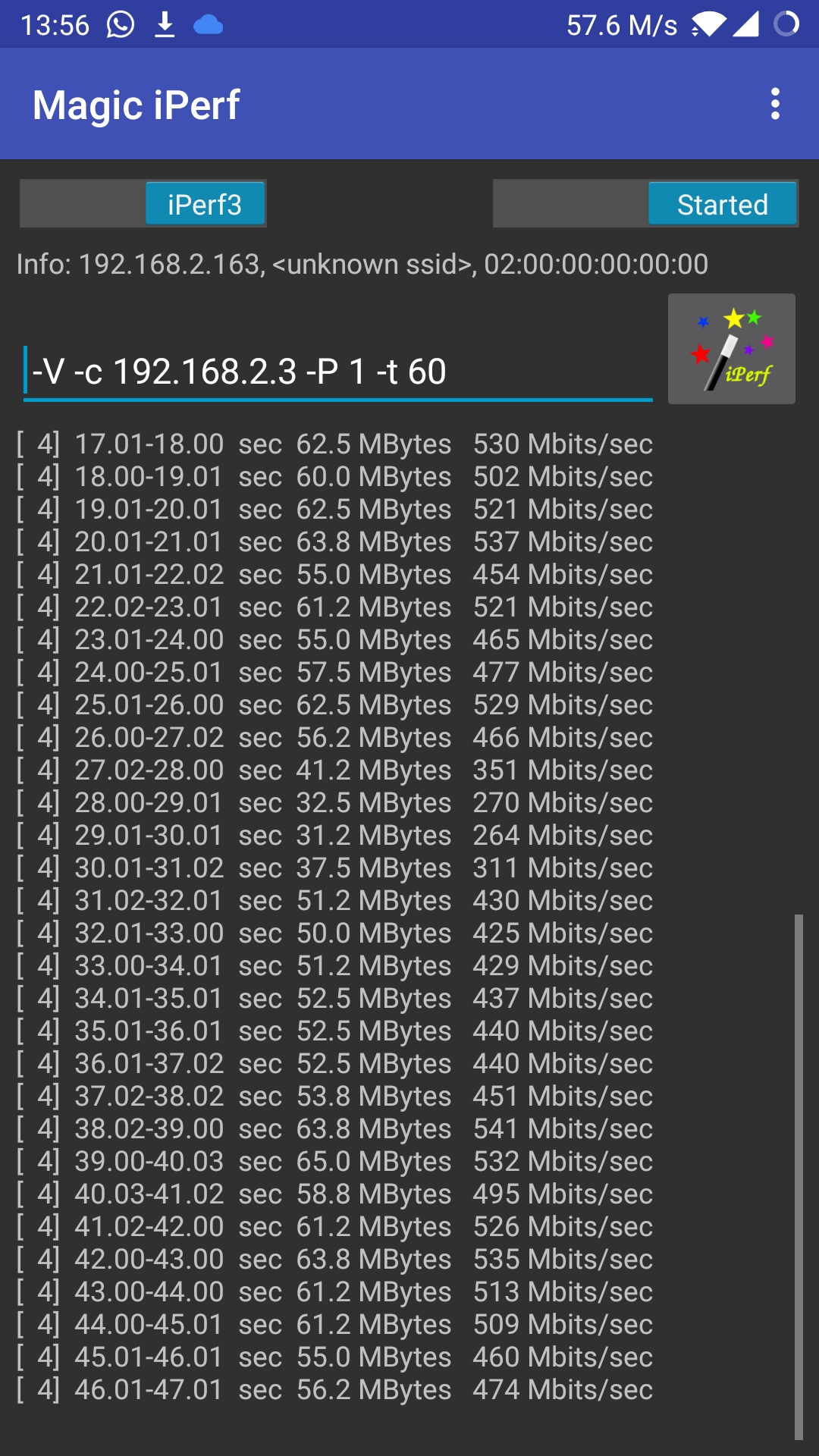
kpTlXEb.jpg


Perhaps the below threads will be helpful in selecting a router. Choosing one with a gigabit port is ideal.

4. Beanforming - Yes, a good to have feature.

5. Gigabit ethernet port - Gigabit port is ideal as its max speed is 1 gbps. If its not advertised, its usually ethernet port - having ethernet speeds < 100 mbps.

6. Wifi standard - Wifi 4 - n , Wifi 5 (ac), Wifi 6 (ax).
Wifi 4 - n only routers can safely be said to be outdated as of now. Decide between Wifi 5 and 6.
  • Wifi 6 - Supposed to be best with very large number of devices (like public Wifi, hostels, classrooms etc)
  • Wifi 6 - Supposed to lessen mobile phone battery usage.
  • Wifi 6 routers tend to be expensive compared to Wifi 5.
  • Online claims about download speed vary, from improving, to being the same.
7. Software - a recent router model may be better supported that an older model. eg it may have features like WPA3 etc and more recent security updates. You could check for 3rd party firmware support also if you're up for it.

Other members could add more details like say hardware, brands, security, features, mesh support etc etc.
 
Last edited:
If you have existing or the provision of internal ethernet cabling (opt for cat6+ if new) nothing beats having multiple access points at multiple locations of the house.

Now with most client devices supporting wireless fast transition (FT), you get seamless roaming wherever you go (within the house ofcourse 😅)

I recently setup fast transition and multiple AP roaming is seamless. Without FT, I've had to manually disconnect and reconnect at times to force the client to connect to the closer AP.

I now use two APs and coverage is decent, I'm planning to add one more if I can get a cable to that area. 😅😅
 
make sure the routers are using same encryption settings. that improves connectivity with the closer access point.

mesh routers take care of this problem i believe.
 
If you have existing or the provision of internal ethernet cabling (opt for cat6+ if new) nothing beats having multiple access points at multiple locations of the house.

Now with most client devices supporting wireless fast transition (FT), you get seamless roaming wherever you go (within the house ofcourse 😅)

I recently setup fast transition and multiple AP roaming is seamless. Without FT, I've had to manually disconnect and reconnect at times to force the client to connect to the closer AP.

I now use two APs and coverage is decent, I'm planning to add one more if I can get a cable to that area. 😅😅
Oh...The greatness of open-wrt/dd-wrt.
 
make sure the routers are using same encryption settings. that improves connectivity with the closer access point.

mesh routers take care of this problem i believe.

Yep, same SSID and creds etc. Add fast transition along with it, you get DIY mesh. 😅

Without FT, the issue is, some clients tend to stick to far away AP and work at a lower speed, than roam to a closer AP.
 
Yes, same SSID over 2.4 GHz and 5 GHz with the same WPA2 keys.

Right now, I have a primary router cum AP (Mi Router 3G) and secondary dumb AP. Both are running OpenWRT 19.07. Both devices are configured with the exact same wireless settings including SSID, and with fast transition enabled (very straightforward in recent versions of OpenWRT Setting up wireless roaming using 802.11r fast transition on OpenWRT · morph027)

Prior to FT, roaming between APs wasn't that efficient, with manual reconnects necessary in case you move upstairs and want to be connected to the closer AP. Note that you'd still be connected to the ground floor AP but obviously at a reduced link speed and lower signal level.

After turning on FT, the roaming happens always, and in the exact same use case, shows full signal and high link speed always.

In FT config, all 4 wireless profiles (2*2.4, 2*5) are part of the same mobility domain, and FT takes care of moving to a better AP if available, more or less forces the client to move to the closer AP I guess.
 
@varkey thanks for the info.
I have these stupid TP-Link routers I bought very cheap from a friend. (Archer C1200 and AC750) don't support openwrt. I deployed it for time being when I got fiber broadband few months ago.
I'm thinking of doing something similar without spending a wack ton of money on Mikrotik or ubnt.
But the real bummer is getting mi routers from China is not that lucrative like before so can recommend me some off the shelf good gigabit ac1200 or greater routers which support openwrt.
 
My suggestion is not to upgrade your router right now. Wait for another one or two years. By then, almost all phones will support WiFi 6 and the price of WiFi 6 routers also will be much lesser. Right now WiFi 6 routers are quite expensive
@thadougamer , (y)Agree. Router / > 500 mbps net / wifi6 phone upgrade... A trident of expenses :)

@vignesh_venkatesan , Is your archer 1200 router the Archer c6 v2? Or c60 or older c6? If C6 v2, TP-Link should soon release mesh support for it. The c6 v2 US model has recently got it. Ive two C6, one of which is an access point.
AC750 in wireless AP mode maybe faster than in wired mode, as it doesnt have gigabit port. Cheaper routers are easier to replace on the wallet 😅

@Ameen , last I recollect C6 doesnt support ddwrt, but supports openwrt. But there are a few issues with it. (It required a switch, some additional steps, and on forums, people have mentioned having problems with 5 ghz on it.)
 
Back