
Its usually confusing to decide which home router to buy. So I thought of listing down a few features (and a brief description) that could be helpful. A good document shared with some technical details below.
1. Wifi speed advertised (eg AC1200 vs AC 2300 etc). - Its usally a marketing gimmick describing total theoretical throughput of all bands used simultaneously. Best to ignore.
2. Bandwith size - eg 40 mhz channel width on 5 Ghz would give 433 mbps max, the same 5 Ghz with a 80 mhz channel width would give 866 mbps max. Go for higher spec one.
3. MIMO - Atleast 2x2 Mimo. Most wifi client devices only support that. Higher MIMO is better. But note that a 2x2 MIMO wifi device and wifi 5 router, on 80 mhz band on 5 Ghz wifi will give you actual speeds of <= 350 mbps at a close distance.
4. Beanforming - Yes, a good to have feature.
5. Gigabit ethernet port - Gigabit port is ideal as its max speed is 1 gbps. If its not advertised, its usually ethernet port - having ethernet speeds < 100 mbps.
6. Wifi standard - Wifi 4 - n , Wifi 5 (ac), Wifi 6 (ax).
Wifi 4 - n only routers can safely be said to be outdated as of now. Decide between Wifi 5 and 6.
Other members could add more details like say hardware, brands, security, features, mesh support etc etc.
1. Wifi speed advertised (eg AC1200 vs AC 2300 etc). - Its usally a marketing gimmick describing total theoretical throughput of all bands used simultaneously. Best to ignore.
2. Bandwith size - eg 40 mhz channel width on 5 Ghz would give 433 mbps max, the same 5 Ghz with a 80 mhz channel width would give 866 mbps max. Go for higher spec one.
3. MIMO - Atleast 2x2 Mimo. Most wifi client devices only support that. Higher MIMO is better. But note that a 2x2 MIMO wifi device and wifi 5 router, on 80 mhz band on 5 Ghz wifi will give you actual speeds of <= 350 mbps at a close distance.
@yougotmehere ,It is possible to get 500mbps wifi speed for a 500 mbps internet connection. Wifi speeds are independent of internet connection speed.
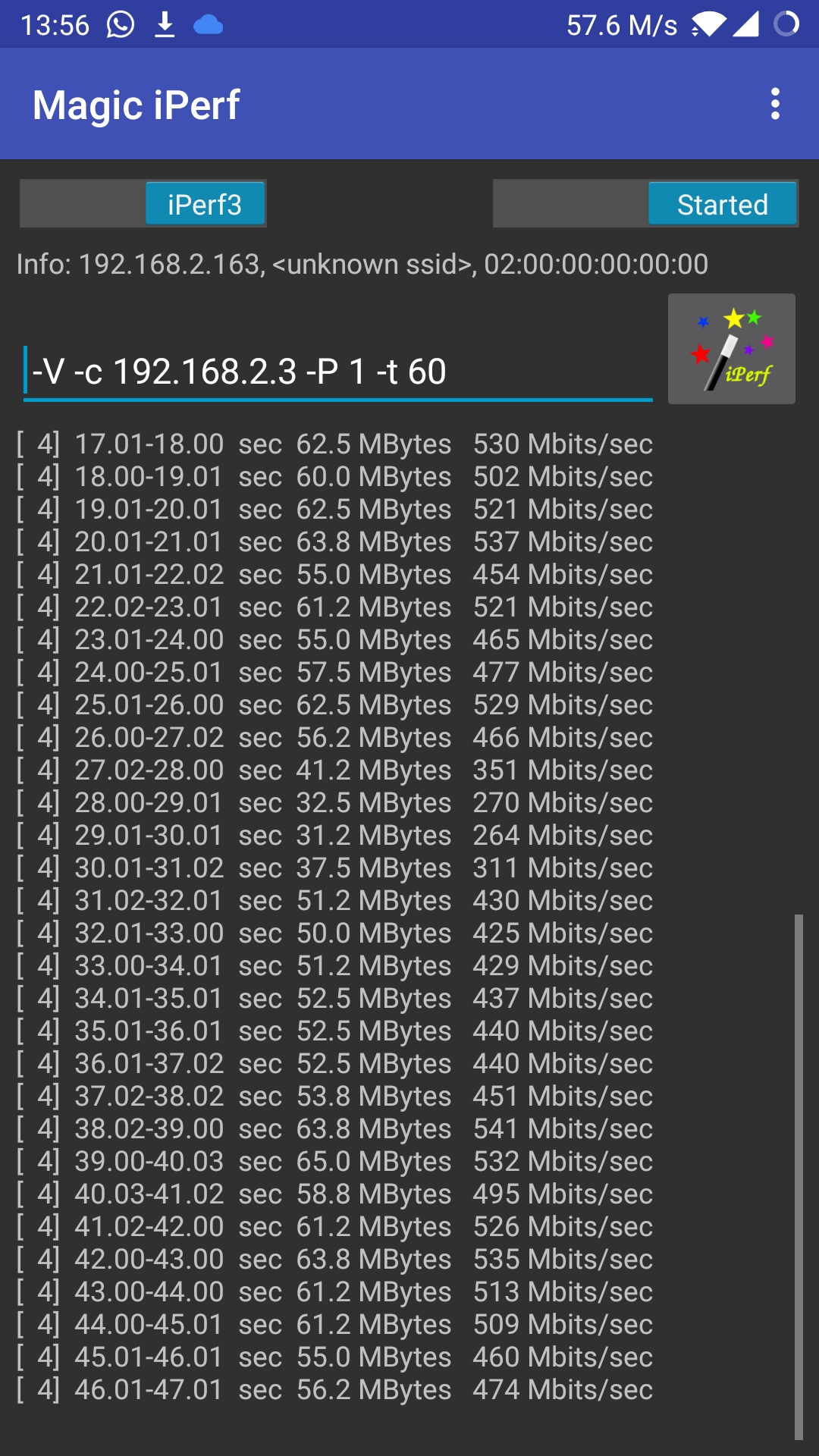
I'm attaching an image of iperf test on my mobile. It's a OnePlus 5 with 2x2 mimo. Connected to an archer c6 on 5ghz, 80hz band. Distance from router is less though, about 10 feet only. The iperf 'server' is running on a raspberry pi on my network itself.
Perhaps the below threads will be helpful in selecting a router. Choosing one with a gigabit port is ideal.
4. Beanforming - Yes, a good to have feature.
5. Gigabit ethernet port - Gigabit port is ideal as its max speed is 1 gbps. If its not advertised, its usually ethernet port - having ethernet speeds < 100 mbps.
6. Wifi standard - Wifi 4 - n , Wifi 5 (ac), Wifi 6 (ax).
Wifi 4 - n only routers can safely be said to be outdated as of now. Decide between Wifi 5 and 6.
- Wifi 6 - Supposed to be best with very large number of devices (like public Wifi, hostels, classrooms etc)
- Wifi 6 - Supposed to lessen mobile phone battery usage.
- Wifi 6 routers tend to be expensive compared to Wifi 5.
- Online claims about download speed vary, from improving, to being the same.
Other members could add more details like say hardware, brands, security, features, mesh support etc etc.
Last edited:


