
Recently I bought archer c6 I wanted to bridge my Syrotech Ont 1110 wdont so I searched this forum and found some suggestions I have put my Ont in bridge mode and copied the MAC address to my archer c6 at first it didn’t work but as soon as I restart after setup it worked now I have some questions
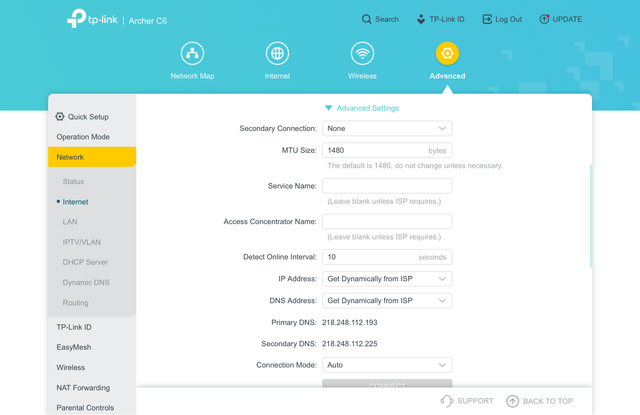
1. So when I changed my profile on my Ont from route to bridge the mtu changed to 1500 now it used to be 1460 also in my archer c6 mtu is at 1480 by default so do I need to change the mtu to 1460 if yes then where in my Ont or archer c6.
2. Also I left few fields on my archer c6 empty do I need to fill these please see the attached photos.
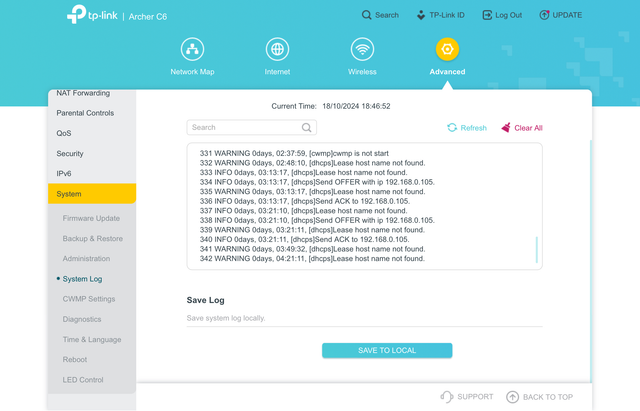
3. I have also attached the logs there are some warnings do I need to take cognisance of it or leave it as it is.
4. On my Ont the connection type I kept on ipv4 should I shift it to ipv4/ipv6 or leave it as it is.
5. Also if I want to access my Ont via archer c6 how can I do that my Ont ip is 192.168.1.1 and TP-Link archer c6 is 192.168.0.1 without hampering the connection.
My internet is working flawlessly currently via the bridge mode no issues till now regarding the internet access but please clear my confusion also if I need any more settings change for my connection please suggest.
1. So when I changed my profile on my Ont from route to bridge the mtu changed to 1500 now it used to be 1460 also in my archer c6 mtu is at 1480 by default so do I need to change the mtu to 1460 if yes then where in my Ont or archer c6.
2. Also I left few fields on my archer c6 empty do I need to fill these please see the attached photos.
3. I have also attached the logs there are some warnings do I need to take cognisance of it or leave it as it is.
4. On my Ont the connection type I kept on ipv4 should I shift it to ipv4/ipv6 or leave it as it is.
5. Also if I want to access my Ont via archer c6 how can I do that my Ont ip is 192.168.1.1 and TP-Link archer c6 is 192.168.0.1 without hampering the connection.
My internet is working flawlessly currently via the bridge mode no issues till now regarding the internet access but please clear my confusion also if I need any more settings change for my connection please suggest.


