
Hi everyone,
Long time reader, first time poster here. Foremost, thanks for having me.
Some context first: I've been on Airtel XStream fibre for some few years now. Last April, they updated the cabling network near me and then paid a visit to my home informing me that my original Huwaei router had to be replaced as it was no longer compatible with Airtel's newer standard. While I didn't really buy it, given that the router belonged to them in the first place, I didn't really object when they replaced it with a ZyXEL PMG5617-R20B variant.
Unfortunately, I started observing peculiar behavior soon after. On odd occasions, websites won't open up, or will be slower or the router would go AWOL for a few minutes while I was working at night and then mysteriously come back. While issues only cropped every now and then, recently, I had it and did some investigations.
Now I'm not an expert at this, but I have some experience so please bear with me- These are my Windows LAN settings:
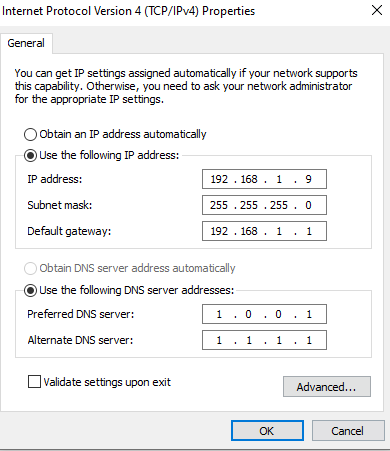
As you can presume, I don't trust Airtel's DNS network. It's slow and tends to be clunky on the best of times. So I use Google or Cloudflare DNS, and with my last router, that'd work seamlessly. Unfortunately, this Zyxel feels like it has been heavily customized by Airtel and not in the best of ways. While my "ipconfig /all" showed that my LAN is indeed passing requests to Cloudflare DNS, the router itself however is doing this:
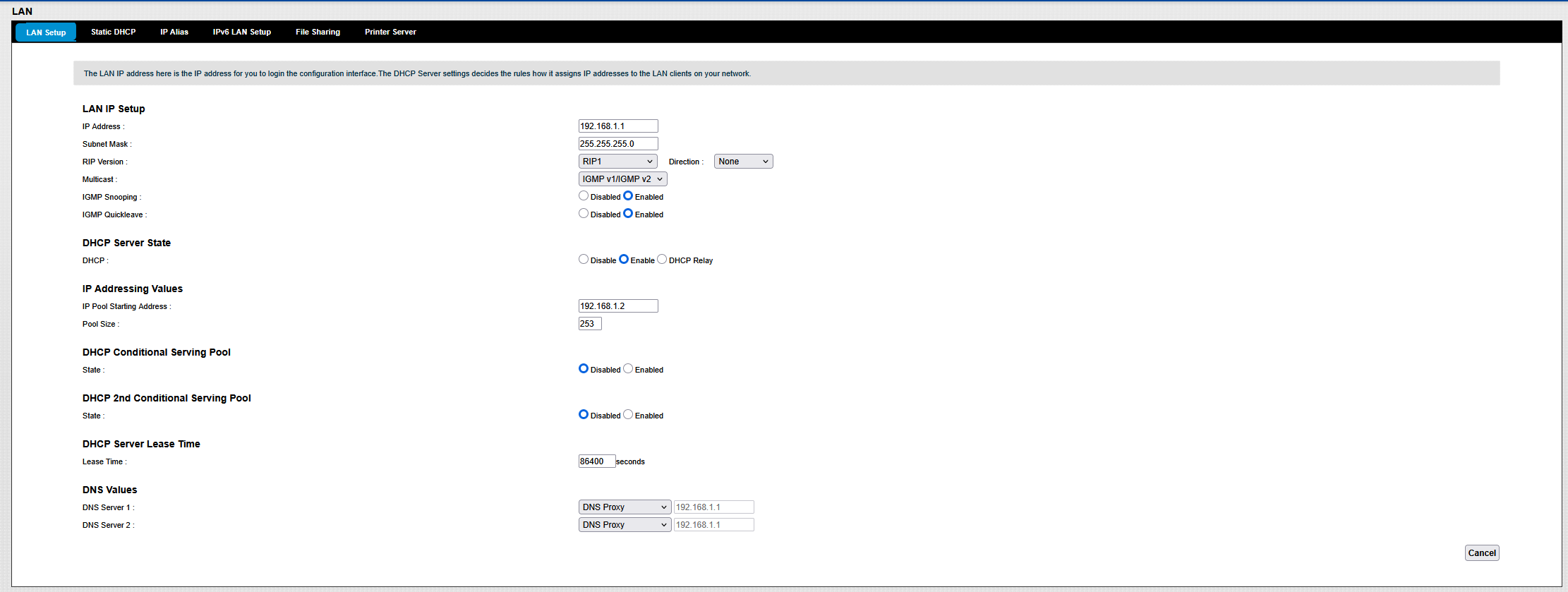
Down below, there are four options in the DNS Values:
If so is the case, I'm not a fan and would rather it didn't as it could explain the wonky web behavior. But here is where my problem comes in:
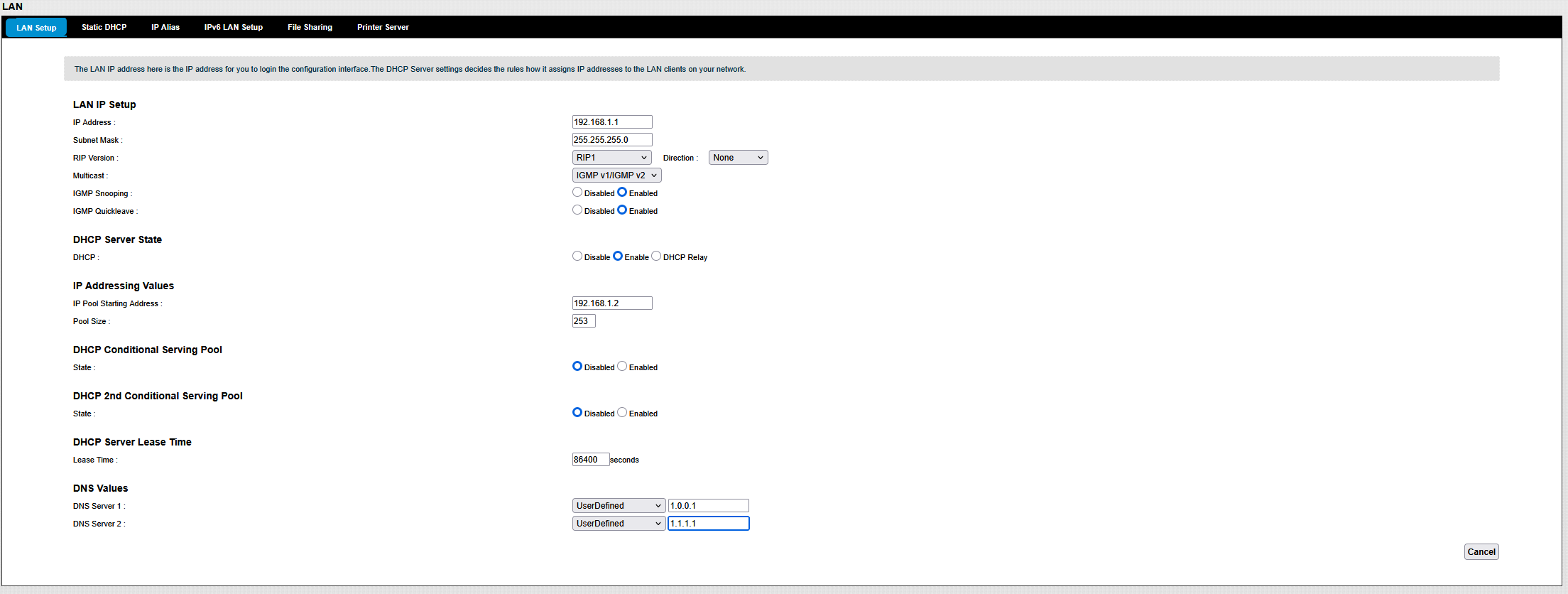
Any attempt on my end to change the DNS here by switching to "UserDefined" Mode is thwarted by a lack of any option button equivalent to "Okay" or "Apply". Experience dictates one should show up right next to Cancel button on the bottom right after I set the DNS value, but... nothing.
Now I've got in touch with Airtel and for some mysterious reason, they are stumped as well. First the guy tried from his own end, but failed. Then a tech visited me at my place but failed as well. He then came to the conclusion that only the NOC staff can make this happen, which seemed extremely odd to me. Why would a router deny the end user such a basic functionality? But Airtel doesn't exactly staff the most "knowledgable employees", so I didn't push the matter with him and they are now currently, and I quote, "working on the issue".
Meanwhile, I also went looking on the internet for any similar discussions, and tripped on two Reddit posts that were made as recently as 7 months and the other 1 year ago from Airtel users with the same intent
#Reddit Post 1
#Reddit Post 2
While most of what was in those threads were speculation at best, but one thing that did catch my eye was the claim that this particular router model had lost this DNS and other functionality some time ago during a firmware update from Airtel, something which is imposed upon you after each router restart. While a compelling theory, I was hoping if someone here had their own take on this matter. I don't have much high hopes from Airtel actually coming through with a proper resolution in this regard. Infact, I wouldn't be surprised if they just up and call me and say "Your internet is working, so all is fine. Please stay calm and keep paying."
Jests aside, I'd appreciate it if someone could weigh their opinion on the matter.
Thanks and Regards,
LonerPrime
Long time reader, first time poster here. Foremost, thanks for having me.
Some context first: I've been on Airtel XStream fibre for some few years now. Last April, they updated the cabling network near me and then paid a visit to my home informing me that my original Huwaei router had to be replaced as it was no longer compatible with Airtel's newer standard. While I didn't really buy it, given that the router belonged to them in the first place, I didn't really object when they replaced it with a ZyXEL PMG5617-R20B variant.
Unfortunately, I started observing peculiar behavior soon after. On odd occasions, websites won't open up, or will be slower or the router would go AWOL for a few minutes while I was working at night and then mysteriously come back. While issues only cropped every now and then, recently, I had it and did some investigations.
Now I'm not an expert at this, but I have some experience so please bear with me- These are my Windows LAN settings:
As you can presume, I don't trust Airtel's DNS network. It's slow and tends to be clunky on the best of times. So I use Google or Cloudflare DNS, and with my last router, that'd work seamlessly. Unfortunately, this Zyxel feels like it has been heavily customized by Airtel and not in the best of ways. While my "ipconfig /all" showed that my LAN is indeed passing requests to Cloudflare DNS, the router itself however is doing this:
Down below, there are four options in the DNS Values:
- Obtain from ISP
- UserDefined
- DNS Proxy
- None
If so is the case, I'm not a fan and would rather it didn't as it could explain the wonky web behavior. But here is where my problem comes in:
Any attempt on my end to change the DNS here by switching to "UserDefined" Mode is thwarted by a lack of any option button equivalent to "Okay" or "Apply". Experience dictates one should show up right next to Cancel button on the bottom right after I set the DNS value, but... nothing.
Now I've got in touch with Airtel and for some mysterious reason, they are stumped as well. First the guy tried from his own end, but failed. Then a tech visited me at my place but failed as well. He then came to the conclusion that only the NOC staff can make this happen, which seemed extremely odd to me. Why would a router deny the end user such a basic functionality? But Airtel doesn't exactly staff the most "knowledgable employees", so I didn't push the matter with him and they are now currently, and I quote, "working on the issue".
Meanwhile, I also went looking on the internet for any similar discussions, and tripped on two Reddit posts that were made as recently as 7 months and the other 1 year ago from Airtel users with the same intent
#Reddit Post 1
#Reddit Post 2
While most of what was in those threads were speculation at best, but one thing that did catch my eye was the claim that this particular router model had lost this DNS and other functionality some time ago during a firmware update from Airtel, something which is imposed upon you after each router restart. While a compelling theory, I was hoping if someone here had their own take on this matter. I don't have much high hopes from Airtel actually coming through with a proper resolution in this regard. Infact, I wouldn't be surprised if they just up and call me and say "Your internet is working, so all is fine. Please stay calm and keep paying."
Jests aside, I'd appreciate it if someone could weigh their opinion on the matter.
Thanks and Regards,
LonerPrime


