Unable to access my router from remotely!

Messages
34
Location
chennai
ISP
bsnl
Hi,

I have my newly installed BSNL ftth with dbc router for my home , which is working fine as of now with internet connection and speed.
but I am not able to access my router remotely or access from other ISP network.

before I have tried to access my home router thru DDNS server but my bsnl router has two predefined DDNS servers are paid one and
also I am not able to add free DDNS server. so concluded to get static ip and access my router remotely and i am not sure
this could be router fault or any router settings issue.

I have enabled remote access from below router page. still I am not able to access my router remotely.
even enable those ports with ticks, router doesn't save the settings. once i reboot my router the ticks are gone.

I am not sure am doing the right way.

Kindly guide me how to proceed further.
Thanks

1586452374130.png
 
Last edited:
hi @swapneelp ,

i am pretty new to NAS
i dont know what Zerotier is.

is there no easier way to connect to it ??
i mean come on ,its a NAS , its supposed to be accessed via the net ..

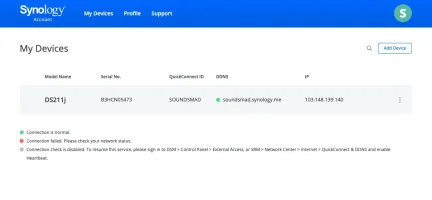
Also i have synology default app quickconnect running.
but it says there is somee issue with my home network..
see attached pic.
 

Attachments

  • Screenshot 2020-04-21 at 7.37.08 PM.webp
    Screenshot 2020-04-21 at 7.37.08 PM.webp
    18.8 KB · Views: 324
Upvote 0
@stringer.6 There is a high probability that your ISP (Seven Star Digital Network Private Limited - AS132296) has implemented CGNAT. If that's the case, then Quickconnect direct method will not work as the connection doesn't hit your router at all, thus never reaches your Synology NAS. The only option is to get a static IPv4 from your ISP and forward the necessary ports. The link which I've shared above has details of ports to be forwarded in the router.

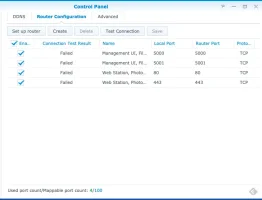
For better QuickConnect performance, it is recommended that you go to Control Panel > External Access > Router Configuration to configure port forwarding for each service:

  • DSM: 5000 (HTTP); 5001 (HTTPS)
  • Photo Station: 80 (HTTP); 443 (HTTPS)
  • Cloud Station:6690

Instructions page

Alternatively, Quickconnect can also work via a Relay server. You need to enable 'QuickConnect relay service'. However, do note that with this method, your connection/access will be relayed through a Synology Relay Server. Access using this method will be considerably slower. The above link has details for enabling the QuickConnect relay service. Hope this helps.
 
Upvote 0
@stringer.6 There is a high probability that your ISP (Seven Star Digital Network Private Limited - AS132296) has implemented CGNAT. If that's the case, then Quickconnect direct method will not work as the connection doesn't hit your router at all, thus never reaches your Synology NAS. The only option is to get a static IPv4 from your ISP and forward the necessary ports. The link which I've shared above has details of ports to be forwarded in the router.


Instructions page

Alternatively, Quickconnect can also work via a Relay server. You need to enable 'QuickConnect relay service'. However, do note that with this method, your connection/access will be relayed through a Synology Relay Server. Access using this method will be considerably slower. The above link has details for enabling the QuickConnect relay service. Hope this helps.

hi ,
@ swapneel
Thank for the prompt reply
I agree with you regarding 7 star being CGNAT and i may not be having a static IP.

"You need to enable 'QuickConnect relay service'"
how do i do this ??
where ?? On the NAS ?

Also , will something like no ip.com help ??
 
Upvote 0
@stringer.6 There is a high probability that your ISP (Seven Star Digital Network Private Limited - AS132296) has implemented CGNAT. If that's the case, then Quickconnect direct method will not work as the connection doesn't hit your router at all, thus never reaches your Synology NAS. The only option is to get a static IPv4 from your ISP and forward the necessary ports. The link which I've shared above has details of ports to be forwarded in the router.


Instructions page

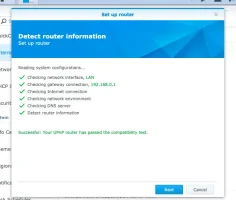
attached screenshot of router configuration test performed by the NAS.
things seem ok there
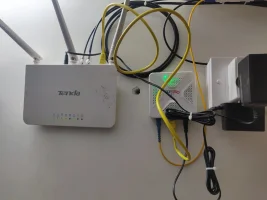
that means at the Tenda router

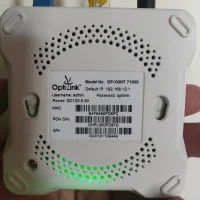
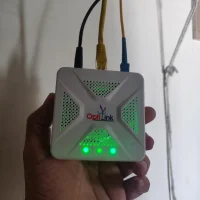
but there is a ONT after the tenda that is the fibre line

Maybe there is some issue there ?

should i connect the NAS directly to my optilink ONT and try ??
 

Attachments

  • Screenshot 2020-04-22 at 12.01.41 AM.webp
    Screenshot 2020-04-22 at 12.01.41 AM.webp
    25.4 KB · Views: 295
  • IMG_20200405_144327.webp
    IMG_20200405_144327.webp
    141.7 KB · Views: 309
  • IMG_20200421_193040.webp
    IMG_20200421_193040.webp
    112.2 KB · Views: 284
  • IMG_20200421_193111.webp
    IMG_20200421_193111.webp
    155.5 KB · Views: 303
  • IMG_20200405_144322.webp
    IMG_20200405_144322.webp
    92.9 KB · Views: 315
Upvote 0
when i try port forwarding rules on the NAS as instructed here

this happens
 

Attachments

  • Screenshot 2020-04-22 at 12.14.17 AM.webp
    Screenshot 2020-04-22 at 12.14.17 AM.webp
    21.7 KB · Views: 299
Upvote 0
@stringer.6 As I've mentioned in my last comment and as confirmed by @vignesh_venkatesan, your ISP has implemented CGNAT. Port forwarding will not work unless you get a static IP from the ISP.

Alternatively, as mentioned, you could look at installing & configuring Zerotier.
 
Upvote 0
@stringer.6 As I've mentioned in my last comment and as confirmed by @vignesh_venkatesan, your ISP has implemented CGNAT. Port forwarding will not work unless you get a static IP from the ISP.

Alternatively, as mentioned, you could look at installing & configuring Zerotier.


Can you help set this up ??

can i host a website using this setup ?
or will i have to move to a static IP only in the end ??
 
Upvote 0
Back