Airtel Static IP - Setup Guidance

  • Thread starter Thread starter gayad
  • Start date Start date
  • Replies Replies 170
  • Views Views 9,019
@akshay71 got it. Almost the same on mine.

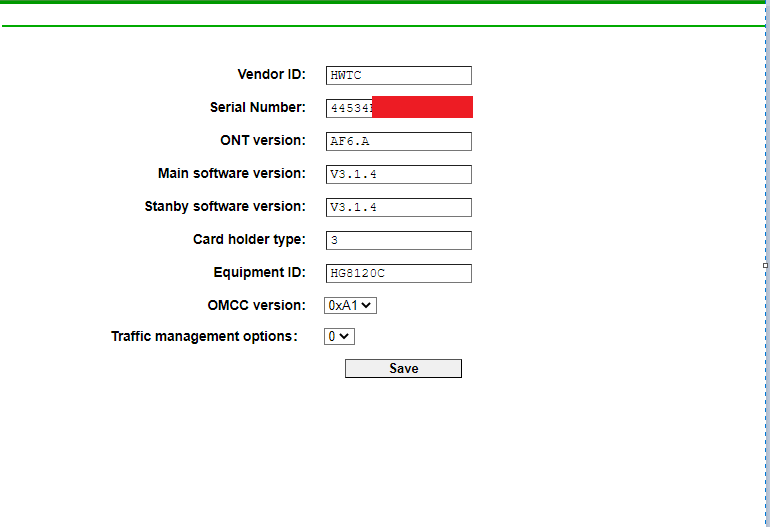
GPON SN: ALCLxxxxxxxx
PLOAM Password: 0
OMCI Vendor ID: ALCL
OMCI software version 1: 3TN00391IJLJ07
OMCI software version 2: 3TN00391IJLJ07
OMCC version: 0x80
Traffic Managament option: 2
CWMP Product Class: ?

Hope I have it right. Unable to find CWMP Product Class or which setting in router it corresponds to.
 
Read my previous reply. I have made few changes to it. Access the onu_sn.htm page and unlock OMCI settings on your G1/G2. There is a youtube video in the link I posted. See it.
 
Last edited:
@akshay71 understood. I'll be taking my dogs out for a walk now and I believe in the meanwhile TL could be pushing configs and firmware anytime.
I've noted all this, as well as the TP-Link OMCI settings. I'll revert back soon.
Thanks for helping!
 
@gayad This is my old setting backup from G3 V2 for ALCL OLT. Even though my ONT is from Nokia, i followed the below setting and set transparent mode and then do VLAN scan. It will list out the VLAN ID's. Remember serial number must be in HEX format.

DPsyX43.png
 
Thanks bro! If I am not wrong this page is unlocked with onu.htm.
I'll get back to you guys asap.

I really appreciate all the help! Just wish I can get it up and running finally.
Now that I have both v1 and v2, I'll try them out and hopefully this thread can be useful for future references.
 
@Hitori_Abhito7 If same steps mentioned in the above youtube video don’t work in G7, it means G7 uses a completely different chipset. I would still recommend anyone with G7 to sell it off and get G3 V1 or V2 which are most compatible with Indian ISPs.
 
@akshay71 yaa G7 is trash. Also, they INSIST on providing a compatibility update with ALCL, coz then they will break the "ToS" of Jio and Airtel by basically providing us with ways of bypassing Jio and Airtel Modems without their permission.
 
Back