Cannot sync network time (NTP) on Win10 on BSNL FTTH

  • Thread starter Thread starter vishalrao
  • Start date Start date
  • Replies Replies 84
  • Views Views 17,040
So I just got a DM on twitter from @Anurag Bhatia giving me some email contacts to write to explain about this issue, which I have just now done.

Let's see if anything fruitful comes out of this! Fingers crossed :D

Thanks Anurag!
 
I got a call from someone in the Bangalore NOC today asking me about the issue which I explained as best I could. Now waiting for a follow-up from their side for any further updates.
 
Yeah didn't make a difference...
 
Untitled.png


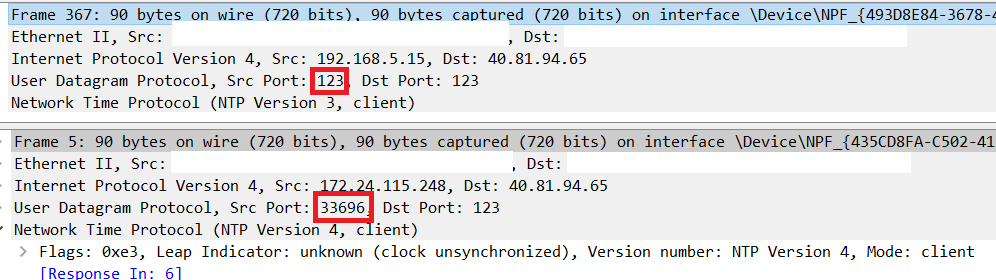
I read through this thread and @vishalrao is correct. I did WireShark on UDP Port 123, first on my regular WiFi Interface on Windows 10 pressing sync button (top picture) and the source port isn't random as it should be (same as dst port). MS must have screwed up?

Bottom one is a picture of WireShark on UDP Port 123 but on WSL Interface, this time I did "ntpdate -q time.windows.com" on my Ubuntu WSL. Source Port is random on Linux.

Someone should complain to MS About this.

NTP does seem to work fine with random port on BSNL. Here is a RIPE Atlas measurement (i assume Atlas uses random source port as its running on Linux?). Atlas Console

@vishalrao If you have a fancier firewall such as Mikrotik or PFSense or Openwrt , you maybe able to rewrite the src port 123 to a random port using NAT/Firewall Rules.
 
Last edited:
Back