
-
Amazon Deals - ToS - Like us?
You are using an out of date browser. It may not display this or other websites correctly.
You should upgrade or use an alternative browser.
You should upgrade or use an alternative browser.
Excitel Broadband: Slow Internet Speeds to Many Servers and Locations
I am affected by high ping, packet loss issues with drops in speed like you said.
I haven't been able to form a pattern yet, as I don't do high throughput network tasks much but definitely, this is happening across Delhi as Excitel support confirmed me. They told me it should be resolved in the next 48hours.
Happy to do any tests that you ask me and can provide them here.
@ajgamer Perhaps better to coordinate on steam/discord? My ID: ashfame
I haven't been able to form a pattern yet, as I don't do high throughput network tasks much but definitely, this is happening across Delhi as Excitel support confirmed me. They told me it should be resolved in the next 48hours.
Happy to do any tests that you ask me and can provide them here.
@ajgamer Perhaps better to coordinate on steam/discord? My ID: ashfame
D
Deleted member 63558
Excitel support confirmed me. They told me it should be resolved in the next 48hours.
Though, they always says the same everytime you would call them but there is no truth behind it. But I'm positive.
Are you seeing speed drops?
If you could posts the speed results to these servers right now and mid-night (After 2 AM)
Excitel to Act Delhi (Single)
Excitel to MNR Broadband (Single)
Excitel to Jio Mumbai (Single) (Not Navi Mumbai)
tracert to Google.com
tracert to 103.44.18.11
tracert to 119.42.152.54
tracert to 1.1.1.1
tracert to 139.59.80.215
tracert to Amazon Mumbai (@JB700 If you have any available)
tracert to 103.48.197.1
Let me know the results here so that it become a proof over here itself.
P.S.: I understand it's so much of tests but then we all who have been active on this thread are helping each other finding the solution and trying to have Excitel fix it.

what exactly did excitel support say regarding this issue?
D
Deleted member 63558
Issue is much more beyond the Packet Loss if someone's concern about the Packet Loss. It's more about the routing. Excitel's routing/peering is messed up as I and other active people on this thread has discussed in detail
D
Deleted member 63558
@JB700 I closed my AWS India Server as the speeds to that Server is shit right now. So I'm trying other company now. Excitel seems to have issues with Europe, Singapore and Indian Servers (haven't tested US/Canada/South America yet).
I will try to check with OVH now else, I will see what EU Hosting Company has network backend with Tata.
I have tested over 5 Cloud Server Providers and all of them have issues with Excitel including AWS, DigitalOcean, Linode and many more.
It's so pathetic that sometimes HTTP download is fine but the iperf and other realistic tests (Server to Client / Server to Home Server) tests shows bad results
I infact created a tunnel too on Linux between the DO and Excitel and it was pathetic. (500Kbps speed anytime of the day). Sometimes in the night it would be fine and speed is normal.
It's sometimes fixes between 2 AM to 6 AM or so.
I will try to check with OVH now else, I will see what EU Hosting Company has network backend with Tata.
I have tested over 5 Cloud Server Providers and all of them have issues with Excitel including AWS, DigitalOcean, Linode and many more.
It's so pathetic that sometimes HTTP download is fine but the iperf and other realistic tests (Server to Client / Server to Home Server) tests shows bad results
I infact created a tunnel too on Linux between the DO and Excitel and it was pathetic. (500Kbps speed anytime of the day). Sometimes in the night it would be fine and speed is normal.
It's sometimes fixes between 2 AM to 6 AM or so.
@ajgamer See below. I have a 100Mbps plan. Speed drops are random, not as severe as you describe but yeah they are there. Sometimes video would buffer during playback. Ping is what I notice all the time cuz playing PUBG on SEA region - Singapore.
Excitel to Act Delhi (Single) https://www.speedtest.net/result/8269449189.png
Excitel to MNR Broadband (Single) https://www.speedtest.net/result/8269450724.png
Excitel to Jio Mumbai (Single) (Not Navi Mumbai) https://www.speedtest.net/result/8269452508.png (Mumbai)
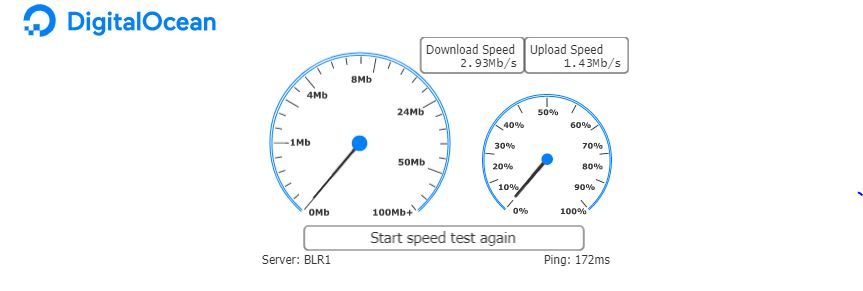
BLR1 Speedtest | DigitalOcean 5.84Mbps down and 5.76Mbps up (214ms)
SGP1 Speedtest | DigitalOcean 3.72Mbps down and 2.51Mbps up (251ms)
AMS2 Speedtest | DigitalOcean 2.00Mbps down and 1.08Mbps up (293ms)
tracert to Google.com
C:\Users\Ashfame>tracert Google.com
Tracing route to Google.com [172.217.166.238]
over a maximum of 30 hops:
1 <1 ms <1 ms <1 ms XiaoQiang [192.168.31.1]
2 1 ms 1 ms 1 ms 103.57.85.1
3 796 ms 707 ms * 103.48.199.1
4 69 ms 3 ms 4 ms 103.56.229.1
5 3 ms 2 ms 4 ms 72.14.222.166
6 2 ms 3 ms 3 ms 108.170.251.113
7 3 ms 3 ms 3 ms 72.14.232.95
8 2 ms 3 ms 2 ms del03s14-in-f14.1e100.net [172.217.166.238]
Trace complete.
tracert to 103.44.18.11
C:\Users\Ashfame>tracert 103.44.18.11
Tracing route to speedtest.mnrbroadband.com [103.44.18.11]
over a maximum of 30 hops:
1 <1 ms <1 ms <1 ms XiaoQiang [192.168.31.1]
2 4 ms 6 ms 4 ms 103.57.85.1
3 * * * Request timed out.
4 4 ms 3 ms 3 ms 10.200.200.1
5 4 ms 3 ms 3 ms as133648.del.extreme-ix.net [45.120.248.41]
6 * * * Request timed out.
7 4 ms 1 ms 2 ms speedtest.mnrbroadband.com [103.44.18.11]
Trace complete.
tracert to 119.42.152.54
C:\Users\Ashfame>tracert 119.42.152.54
Tracing route to 119.42.152.54 over a maximum of 30 hops
1 <1 ms <1 ms <1 ms XiaoQiang [192.168.31.1]
2 2 ms 1 ms 1 ms 103.57.85.1
3 * * * Request timed out.
4 3 ms * 3 ms 103.56.228.1
5 2 ms 2 ms 1 ms 14.141.116.229.static-Delhi.vsnl.net.in [14.141.116.229]
6 4 ms 3 ms 3 ms 14.141.116.70.static-Delhi.vsnl.net.in [14.141.116.70]
7 4 ms * 3 ms 203.122.61.77.reverse.spectranet.in [203.122.61.77]
8 5 ms 6 ms 5 ms 203.122.48.54.reverse.spectranet.in [203.122.48.54]
9 4 ms 4 ms 4 ms 119.42.152.54
Trace complete.
tracert to 1.1.1.1
C:\Users\Ashfame>tracert 1.1.1.1
Tracing route to one.one.one.one [1.1.1.1]
over a maximum of 30 hops:
1 <1 ms <1 ms <1 ms XiaoQiang [192.168.31.1]
2 2 ms 1 ms 1 ms 103.57.85.1
3 * * * Request timed out.
4 * * 109 ms 103.56.228.1
5 3 ms 2 ms 2 ms 14.141.116.229.static-Delhi.vsnl.net.in [14.141.116.229]
6 36 ms 43 ms 36 ms 172.31.180.57
7 37 ms 37 ms 38 ms ix-ae-4-2.tcore1.cxr-chennai.as6453.net [180.87.36.9]
8 79 ms 79 ms 78 ms if-ae-34-2.tcore1.svq-singapore.as6453.net [180.87.36.41]
9 84 ms 83 ms 86 ms 120.29.215.101
10 78 ms 78 ms 78 ms one.one.one.one [1.1.1.1]
Trace complete.
tracert to 139.59.80.215
C:\Users\Ashfame>tracert 139.59.80.215
Tracing route to 139.59.80.215 over a maximum of 30 hops
1 <1 ms <1 ms <1 ms XiaoQiang [192.168.31.1]
2 1 ms 1 ms 1 ms 103.57.85.1
3 * 813 ms * 103.48.199.1
4 2 ms * * 103.56.228.1
5 1 ms 1 ms 2 ms 14.141.116.229.static-Delhi.vsnl.net.in [14.141.116.229]
6 36 ms 34 ms 34 ms 172.31.232.33
7 38 ms 38 ms 38 ms 219.65.110.186.static-bangalore.vsnl.net.in [219.65.110.186]
8 34 ms 37 ms 34 ms 138.197.249.15
9 35 ms 34 ms 34 ms 139.59.80.215
Trace complete.
tracert to 103.48.197.1
C:\Users\Ashfame>tracert 103.48.197.1
Tracing route to 103.48.197.1 over a maximum of 30 hops
1 <1 ms <1 ms <1 ms XiaoQiang [192.168.31.1]
2 2 ms 1 ms 1 ms 103.57.85.1
3 * * * Request timed out.
4 57 ms 7 ms * 103.56.228.1
5 * * * Request timed out.
6 3 ms 3 ms 3 ms 103.48.197.1
Trace complete.
Excitel to Act Delhi (Single) https://www.speedtest.net/result/8269449189.png
Excitel to MNR Broadband (Single) https://www.speedtest.net/result/8269450724.png
Excitel to Jio Mumbai (Single) (Not Navi Mumbai) https://www.speedtest.net/result/8269452508.png (Mumbai)
BLR1 Speedtest | DigitalOcean 5.84Mbps down and 5.76Mbps up (214ms)
SGP1 Speedtest | DigitalOcean 3.72Mbps down and 2.51Mbps up (251ms)
AMS2 Speedtest | DigitalOcean 2.00Mbps down and 1.08Mbps up (293ms)
tracert to Google.com
C:\Users\Ashfame>tracert Google.com
Tracing route to Google.com [172.217.166.238]
over a maximum of 30 hops:
1 <1 ms <1 ms <1 ms XiaoQiang [192.168.31.1]
2 1 ms 1 ms 1 ms 103.57.85.1
3 796 ms 707 ms * 103.48.199.1
4 69 ms 3 ms 4 ms 103.56.229.1
5 3 ms 2 ms 4 ms 72.14.222.166
6 2 ms 3 ms 3 ms 108.170.251.113
7 3 ms 3 ms 3 ms 72.14.232.95
8 2 ms 3 ms 2 ms del03s14-in-f14.1e100.net [172.217.166.238]
Trace complete.
tracert to 103.44.18.11
C:\Users\Ashfame>tracert 103.44.18.11
Tracing route to speedtest.mnrbroadband.com [103.44.18.11]
over a maximum of 30 hops:
1 <1 ms <1 ms <1 ms XiaoQiang [192.168.31.1]
2 4 ms 6 ms 4 ms 103.57.85.1
3 * * * Request timed out.
4 4 ms 3 ms 3 ms 10.200.200.1
5 4 ms 3 ms 3 ms as133648.del.extreme-ix.net [45.120.248.41]
6 * * * Request timed out.
7 4 ms 1 ms 2 ms speedtest.mnrbroadband.com [103.44.18.11]
Trace complete.
tracert to 119.42.152.54
C:\Users\Ashfame>tracert 119.42.152.54
Tracing route to 119.42.152.54 over a maximum of 30 hops
1 <1 ms <1 ms <1 ms XiaoQiang [192.168.31.1]
2 2 ms 1 ms 1 ms 103.57.85.1
3 * * * Request timed out.
4 3 ms * 3 ms 103.56.228.1
5 2 ms 2 ms 1 ms 14.141.116.229.static-Delhi.vsnl.net.in [14.141.116.229]
6 4 ms 3 ms 3 ms 14.141.116.70.static-Delhi.vsnl.net.in [14.141.116.70]
7 4 ms * 3 ms 203.122.61.77.reverse.spectranet.in [203.122.61.77]
8 5 ms 6 ms 5 ms 203.122.48.54.reverse.spectranet.in [203.122.48.54]
9 4 ms 4 ms 4 ms 119.42.152.54
Trace complete.
tracert to 1.1.1.1
C:\Users\Ashfame>tracert 1.1.1.1
Tracing route to one.one.one.one [1.1.1.1]
over a maximum of 30 hops:
1 <1 ms <1 ms <1 ms XiaoQiang [192.168.31.1]
2 2 ms 1 ms 1 ms 103.57.85.1
3 * * * Request timed out.
4 * * 109 ms 103.56.228.1
5 3 ms 2 ms 2 ms 14.141.116.229.static-Delhi.vsnl.net.in [14.141.116.229]
6 36 ms 43 ms 36 ms 172.31.180.57
7 37 ms 37 ms 38 ms ix-ae-4-2.tcore1.cxr-chennai.as6453.net [180.87.36.9]
8 79 ms 79 ms 78 ms if-ae-34-2.tcore1.svq-singapore.as6453.net [180.87.36.41]
9 84 ms 83 ms 86 ms 120.29.215.101
10 78 ms 78 ms 78 ms one.one.one.one [1.1.1.1]
Trace complete.
tracert to 139.59.80.215
C:\Users\Ashfame>tracert 139.59.80.215
Tracing route to 139.59.80.215 over a maximum of 30 hops
1 <1 ms <1 ms <1 ms XiaoQiang [192.168.31.1]
2 1 ms 1 ms 1 ms 103.57.85.1
3 * 813 ms * 103.48.199.1
4 2 ms * * 103.56.228.1
5 1 ms 1 ms 2 ms 14.141.116.229.static-Delhi.vsnl.net.in [14.141.116.229]
6 36 ms 34 ms 34 ms 172.31.232.33
7 38 ms 38 ms 38 ms 219.65.110.186.static-bangalore.vsnl.net.in [219.65.110.186]
8 34 ms 37 ms 34 ms 138.197.249.15
9 35 ms 34 ms 34 ms 139.59.80.215
Trace complete.
tracert to 103.48.197.1
C:\Users\Ashfame>tracert 103.48.197.1
Tracing route to 103.48.197.1 over a maximum of 30 hops
1 <1 ms <1 ms <1 ms XiaoQiang [192.168.31.1]
2 2 ms 1 ms 1 ms 103.57.85.1
3 * * * Request timed out.
4 57 ms 7 ms * 103.56.228.1
5 * * * Request timed out.
6 3 ms 3 ms 3 ms 103.48.197.1
Trace complete.
D
Deleted member 63558
@ashfame You've facing the same issue as mine.
The reason you're saying this is because I have testing happening every few minutes/hours giving me the report right now.
If you start testing it manually hourly, you would understand that the issue is as severe as I've explained it here on the thread. (There is no one on this forum who have ever tried to explain the issues of Excitel this in-depth instead they just being biased towards Excitel, defends it).
Why am I saying this?
Because Excitel to Excitel is normal. And if that is normal, it means LCO isn't at the cause.
It's the Excitel's Backend which is the problem.
Now, Excitel has their all the servers and router gateways sitting in the same Nehru Palace Building at the same room.
So, You and I are getting the connection physically from the same coordinates.
Now, You are getting the connection from the 103.48.199.1 (which was my previous router) and I'm getting the connection via. 103.48.197.1 now.
Okay, So according to me, You're facing the issue.
Your DigitalOcean Speeds are Poor, Your Excitel to Mumbai (Jio) is poor which clearly shows that the peering/caching is broken.
At the same time, I am seeing the same results on my connections.
You would see normal speeds around 2AM I guess, So do submit the test results.
And, It will again go back to shit speeds in the morning.
P.S.: I pay for the speeds too, if the Excitel's FUP is too much for many.
I have a 100Mbps plan. Speed drops are random, not as severe as you describe but yeah they are there. Sometimes
The reason you're saying this is because I have testing happening every few minutes/hours giving me the report right now.
If you start testing it manually hourly, you would understand that the issue is as severe as I've explained it here on the thread. (There is no one on this forum who have ever tried to explain the issues of Excitel this in-depth instead they just being biased towards Excitel, defends it).
Why am I saying this?
Because Excitel to Excitel is normal. And if that is normal, it means LCO isn't at the cause.
It's the Excitel's Backend which is the problem.
Now, Excitel has their all the servers and router gateways sitting in the same Nehru Palace Building at the same room.
So, You and I are getting the connection physically from the same coordinates.
Now, You are getting the connection from the 103.48.199.1 (which was my previous router) and I'm getting the connection via. 103.48.197.1 now.
Okay, So according to me, You're facing the issue.
Your DigitalOcean Speeds are Poor, Your Excitel to Mumbai (Jio) is poor which clearly shows that the peering/caching is broken.
At the same time, I am seeing the same results on my connections.
You would see normal speeds around 2AM I guess, So do submit the test results.
And, It will again go back to shit speeds in the morning.
P.S.: I pay for the speeds too, if the Excitel's FUP is too much for many.
D
Deleted member 63558
Yeah, I totally understand your point. All I am saying is that, It's the ISP's job to fool around the users like you who's usage is just normal/average.
They are taking money from you for Excitel to Every Server around the globe (not promising full-speeds to them but at-least 20-50% should be the average). But what we are getting is not even 5% of the speeds since last 2 weeks I can say.
Anyways, we can just hope it works fine in coming days (they fix it).
P.S.: I am getting 100% fine speeds from Airtel to every fuckin' server around the globe. No matter if it's DO/AWS or any other. I have confirmed the same with the other broadband guys too (using Tata Sky).
Also, Many people using JioFiber confirmed the good speeds on the same servers.
It's Excitel and it's sister/replicated companies which are facing this issue which includes Precious Netcom too. It takes no rocket science to understand that FTTH won't solve this issue. It's the backend issue.
Given that, Fiber will route from the same gateways, same transit and same routers as the Ethernet Connections are. People with Fiber Installments are facing the same issue. (Shared in OP)
They are taking money from you for Excitel to Every Server around the globe (not promising full-speeds to them but at-least 20-50% should be the average). But what we are getting is not even 5% of the speeds since last 2 weeks I can say.
Anyways, we can just hope it works fine in coming days (they fix it).
P.S.: I am getting 100% fine speeds from Airtel to every fuckin' server around the globe. No matter if it's DO/AWS or any other. I have confirmed the same with the other broadband guys too (using Tata Sky).
Also, Many people using JioFiber confirmed the good speeds on the same servers.
It's Excitel and it's sister/replicated companies which are facing this issue which includes Precious Netcom too. It takes no rocket science to understand that FTTH won't solve this issue. It's the backend issue.
Given that, Fiber will route from the same gateways, same transit and same routers as the Ethernet Connections are. People with Fiber Installments are facing the same issue. (Shared in OP)
Last edited by a moderator: