
-
Amazon Deals - ToS - Like us?
You are using an out of date browser. It may not display this or other websites correctly.
You should upgrade or use an alternative browser.
You should upgrade or use an alternative browser.
New to FTTH CONNECTION NEED HELP ABOUT WIFI !
- Thread starter richie98390
- Start date
- Replies 20
- Views 23,661
The method suggested earlier does certainly work. I am using BSNL FTTH since two years. Earlier I had DSL connection with my Linksys modem. After getting FTTH I used the same modem. First make sure that DHCP is enabled in Fibre modem. Then connect the Internet Port from Fibre Modem to your ADSL Router with RJ45 cable to 1st LAN port of your ADSL modem. Make sure you disable DHCP on your ADSL modem. ( In short just make sure that you use it as a router)
I am also attaching the screenshots of my Linksys modem.
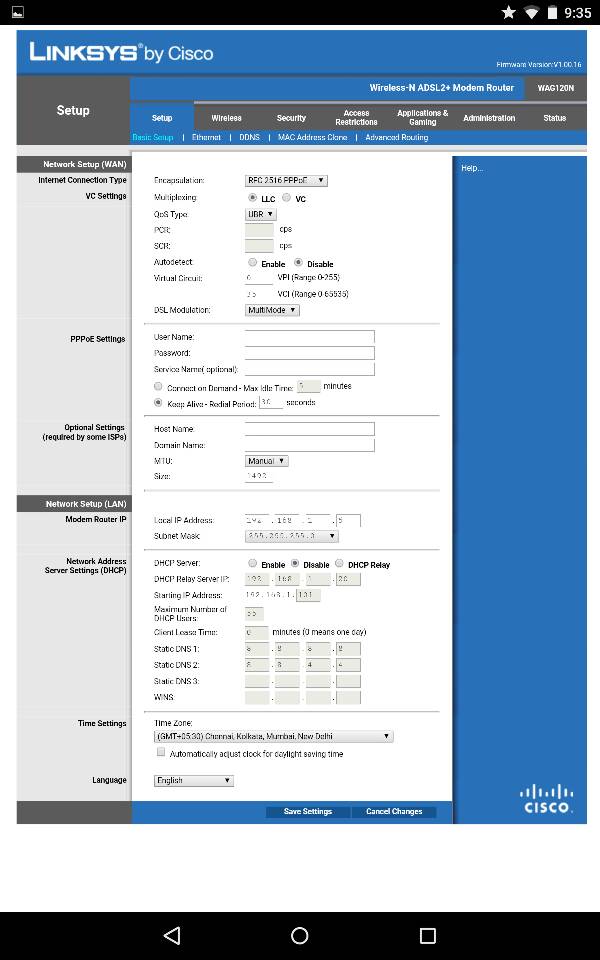
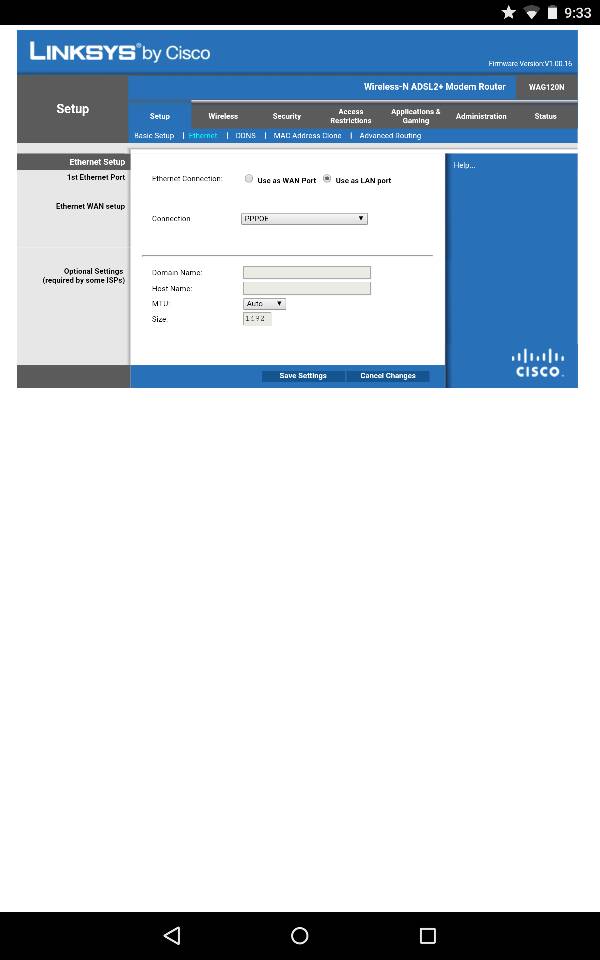
I am also attaching the screenshots of my Linksys modem.
I have configured my D-Link Wifi router with FTTH fibre modem by myself . I have made a video for it thinking may be it will help others . Please check the video link below. Share your comments / Likes / Dislikes so that i can make more and better videos next timeThe method below did it work ?
Source
Sorry guys , I have not seen the page 2 of this thread and pasted my reply again .Please ignore my second reply
topazonic , Thanks for sharing the details for Linksys which will defenitly help whoever using that . Actually my comment " That was not true" was not related to your comments . Again i picked the wrong thread .
topazonic , Thanks for sharing the details for Linksys which will defenitly help whoever using that . Actually my comment " That was not true" was not related to your comments . Again i picked the wrong thread .
Hi Rajesh Thanks for you video. I recently upgraded my BB to FTTH BSNL . I was using Asus DSL-AC68U ADSL/VDSL Modem Router. I've connected ethernet port-1 from BSNL modem to ethernet-1 of Asus modem router and disable DHCP of Asus. Now my iPhone and Asus Notebook connect to the wifi network and I browse internet. But internet is not connected to my other Sony Notebook. Is there anything wrong in the settings of Asus or in my Sony notebook. Please give any suggestions.
Shashi
Shashi

x720
Incoherent Poster
No.
Similar threads
- Replies
- 7
- Views
- 6,422
- Replies
- 7
- Views
- 2,242
