@icoolguy1995 TP-Link Archer C6 supports OpenWRT, but check on OpenWRT forum for any issues with OpenWRT build on this device before buying.

It will get easier thought if you are having the Airtel technician as your helper ..but assuming you dont have him as your guy next door . I am going to write this...My method may not give you a working soft phone but it will give you a insightEven me too! Not sure how to use IP Telephony with LAN connection using my Airtel FTTH connection.
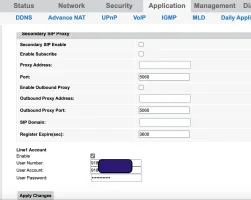
It can be found in the HTML page by doing Inspect Element and you will find a plain passwordI will try this with airtel, although when i called airtel for the sip password, they had no clue what i was taking about. They were like do you need the password for static ip address . I said no, sip stands for session initiation protocol for voip. ineed the username and password for that just like you have for pppoe. And they had no clue. although all the settings for SIP are there in my ONT just the password is hidden , if i can extract the password from the ONT then i think this can be done on airtel too.

Were you able to get it to work?It will get easier thought if you are having the Airtel technician as your helper ..but assuming you dont have him as your guy next door . I am going to write this...My method may not give you a working soft phone but it will give you a insight
- You need to have a Landline over FTTH already working
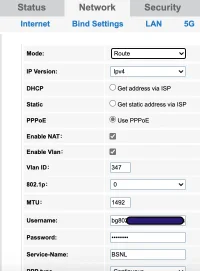
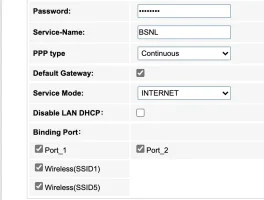
- The working also depends a lot on your router ...Mine is a Alphion ONT-1143 provided by the BSNL which has a dedicated port for Telephone cable(RJ-11) ..Here I am stating my config just for you to seek the similarities due to ISP difference(Airtel and BSNL)
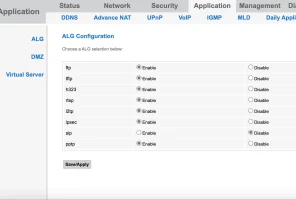
- Make sure router should not have any kind of firewall thing which restricts any SIP traffic.
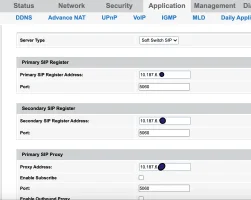
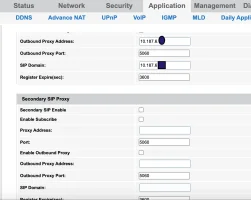
- You should note the configuration from your router to use on the soft sip phone ..which requires but not limited to
- Server address(main SIP address) [you may call it the landline server]
- Outbound proxy address
- VOIP username and password given to you by ISP (not your WAN username)
- The port which is used for VOIP calling(usually 5060)
- Next you head over to the app which you`re gonna use and enter these details in their respective fields ...This should pretty much work and you should be able to make calls
Hi Varkey, i was googling for this very particular SIP setting to try in my android mobile so i could receive and make call when at home using wifi. But i tried with the limited knowledge of these VoIP settings. I am a newbie, would appreciate if could help.I find the built-in SIP client in Android to be better than GS Wave. It's simple and just works.
If you enable SIP calling for all calls, you can make calls from the native dialer just like choosing the SIM to use for the call.
View attachment 1265View attachment 1266
Ok, so I figured it out. The issue is that, SIP doesn't work so well when behind NAT, that's the reason when there is NAT involved, it fails.
To fix that, I used something called siproxd which is installed on my OpenWRT router. This acts like a proxy and works around the NAT issues by modifying the SIP requests and stuff on the fly.
Now I am able to make and receive calls with any SIP client, in fact I am able to make calls from Bangalore through my BSNL VOIP connection in Kerala (I use Zerotier for the remote connectivity)
 broadband.forum

 Airtel Xstream Fiber