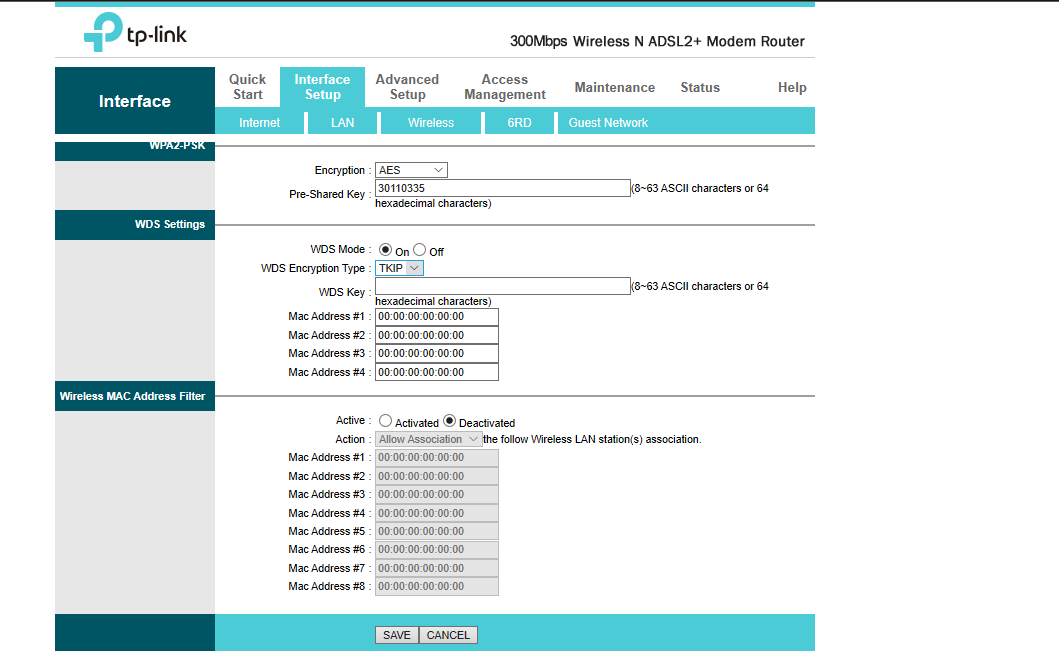
What settings do I need to configure on the TP-Link router? (which I want to use as a range extender)
And also is there anything which I need to configure on my Jio ONT?
Nothing. Just set up your TP-Linkrouter in extender mode, if thats possible and then set up accordingly. Its different for every router so I cannot tell you the exact setup.
The extender function is called WDS in TP-Linkrouters. And you can find them under 2.4 & 5GHz wifi settings. It is not exactly a extender but it can bridge different APs.
@socrates The problem is not the speed, the issue is that it is inconsistent sometimes it drops to 1~2 Mbps. If it remains consistent at 50 Mbps or even 40 Mbps I am happy with that.
Can be other 2.4 ghz signals which are interfering. Check with a phone app to see signals at different channels in your area and set it to one that's less congested.
Extenders will essentially half your speed and increase ping. I bought one a couple of years back for my Airtel connection (Netgear). Used it for a few hours, hated the speed dip and high pings, and it's just lying unused.
If you can, extend connection between the new router and Jio via a LAN cable. And use the router near where you want to use it.
Just got this video from youtube showing jio set top box.it can be seen having jio tv app pre installed inside set top box.does it mean they r launching IPTV service as well!!
The extender function is called WDS in TP-Linkrouters. And you can find them under 2.4 & 5GHz wifi settings. It is not exactly a extender but it can bridge different APs.
This website uses affiliate links. This means that if you click on a link and make a purchase, we may receive a commission. This does not affect the price you pay for the product.
This site uses cookies to help personalise content, tailor your experience and to keep you logged in if you register.
By continuing to use this site, you are consenting to our use of cookies.