TP-Link Archer C6 PPOE issue with BSNL FTTH

  • Thread starter Thread starter Kick933
  • Start date Start date
  • Replies Replies 104
  • Views Views 21,548

Kick933

Still Learning
Messages
517
Location
Haryana
ISP
BSNL FTTH
I have just received the much awaited C6 from Amazon.
But it got a wired issue.
I have set the dumb ONT into transparent bridge mode and router usually work great after setting up my BSNL FTTH profile.

But,as soon as their is a LOS,the C6 won't initiate auto-connect.I have to go to the management page and click on connect.
It seems that I am missing something.Can I hope to get some help as it has got very frustrating since signal drop is common at my place,albeit for 2 minutes every 5 hours.
 
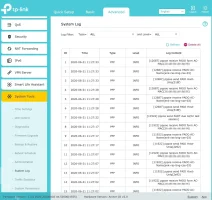
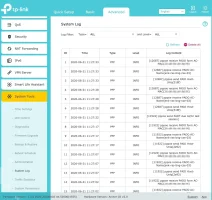
@varkey yes, I am having the latest firmware which have OneMesh support and all. I guess it's able to talk to the PPP devices. please check the attached screenshot.

I send an email to TP-Link support, not sure whether they will respond and resolve the issue. 😐
 

Attachments

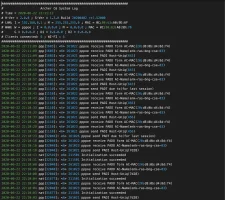
  • Archer_C6-logs.webp
    Archer_C6-logs.webp
    103.8 KB · Views: 470
Upvote 0
Hey,just a tidbit,Please do not use custom Mac address.
Can you tell me which MAC address are you cloning.
Did you set up VLAN correctly.I do not see any photo of VLAN config page from TP-Link.
 
Upvote 0
@Kick933 I just tried with my Laptop and the ONU MAC (which get WAN disconnected msg) just for testing.

VLAN is set on the ONU itself, and I am able to connect to internet from my Laptop using PPPoE mode.

The issue is it's just not working with my router (TP-Link C6), I can see the PPP logs on the syslog of router. Attaching log for reference.
 

Attachments

  • Archer_C6-logs.webp
    Archer_C6-logs.webp
    103.8 KB · Views: 329
Upvote 0
@Kick933 and @abbyck thanks for the suggestions and steps. I tried those and no luck there.

BSNL is not using MAC binding, I confirmed it with them. Also I tried PPPoE from my computer and it seems to be working perfectly. So the issue will be on my TP-Link router.

Do you have any suggestion on the TP-Link configuration part? @Kick933 @abbyck @varkey
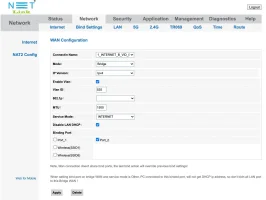
Please tell me if you ticked the Disable LAN DHCP in Bridge Profile of ONU.
I am still unsure as it is the issue most of the times when the DHCP server interfere and RA packets get out of order leading to non-receipt of the PPPOE challenge.
Please tell me you disabled DHCP.
PLEASE..!!!!!
And attach ONU image of Bridge mode setup.I wanna see again.
In last images,you did not tick the "Disable LAN DHCP"
 
Upvote 0
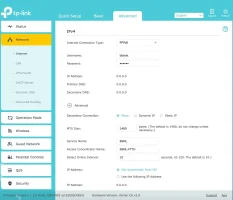
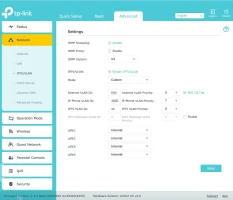
@Kick933 yes, I tried with disable LAN DHCP. Here is my new configuration screenshots and log file
 

Attachments

  • Archer_C6-PPPoE.webp
    Archer_C6-PPPoE.webp
    59.2 KB · Views: 362
  • Archer_C6-VLANenabled.webp
    Archer_C6-VLANenabled.webp
    54.8 KB · Views: 432
  • ONU-BridgeSetting.webp
    ONU-BridgeSetting.webp
    63.2 KB · Views: 352
  • syslog-2020-06-22__1__log.webp
    syslog-2020-06-22__1__log.webp
    266 KB · Views: 357
Upvote 0
Hi Folks,

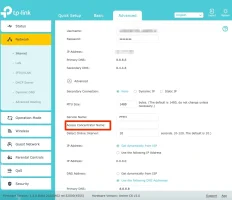
I got the PPPoE working, it was my mistake. I gave a value to the Access concentrator name and that was why it's failing. My Bad 😐

Thanks a lot for your help @Kick933 @varkey @abbyck

@here, anyone facing disconnection issues recently with BSNL FTTH connection, I am having it lately. Connection will be up after few minutes.
 

Attachments

  • Archer_C6-issuesolved.webp
    Archer_C6-issuesolved.webp
    57.7 KB · Views: 408
Upvote 0
Oh.....Did not pay any attention to it.
BTW it is used to provision various services through different PPPOE servers on mesh topology to provide multiple services from same or different ISP on same Infra.
 
Upvote 0
Hi Folks,

I got the PPPoE working, it was my mistake. I gave a value to the Access concentrator name and that was why it's failing. My Bad 😐

Thanks a lot for your help @Kick933 @varkey @abbyck

@here, anyone facing disconnection issues recently with BSNL FTTH connection, I am having it lately. Connection will be up after few minutes.
FYI google's secondary dns is 8.8.4.4, not 8.4.4.8 as you have set :)
 
Upvote 0
Back