ACT ipv6 settings for PPPoE

  • Thread starter Thread starter superczar
  • Start date Start date
  • Replies Replies 8
  • Views Views 205
Messages
26
Location
Pune
ISP
Airtel
Hi

Can anyone please share the ipv6 PPPoE settings for ACT?
It would appear that ACT also supports ipv6

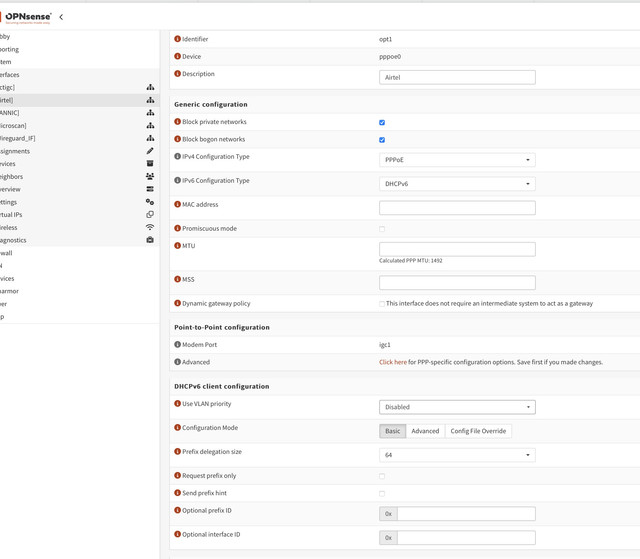
On my airtel line, I need to set the following on opnsense

DHCP Configuration type - dhcpv6
PD size - 64
Request Prefix/ PD hint : Disabled

However for ACT, Tried both dhcpv6 and SLAAC but no luck.
would really appreciate If anyone using ACT with working ipv6 could post their PPPOE settings from whatever router they are using
 
I don't have ACT Fiber. I have Airtel Fiber with my OpenWrt router connected via DHCP to Airtel provided ONT. The ONT handles PPPoE, not my OpenWrt router. I am using OpenWrt's IPv6 Relay Mode to get IPv6 working on my LAN devices.

Generally "Request Prefix" must be ENABLED for LAN devices to receive IPv6 address.

Regarding IPv6 over PPPoE, I believe that happens only after IPCP6 assigns a link-local address to the PPPoE tunnel interface within the Router. Only after that you can request DHCPv6 over that PPPoE tunnel interface.

I am not familiar with OPNsense or pfSense. But it would be helpful if you could post a screenshot or text config here.
 
Airtel ipv6 is straightforward and is working as expected.
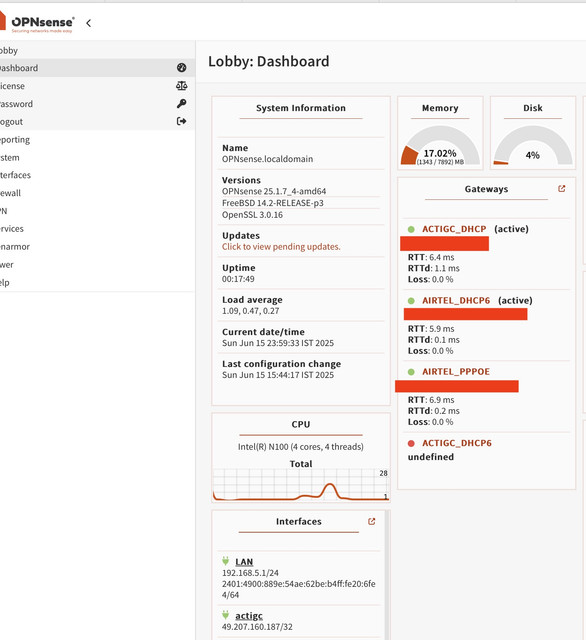
If you look at the screenshot below, my Airtel connections shows up as two distinct gateways - one ipv4 (airtel_pppoe) and the other as Airtel_dhcp6

The second screenshot has settings for the Airtel interface
I am trying to figure out what settings are to be used for ACT to also shows up as a dual stack connection
Currently its establishing a single stack ipv4 connection (ACTIGC_DHCP)


In both the cases, "Prefix request" must be enabled at least in my case using Mikrotik.
Hmm, maybe ACT still does not have ipv6 in Pune.
If you don't mind, could you share your winbox screen for PPPoE/ gateway settings on ACT
 
What specific settings you are looking at ? PPPoE settings are just my username/password and which interface... nothing else. For ipv6, DHCPv6 client,

 
I was looking for anything that could hint at why mine won't connect

To elaborate, this is how its setup:

ACT CPE:
Set to bridged mode (bridged_ethernet) with connection type as other
Also No VLAN (unlike airtel which expects connection to be on VLAN ID 100)


Router side (Opnsense) :
PPPoE with ipv6 configuration type as dhcpv6, PD size of 64 and request prefix/ send prefix hint to disabled/ unchecked


The Airtel one is set similarly with one key difference being that the Airtel CPE is set with VLAN enabled and VLAN ID of 100
 
I think you need to enable prefix request, see my screenshot in the previous post. Left one is ACT and right is Airtel setting. Yes, in my case also, no VLAN for ACT and for Airtel its 100(though i use 1503 due to ALC OLT, but thats different topic).
 
Back