Airtel Xstream Broadband has switched to CG Nat

@tatyasky Finally, I was able to get the ipv6 address in the router. But the internet doesn't work on that.
Seems the same mac cannot dial another PPPoE and hence, it was not connecting earlier. I had to use the same Ipv4 session. then I get IP but not the Gateway. If I just dial ipv6 (no IPv4), I get the gateway but still internet doesn't work. It's may be because I have public IPv4?
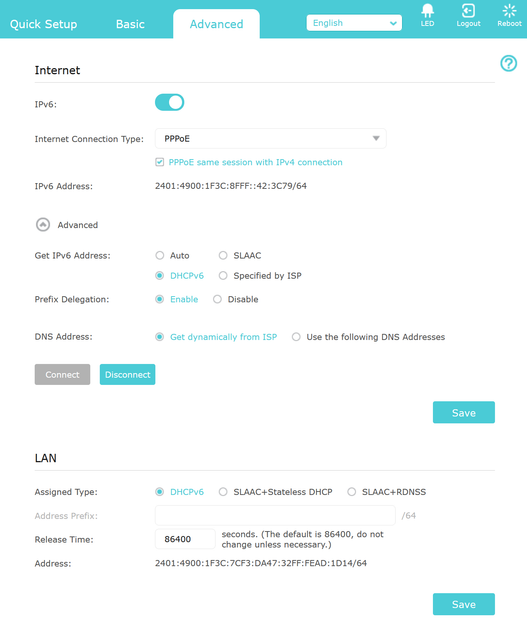
ipv-6.png
Dial PPPoE only on IPv4.
IPv6 will auto-connect on dual stack once successful IPv4 connection is made.

Very important is NOT to use SLAAC option.

To disable Windows 10/11 temporary IPv6 assignment run these commands one by one in elevated admin powershell

Code:
netsh interface ipv6 set globalrandomizeidentifiers=disabled
Code:
netsh interface ipv6 set privacystate=disabled

Reboot PC to get a static IPv6 address. You may also need to add firewall exception in TP-Link router if it has a IPv6 firewall.
 
Last edited:
finally working bridge mode and I am able to configure ipv6 too.
But not working on browser.
 
I have sent mail for bridge mode.
Will ask them about ipv6 too now that I am on cgnat.
Can't do much on this router.
Everything is disabled.
Did u send the email few minutes before writing the comment here?. Also, you said bridge mode is working now, so did they call you or did u try to enable now and it worked?.
 
Sent mail yesterday. recd call yesterday from support and today they said bridge mode is static ip. after a argument and then a conference call with tech team i was told it would be done soon.
within an hour it was done.
 
Sent mail yesterday. recd call yesterday from support and today they said bridge mode is static ip. after a argument and then a conference call with tech team i was told it would be done soon.
within an hour it was done.
Even i have sent email to them yesterday and have not received any call yet.
 
Back