
-
Amazon Deals - ToS - Like us?
You are using an out of date browser. It may not display this or other websites correctly.
You should upgrade or use an alternative browser.
Airtel Xstream Broadband has switched to CG Nat
- Thread starter Styler
- Start date
- Replies 205
- Views 56,640
-
- Tags
- airtel airtel xstream cgnat
mine still ipv4 public not cgnat so no problems till now


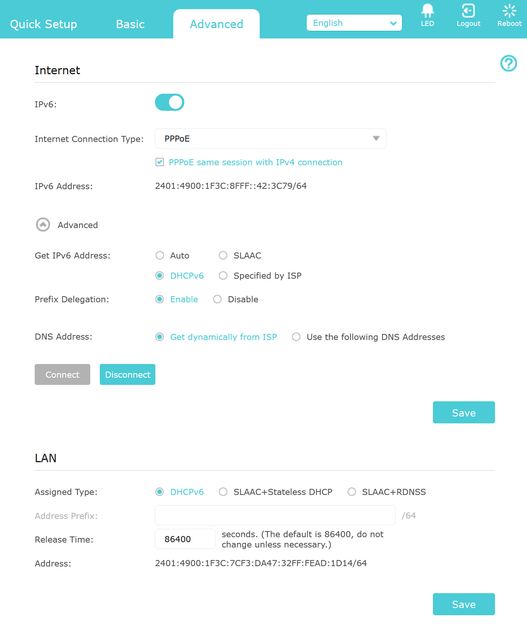
Yesterday I returned TP-Link Deco X20 router as IPv6 didn’t work on it and it was controllable via app only. No Web UI controls.
Here, except WOW (Wake on WAN) pings, I have fully embraced IPv6. I have even assigned my own static IPv6 address to my PC. Upon adding firewall exception in my Asus Router, I can use remote desktop to login to my PC using the Static IPv6 which I set. If the connection which I am using is not IPv6 enabled, I have installed Tailscale and use tailscale IPv4 for remote access.
I have received 500 Mbps connection speeds even on tailscale for file transfer for my cousin in US.
Last edited:

imdarkray
n00b
- Messages
- 806
- Location
- Patna, Bihar
- ISP
- Airtel Xstream, Jio Fiber, Railwire, Siti, Airtel 4G, Jio 4G, VI

imdarkray
n00b
- Messages
- 806
- Location
- Patna, Bihar
- ISP
- Airtel Xstream, Jio Fiber, Railwire, Siti, Airtel 4G, Jio 4G, VI
Similar threads
- Replies
- 3
- Views
- 1,060


- Replies
- 7
- Views
- 6,926