BSNL FTTH Bharat Fiber Broadband has problems after connecting to VPN

  • Thread starter Thread starter sibidas
  • Start date Start date
  • Replies Replies 69
  • Views Views 41,424
Messages
10
Location
Kerala
ISP
BSNL FTTH
Hi,

I am facing an issue with my BSNL fiber connection. After connecting to my office VPN, I am not able to access internal or external sites. I am able to ping though. I have also raised concern with BSNL team. my office IT team is telling it is a problem with the router that is shipped with BSNL connection. But I have not gotten any confirmation from bsnl team. They asked for traceroute details, which I provided. Anybody else facing similar issues using vpn through BSNL?
 
@vu3knb Changed mtu to 1490. But issue persisted. On a side note, I was able to configure ONU in bridge mode (you were right. no MAC binding). I am now using my Tenda router and it is working fine. Surprisingly, now there is no VPN issue. After connecting to VPN, all sites are opening fine. So it was indeed a problem with bsnl installed router. But not sure, what setting exactly is causing this. Thanks for all the help.
 
Upvote 0
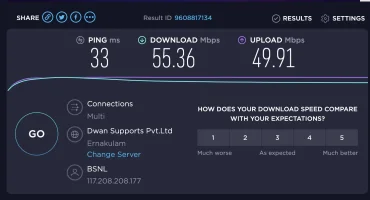
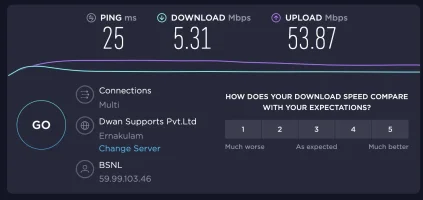
Thanks!! @vu3knb But unfortunately, after connecting in bridge mode, downlink speed dropped to 6Mbps from 55Mbps. Uplink is holding up though. Did you notice it too in your case?
 

Attachments

  • Screenshot 2020-06-15 at 9.16.21 PM.webp
    Screenshot 2020-06-15 at 9.16.21 PM.webp
    43.7 KB · Views: 897
  • Screenshot 2020-06-15 at 9.16.32 PM.webp
    Screenshot 2020-06-15 at 9.16.32 PM.webp
    36.1 KB · Views: 429
Upvote 0
@sibidas
dude same issue with me for the new connection received today.
can you help me with steps for bridge mode.on the Bsnl ONU modem I have ppoe and bridge options in drop down. Can I select the bridge and restart modem?
Does this works or still need to use PPOE option?
 
Upvote 0
@vu3knb thanks for the update.
@phaneendrakotha
1. Connect your other router wan port to bsnl router using rj45 cable.
2. In bsnl router, take a backup of config and note down the PPoE user and pass.
3. Switch connection to bridge mode. You need to enae the port binding option to the corresponding Ethernet port in bsnl router, to which you connected the other router.
4. Login to new router and setup a PPoE connection with the same credentials and connect. once connected, you are done. You can use new router for internet.
PS. In my case I noticed a drop in speed after switching to bridge mode. I also changed the DHCP address range in new router so a different one (192.168.2.x) , so that it will not conflict with BSNL one.
 
Upvote 0
@Rajdeep weird. My other router is able to handle speed of more than 100Mbps duplex. When I connect it as a repeater, I am getting around 60Mbpd in non peak hours, which is good. But once in bridge mode, my speed is hovering around 5Mbps
 
Upvote 0
Back