BSNL - Port 443 not forwarding

  • Thread starter Thread starter Artemis
  • Start date Start date
  • Replies Replies 11
  • Views Views 1,135
Messages
11
Location
Kochi
ISP
BSNL FTTH | JioFiber | Vi
Hello all, tried setting up a reverse proxy using Caddy through 443 and for the sake of my life it does not seem to work. I have tried port forwarding 443 to the internal device, tried putting it in a DMZ and even tried switching the firewall but to no avail. I am not behing CG-NAT and have a public IPv4 starting in the range 117.x.x.x. All port checkers show the ports as blocked too.

Another thing to note is that the reverse proxied subdomain is accessible through my internet. Like I can type in subdomain.website.com and it will load the server.

I am currently using the provided ONT Model (ZTE F670LV9.0), with no additional routers.

My fear is that they have blocked outbound traffic on this port?
 
Yes I do. I have set-up A records through Cloudflare and crossed checked the IP as well. Nonetheless, Port 443 should be be connectable if I'm reverse proxying right?
 
If an online port checker shows the port as closed, then there is a misconfiguration on your side. Check that you have forwarded the port correctly. Please post the router port forwarding for a better understanding.
 
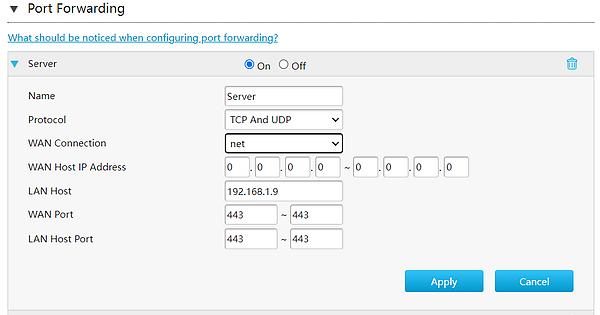
BSNL-Port-Forwarding-Config.jpg


This is the port forwarding config, very simple setup, my server is hosted on 192.168.1.9 for reference.
 
Is there an option for NAT type? May be you are currently on symmetric NAT and outside connection isn't allowed.
 
Forwarding other ports work? In most routers to forward a port, the service you are trying use should be listening to the port for it to be forwarded, verify that first. You can use a port forwarding tester to verify if the problem is with port forwarding or the program that you are trying to use.
 
a few questions.
  1. Verify if the firewall on the server is not blocking port 443
  2. check net type on ONT and it to NAT 1
  3. if the caddy is accessible using a local IP
  4. what are the other options in the "WAN connection" other than "net" in the above screenshot?
 
1. Yep, I have tried disabling firewall altogether.
2. I don't think I have that option on this router, where do I find this?
3. Yep, locally accessible just fine, THING is the subdomain resolves just fine on local LAN leading me to believe something is wrong with my router config, but even then no matter what amount of port forwarding/firewalling I disable the ports are never open through any checkers online.
4. Oh, just "auto"
 
Back