Getting IPv6 on Mikrotik SXT LTE6

  • Thread starter Thread starter proton8454
  • Start date Start date
  • Replies Replies 11
  • Views Views 3,753
Messages
215
Location
NA
ISP
Airtel
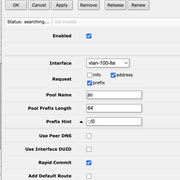
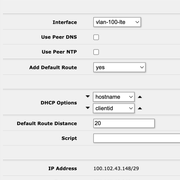
Currently, I'm passing through the LTE interface from SXT LTE6 to a Hex S which distributes the WAN to other devices on the network. DHCP on IPv4 works perfectly and I get internet. However, IPv6 remains problematic. No matter what I change, the router is unable to search for an IPv6 pool. I'm currently searching for a pool prefix length of 64. Has anyone been able to set up ipv6 for Jio on SXT LTE6?
 
I have the exact same config, ie SXT LTE6 with a Hex S and have the exact same issue as well. Was not able to get IPv6 working unfortunately. :(
 
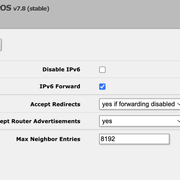
Go to IPV6 -> Settings -> Accept router advertisements.
Set this to yes and reboot the device.

Jio assigns dynamic /64s with slaac and with this you'll have IPv6 connectivity on the sxt device. Since slaac requires minimum block size of /64, you can not split it further and advertise on other interfaces. This is also not a routed prefix so you need a NDP relay/daemon and afaik, this use case is not supported by Mikrotik yet.

You can take a smaller block from the /64 and use dhcpv6 for assignment but android devices do not support dhcpv6 for address assignments and you'll have to write scripts because jio gives a dynamic prefix.

In short, this is painful and annoying to do on mikrotik.
 
@ishanjain28 Will that work when the SXT LTE6 is bridged as well?

As you suggested, changed Accept Router Advertisements to yes. It was previously, yes, if forwarding disabled and I noticed forwarding was enabled. Added an IPv6 DHCP client, but nothing. 😢

 
@MrGordon Jio does not assign addresses with DHCPv6 on LTE so this DHCPv6 clients will forever be searching for a DHCPv6 server and won't be useful at all.

Did you reboot the device after setting accept router advertisements to yes ? If so and assuming there aren't other problems, you should now have a IPv6 address on the LTE interface and a default ipv6 route to go with it.
 
Interesting. No I did not reboot the device. So you are saying that I don't need to add a DHCPv6 client at all and I will see the IPv6 address automatically?

Also, on Jio 5G, adding a DHCPv6 client does work. (This was tested on a totally separate 5G CPE and OpenWRT router, so I don't know if it works on Mikrotik)
 
Last edited:
@ishanjain28 No luck, I rebooted the device after setting Accept Router Advertisements to yes. But no IPv6 address from Jio. Is there anything I'd need to do on the SXT LTE6?

This is how IPv6 --> Settings look on the Hex S

 
@ishanjain28 No luck, I rebooted the device after setting Accept Router Advertisements to yes. But no IPv6 address from Jio. Is there anything I'd need to do on the SXT LTE6?

AFAIK, They are using SLAAC for this. I have only ever seen DHCPv6 traffic for DNS information.

Accept router advertisements only takes effect after reboots so that was necessary but you still don't get IPv6 address so I don't know what may be happening here.
 
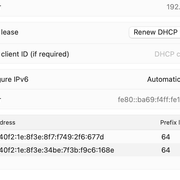
@ishanjain28 I connected the other 5G CPE that I mentioned earlier to an hap ac2. I enabled Router Advertisements and rebooted the device. Surprisingly I am able to see the IPv6 address assigned to the 5G CPE interface.


I then manually created another entry with the prefix, assigned to the bridge and set to advertise. Now client devices are getting assigned IPv6 address from that prefix. I also added a DHCP v6 client, but its stuck at searching, aligns with what you shared.

However what confuses me is, the exact same 5G CPE, when connected to an OpenWRT device gets an IPv6 address when a DHCPv6 is selected as the protocol.
OpenWRT also lets you extend the same prefix to the LAN/Bridge automatically. Looks like that feature is not available in Mikrotik.


Any insights on the difference in behaviour on OpenWRT?
 
Back