help openwrt on raspberry pi

  • Thread starter Thread starter starter
  • Start date Start date
  • Replies Replies 37
  • Views Views 387
today i got my router and TP-Link gigabit ethernet adaptor,i feared that i dont wanna brick my new router ( however Asus router are hard to brick)

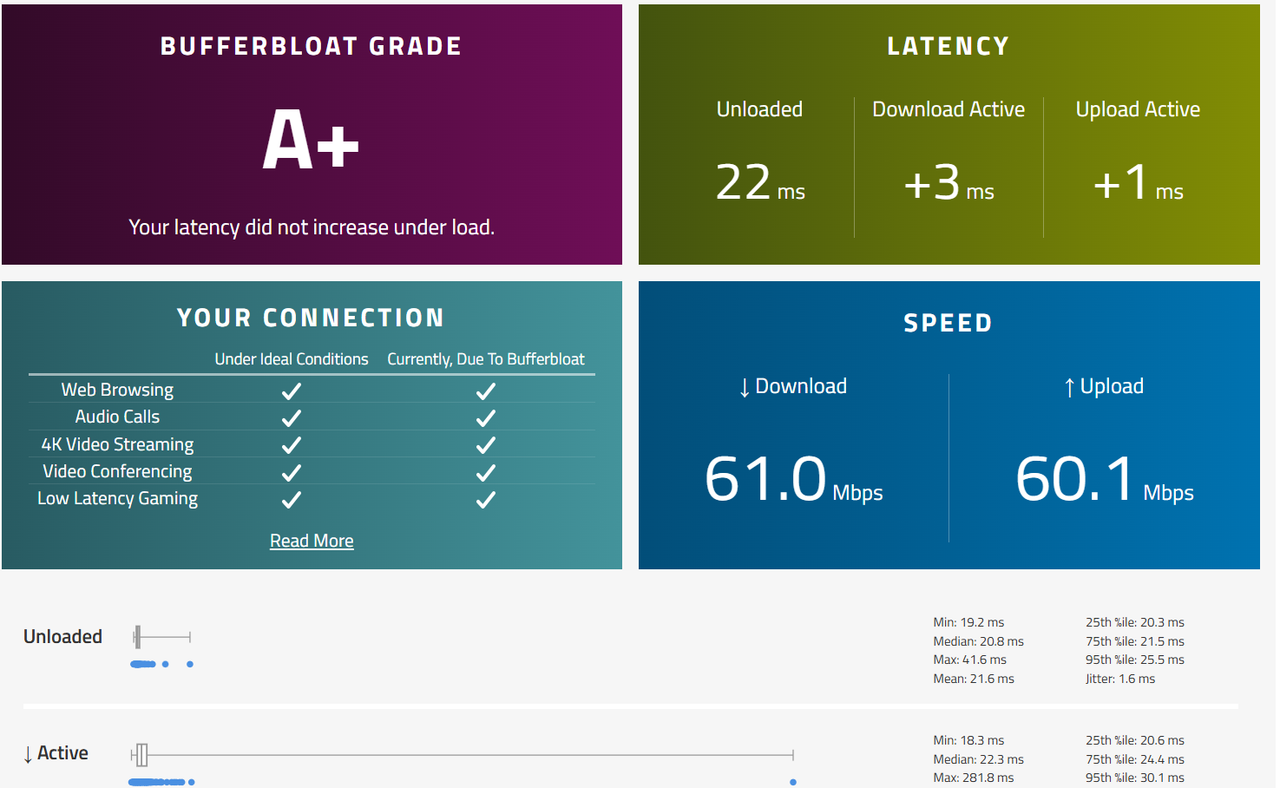
still i ordred adaptor in case router doest perform well,but i was surprised,asus router does perform supergood ( initially it was not good ,when i enabled qos and set limit 60 mbps ,it suddenly becomes super good ),do i acutally need openwrt ?? looks like asuswrt is performing well for 60 mbps speed
Screenshot-(53).png
 
That depends. If you want an open source router firmware that gets updates regularly and provides packages that extend the features and functionality of a router, then go for it.
 
i will install openwrt , i hope everything will go smooth ,and if bridging worked on asuswrt them it should work on openwrt also

one question- does leaving ont on bridge mode and connect nothing can aslo blacklist my ont ??

and also if i accidentally put down wan interface , will this leak mac address?? like i apply some setting ,or it takes some time to apply clone mac


yesterday, it took so much time , then lastly i came to know that asuswrt use wan interface as eth1 , and i test it my uaing pi 5 as pppoe server , so that i can see clone mac is working perfectly
 
No blacklist. It's just bridge.

Leak MAC address to whom? PPPoE connects to its server only.

eth0, eth1 etc. are just logical interfaces. You will see how things are arranged when you load the firmware.
 
bro ,i installed openwrt , but i do feel its not better than asuswrt ( something is wrong from my side )

however ,both in bufferbloat test ,got A+

but to achieve A+ by openwrt ,it needed to lower the bandwidth to 55000 ,whereas asuswrt giving A+ on 60 mbps limit

however openwrt gives 0+ on active download and 0+ on active upload

but unloaded latency is higher on openwrt

is im doing anything wrong ??
 
How will I know without looking at the configuration?

https://openwrt.org/dohttps://openwrt.org/docs/guide-user/network/traffic-shaping/sqm-details It is mentioned here to set speed to 95% because there are overheads and you can't just expect full speed. I haven't used Asuswrt but that is propbably just QOS which is very different from SQM in openwrt.

Also, I guess your plan is 50 Mbps and you are getting 60 Mbps without traffic shaping right? SQM is useful when you are using the full speed of your connection and that hardly happens under normal usage like browsing or even gaming.
 
1. yes im using sqm cake

2. my plan is 60 mbps ,i gets around 65 + mbps ,and i set in sqm 55000 kbps

i testted without sqm ,im getting 65+ mbps download and 70+ mbps upload and also checked bufferbloat test ,gets grade D ,

tell me what config you need ??

all im saying ,openwrt feels heavy

with asuswrt ,i gets A+ grade with increase in latency within +3 ms thats too with 60 mbps bandwidth limit

but with openwrt ,it gets A+ grade with increase in latency within 4-5 ms with 55 mbps bandwidth limit

im not saying ,openwrt doest working ,it working ,but it should perform better than asuswrt , and their is a lot of setting in openwrt ,im feeling ,something im missing so that openwrt not performing 100%


sorry for late reply ,yesterday their was fault in my area due to strom
 
Back