
-
Amazon Deals - ToS - Like us?
You are using an out of date browser. It may not display this or other websites correctly.
You should upgrade or use an alternative browser.
You should upgrade or use an alternative browser.
help openwrt on raspberry pi
- Thread starter starter
- Start date
- Replies 37
- Views 387

- Messages
- 73
- Location
- Hyderabad
- ISP
- Airtel Fiber - 200 mbps, BSNL (LCO Operator) - 300 mbps, Jio Fiber - 30 Mbps + OTT
@starter sqm in general is more cpu intensive, that's why you're seeing this dip. no consumer router is properly capable of running the cake model of sqm. Try switching to fq_codel and you will see a big difference in performance.
Also sqm is not compatible with hardware offloading most of the time unlike general qos settings in Asus firmware.
Also sqm is not compatible with hardware offloading most of the time unlike general qos settings in Asus firmware.

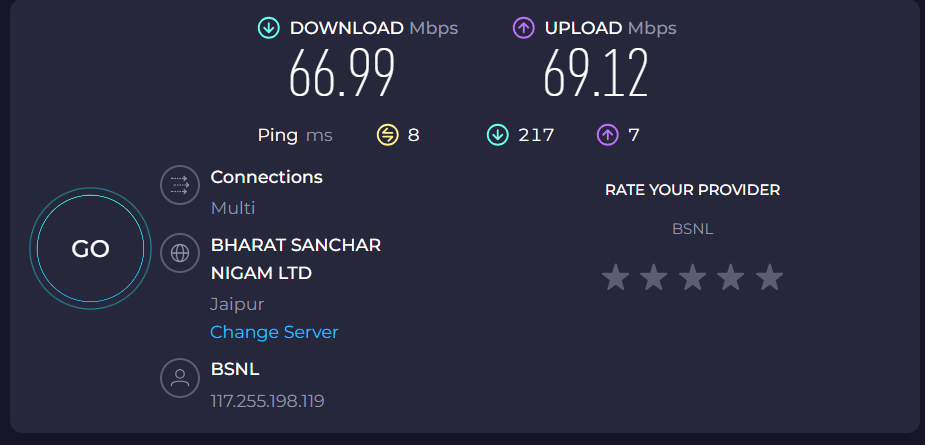
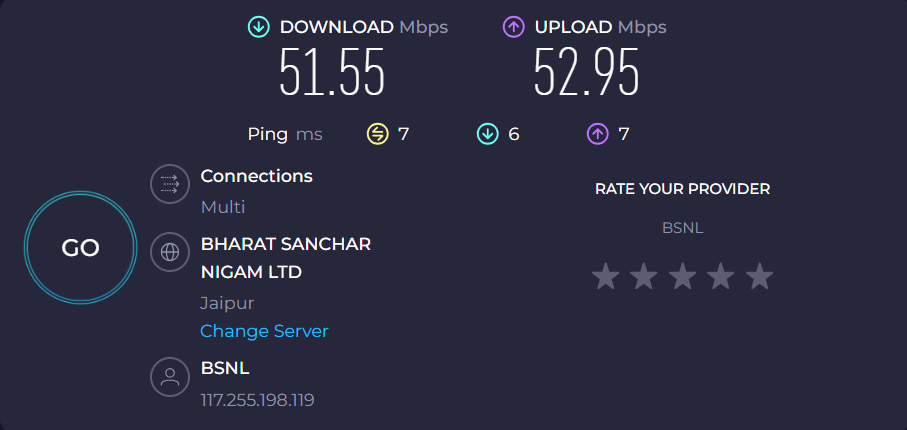
@thatayush While that is true, the AX53U is dual core and should be able to handle 60 Mbps fine. What @starter wants is full speed which is impossible with SQM due to overheads. Best he can do is 95% with SQM which isn't bad at around 63 Mbps.
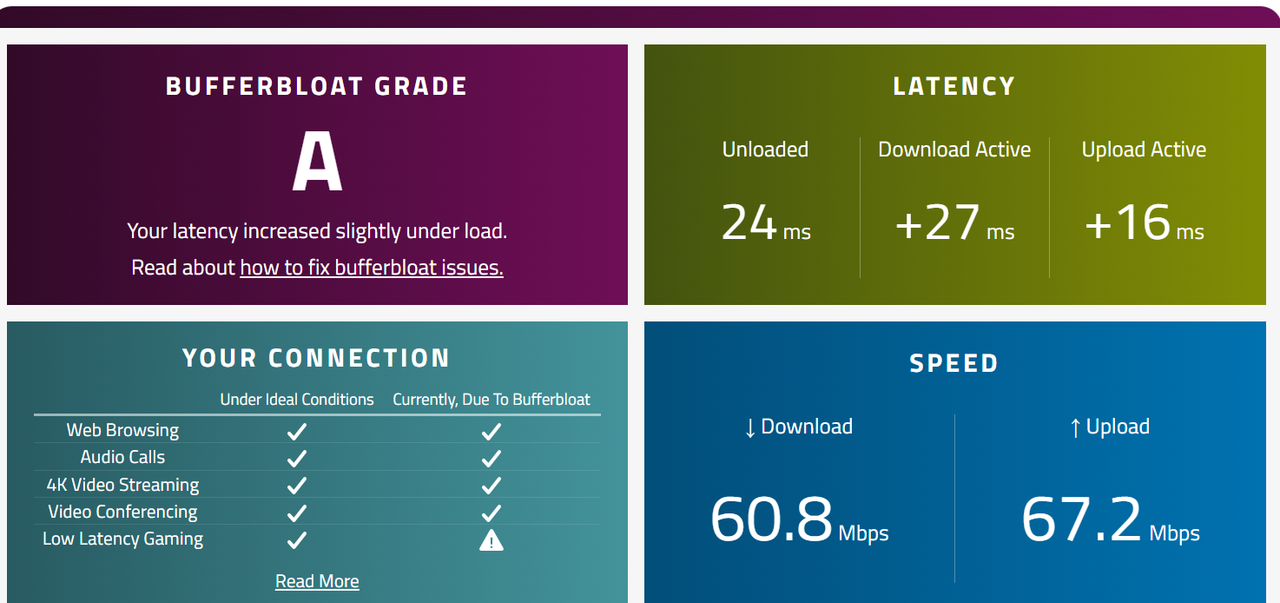
We are getting more than plan speed from BSNL as there is no shaping from their end but bufferbloat goes brrr. And yeah, hardware offlloading or software offloading needs to be disabled if SQM is used.
@starter Share your SQM config.
Also, I don't see Asus merlin firmware on their site for AX53U, either it has been dropped long ago or was never supported. So, it is running stock firmware which possibly has QOS which is very different from SQM and there is no reason to compare them.
We are getting more than plan speed from BSNL as there is no shaping from their end but bufferbloat goes brrr. And yeah, hardware offlloading or software offloading needs to be disabled if SQM is used.
@starter Share your SQM config.
Also, I don't see Asus merlin firmware on their site for AX53U, either it has been dropped long ago or was never supported. So, it is running stock firmware which possibly has QOS which is very different from SQM and there is no reason to compare them.
Last edited:
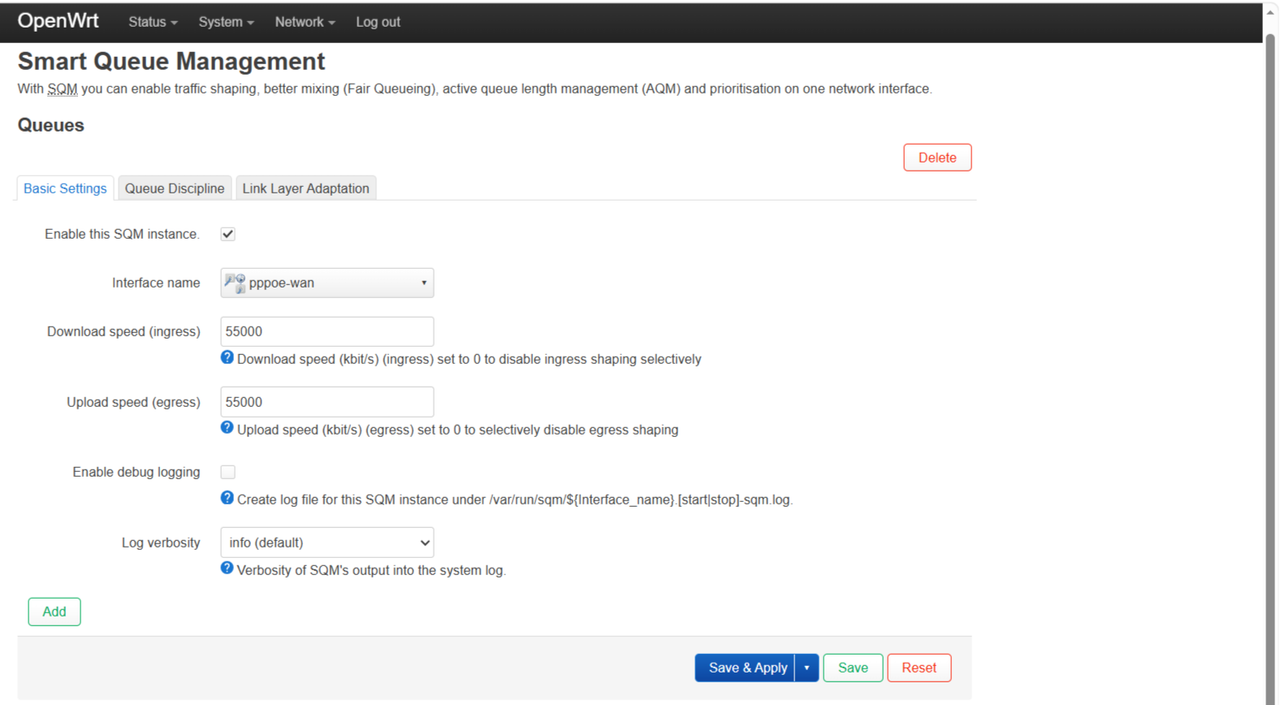
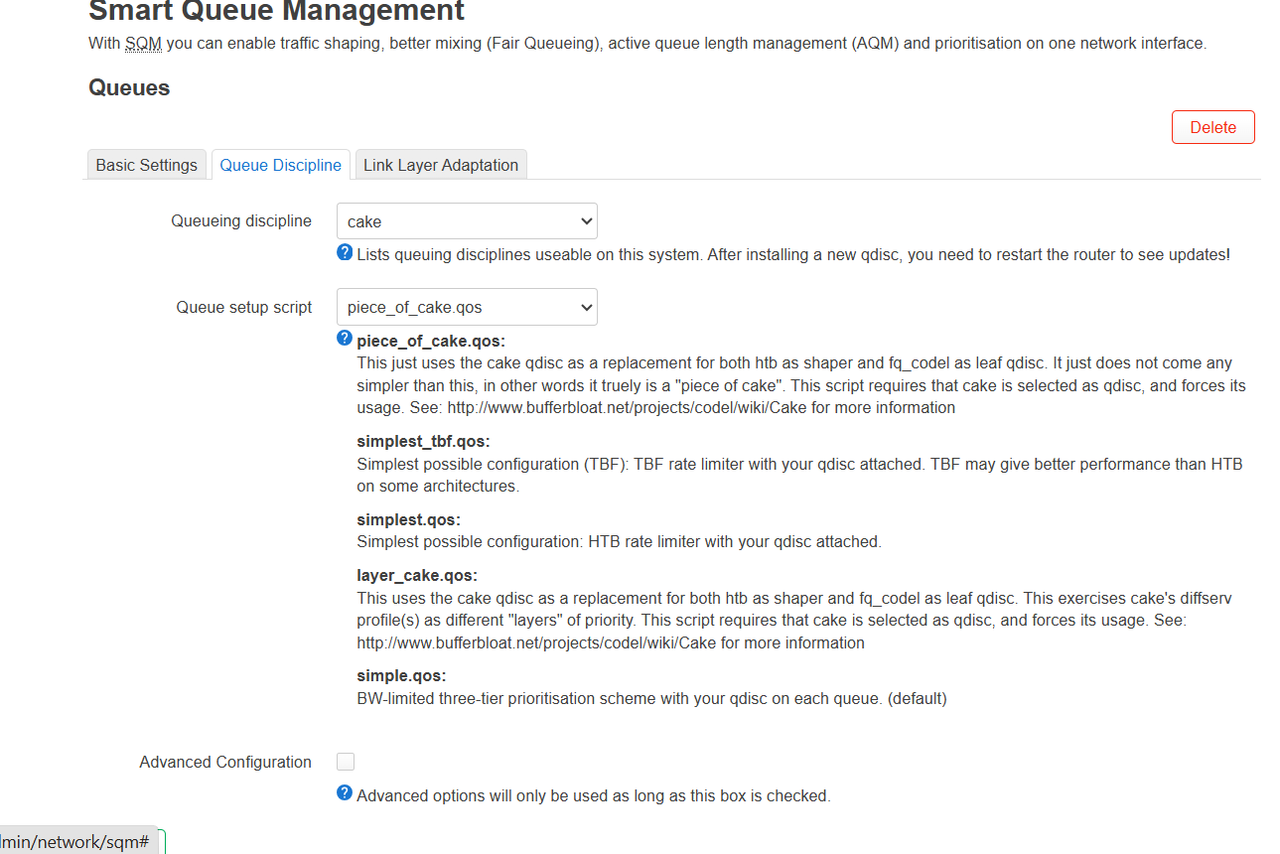
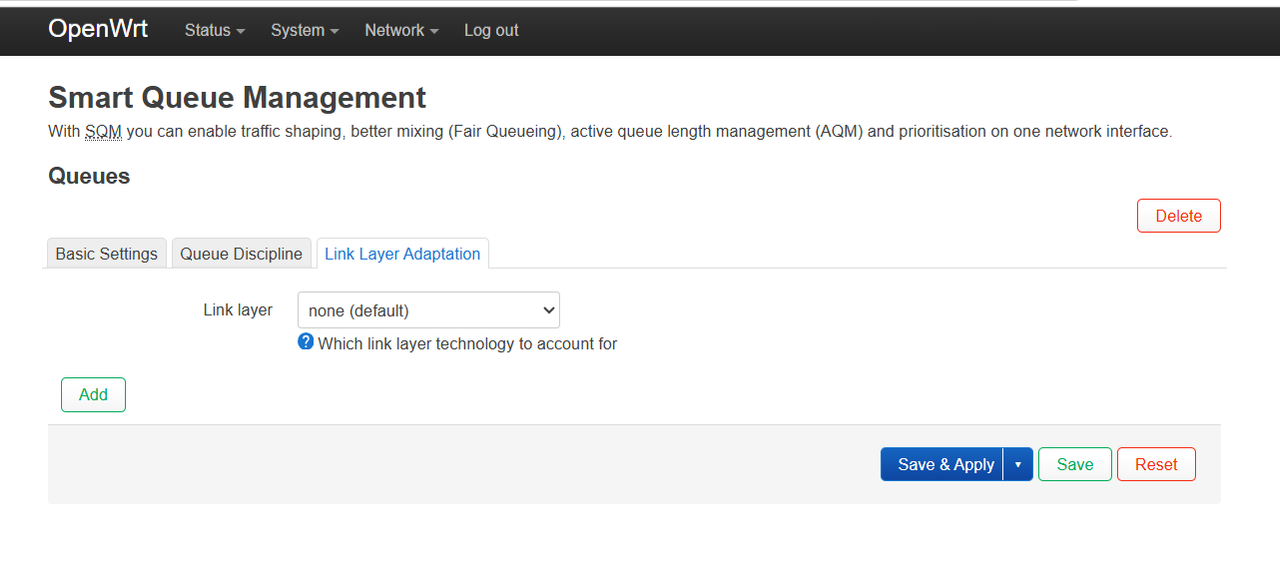
You can set to 95% of the best result you got on speedtest like I said above. And link layer can be set to Ethernet with overhead with 44 bytes. Also, like I said above, don't expect full speed like with QOS or without QOS. There will be zero added latency at best on SQM.
totally feel disappointed ,yes Asus ax53u has weak dual core ,with sqm at 55000 kbps ,one core indeed reach 80% of one core ( most probably it sqm use one core)
ax53u has 2 core 2 threads ,but sqm use only cpu and sqm does add some latency ( browsing with cake sqm will always something wrong happening ,no matter what , because it hold packets for very short amonut of time )
my conclusion is that router is not enough for running openwrt , now later this year ,when i buy mini pc ,i will use pi 5 ( it has much stronger cpu ,can handle sqm with cake even for 500 mbps )
and why i feel asuswrt is smooth ,it does use hardware offload ,it means ,with asuswrt ,most things worked handle by hardware
and when i installed openwrt , i already loosed half power of my router
asuswrt is optimised for balancing load between cpu and hardware offload ,thats why i feel asuswrt is smooth ( not much difference )
im in super deep confusion ,what to do now ?
i wants to use pi 5 ,but im heavily depend on it ,as it handles immich ,jellyfin ,qbittorrent and autobrr ( automation of downloading movies and webseries ) and VPN
looks like i should move back to asuswrt for some months and on dilwali when i buy mini pc ,i will use pi 5 for openwrt
i should have researched more on this
currently pi 5 1gb and nanopi r3s cost same ( around 4800 rs ) ,if i knew about this already ,then i would have purchased a average dual band router and nanopi r3s
now i strongly needs your suggestion , at 55000 sqm does handles good ,but some kind of laggyness in browsing
what should i do now ,should i remain with openwrt or move back to asuswrt
ax53u has 2 core 2 threads ,but sqm use only cpu and sqm does add some latency ( browsing with cake sqm will always something wrong happening ,no matter what , because it hold packets for very short amonut of time )
my conclusion is that router is not enough for running openwrt , now later this year ,when i buy mini pc ,i will use pi 5 ( it has much stronger cpu ,can handle sqm with cake even for 500 mbps )
and why i feel asuswrt is smooth ,it does use hardware offload ,it means ,with asuswrt ,most things worked handle by hardware
and when i installed openwrt , i already loosed half power of my router
asuswrt is optimised for balancing load between cpu and hardware offload ,thats why i feel asuswrt is smooth ( not much difference )
im in super deep confusion ,what to do now ?
i wants to use pi 5 ,but im heavily depend on it ,as it handles immich ,jellyfin ,qbittorrent and autobrr ( automation of downloading movies and webseries ) and VPN
looks like i should move back to asuswrt for some months and on dilwali when i buy mini pc ,i will use pi 5 for openwrt
i should have researched more on this
currently pi 5 1gb and nanopi r3s cost same ( around 4800 rs ) ,if i knew about this already ,then i would have purchased a average dual band router and nanopi r3s
now i strongly needs your suggestion , at 55000 sqm does handles good ,but some kind of laggyness in browsing
what should i do now ,should i remain with openwrt or move back to asuswrt
correction - disbaling wifi reduce max cpu core usage to 45 %,
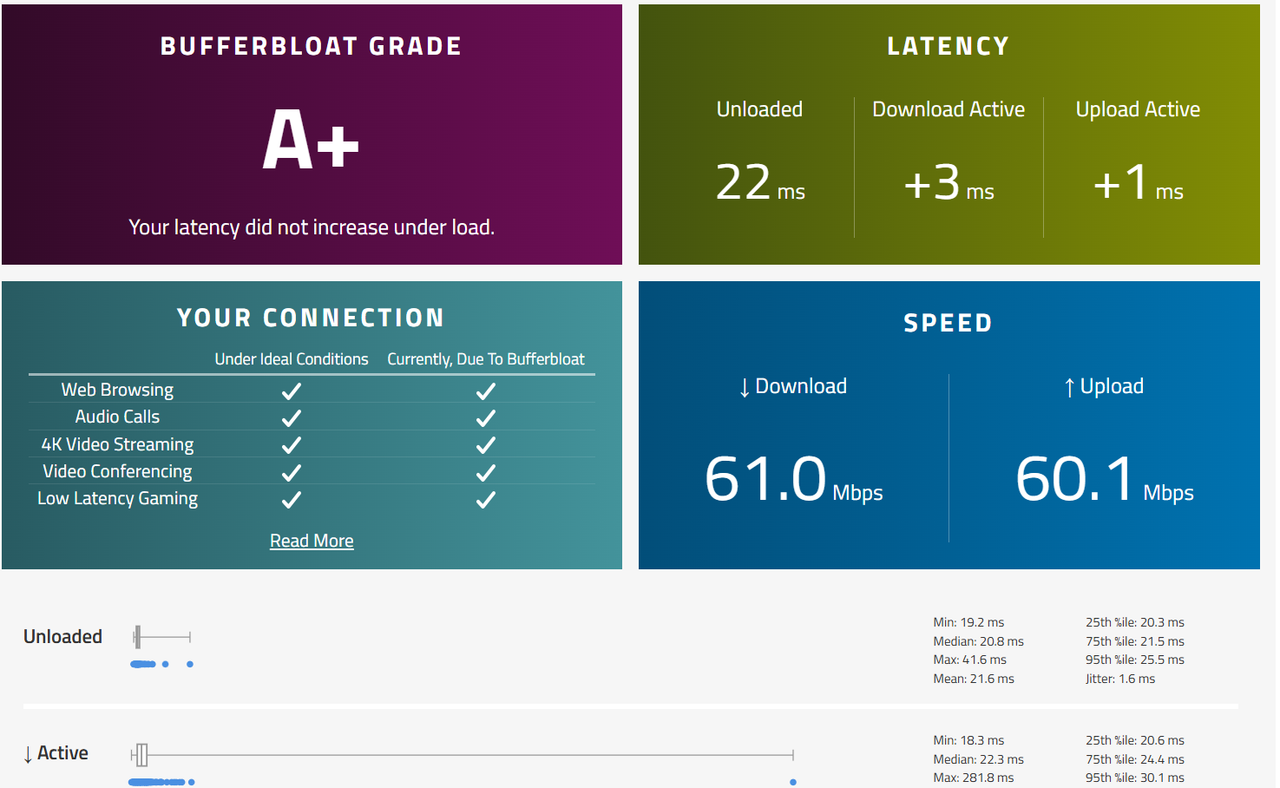
when i did buffferbloat test while wifi completely disabled ,cpu usage 45 % ,and when i set limit 60000 kbps ,mac cpu usage is 52 %
so its clear ,cake sqm is not saturating one core ,its the wifi ,now i have to find solution ,why wifi taking too much cpu usage ,even when bufferbloat test is going on ehternet
when i did buffferbloat test while wifi completely disabled ,cpu usage 45 % ,and when i set limit 60000 kbps ,mac cpu usage is 52 %
so its clear ,cake sqm is not saturating one core ,its the wifi ,now i have to find solution ,why wifi taking too much cpu usage ,even when bufferbloat test is going on ehternet
Enable packet steering and check if you haven't already. Also, add irqbalance and enable it.
On the other hand, you can disable SQM and enable hardware offloading. If that works a little bit then you can add a QOS package and see if that helps.
On the other hand, you can disable SQM and enable hardware offloading. If that works a little bit then you can add a QOS package and see if that helps.
my testing conclusion - wifi driver creating problem ,reducing transmission power reducing load ,but why i should compromise on wifi ,when everyone gonna use wifi ,only pi 5 is on lan ,and i dont think reducing power beyond 15 dbm is a good idea
and also ,since pi 5 is on automation ,so when it download and upload torrent ,it pushes one core to max , torrenting is very heavy on cpu , i need hardware offload ,or a good hardware
so i decided to revert back for some time , its better to use strong cpu hardware ( decided to go either for pi 5 or nanopi r3s )
im sorry sloj , im feeling bad , you tried your best to help me , but i also disappointed
already reverted back to asuswrt
( i dont know how ,but asuswrt cpu usage is so balanced , even with qos enabled, bufferbloat test , cpu usage remains low, most probably using hardware offloading )
main reason of reverting is not bandwidth , their is some kind of slowness
thanks you for taking your time to help me
and also ,since pi 5 is on automation ,so when it download and upload torrent ,it pushes one core to max , torrenting is very heavy on cpu , i need hardware offload ,or a good hardware
so i decided to revert back for some time , its better to use strong cpu hardware ( decided to go either for pi 5 or nanopi r3s )
im sorry sloj , im feeling bad , you tried your best to help me , but i also disappointed
already reverted back to asuswrt
( i dont know how ,but asuswrt cpu usage is so balanced , even with qos enabled, bufferbloat test , cpu usage remains low, most probably using hardware offloading )
main reason of reverting is not bandwidth , their is some kind of slowness
thanks you for taking your time to help me
Ya, torrents can use lots of resource as multiple connections are made. For Wifi you have to select proper country code and rest will be applied accordingly I guess, never used wifi on the RPi4b with openwrt. No worries, use what works good and best for you.

