
-
Amazon Deals - ToS - Like us?
You are using an out of date browser. It may not display this or other websites correctly.
You should upgrade or use an alternative browser.
You should upgrade or use an alternative browser.
MTNL Mumbai MTNL Throttling speed or just overload of infrastructure
- Thread starter Satyajeet
- Start date
- Replies 187
- Views 29,709

I dont know if I am on Alcatel/SOTL. But here are my ping results (1 mbps line)
PING 216.12.203.92 (216.12.203.92) 56(84) bytes of data.
64 bytes from 216.12.203.92: icmp_seq=1 ttl=53 time=108 ms
64 bytes from 216.12.203.92: icmp_seq=2 ttl=53 time=117 ms
64 bytes from 216.12.203.92: icmp_seq=3 ttl=53 time=114 ms
64 bytes from 216.12.203.92: icmp_seq=4 ttl=53 time=114 ms
64 bytes from 216.12.203.92: icmp_seq=5 ttl=53 time=107 ms
64 bytes from 216.12.203.92: icmp_seq=6 ttl=53 time=127 ms
64 bytes from 216.12.203.92: icmp_seq=7 ttl=53 time=103 ms
PING 216.12.203.92 (216.12.203.92) 56(84) bytes of data.
64 bytes from 216.12.203.92: icmp_seq=1 ttl=53 time=108 ms
64 bytes from 216.12.203.92: icmp_seq=2 ttl=53 time=117 ms
64 bytes from 216.12.203.92: icmp_seq=3 ttl=53 time=114 ms
64 bytes from 216.12.203.92: icmp_seq=4 ttl=53 time=114 ms
64 bytes from 216.12.203.92: icmp_seq=5 ttl=53 time=107 ms
64 bytes from 216.12.203.92: icmp_seq=6 ttl=53 time=127 ms
64 bytes from 216.12.203.92: icmp_seq=7 ttl=53 time=103 ms
120 is SOTL. 59 is Ericsson and Old Alcatel. 186 is new Alcatel. This is for Mumbai.
With new port you might get either SOTL or new Alcatel. Can't say.
Dunno which server is bad these days. Ericsson is fine as always.
Check the first block of your IP and see.

Ok Guys Finally after 3 months of aggravation dealing with the incompetents at MTNL i got my issue fixed.
I've got my port changed from ericcson 59.183.xx.xx to Alcatel 182.56.xx.xx
Ran an hourly test for 12 hours using TestMy.net Broadband Internet Speed Test and the average speed was 6.27 Mbps. The peak to my surprise was 8.04Mbps and the low was 4.78 Mbps
The best ping i get is 7ms
Even speedtest.net with NY as the test server location seems to give me more than 5 mbps which is pretty good during peak hours.
So far only issue i seem to see is that when I FTP files some of them time out randomly.. heard some people had this issue, but at the moment its a minor irritation compared to the 0.2 Mbps speeds i used to get during the day
BIGGEST MISTAKE I DID and which i hope this post will save you from was to waste my time with the assorted exchange folk between who i was shuffled to and fro
Only complain once to the 1504 helpline and save the docket number. If they dont and im sure they wont fix your issue, call up ( dont email) the appellate authority of your area and state your grievance and give them the docket number. Ask the person attending to your call for his/her name and tell them that you are mailing your grievance to the appellate authority email with a CC to the GM broadband. ( CC to the GM seems to give the dead folk there a sudden burst of vitality.. guess some old babu culture never dies)
Dont fall for the "i will get back to you" BS they tell you. Ask them when you can expect a resolution and once they commit to a time, call back and ask them what steps they have taken.
You will need to do this a few times before they realise you arent going to give up easy.
Ask for a port change specifically. They will give you BS about how its possibly due to a cable fault and send those pappu linemen to your house, indulge them, but keep asking for a port change.
Finally they will relent and move you to a multiplexer with a lower load which is what gets you the promised speed in the peak hours.
I have a sneaky suspicion that this is a multiplexer that they have reserved for people who create a hue and cry about speed. All the other poor sods that dont complain or give up are left to overburdened connections where the contention ratio is terrible.
I have uploaded the list of the appellate authorities of the different regions of mumbai here for easy reference : Dropbox - appellate.xls
The current GM broadband is Ms Gunjan Dave and the contact info can be got from
http://mtnlmumbai.in/index.php/contactus
I hope this will save some folk the 3 months i wasted.. and some of it was fun too.. like when MTNL tweeted about the "Digital India Week".. Mr Modi's pet project launched with big fanfare... I posted a screen shot of my shitty speed with direct messages to Ravi Shankar Prasad and Timesnow... strangely even this public shaming didnt evoke any response from them... and they crib about the govt giving breaks to private players... god save india from such incompetents... who are not only incompetent... but even indifferent...
AND in the odd event that they still don't fix it.. this is the final resort : Telecom Consumer Complaints Monitoring System
Thankfully I didn't have to go that far
Cheers!

If you get 182.56.XX.XX server on New Shitcatel, may god give you strength to endure endless page reloads and timeouts. When they had put me on that system, I had nightmare internet experience. Websites used to time out on my mobile devices connected to WiFi. I was able to replicate this issue in the server room itself on dude's main pc there. So they readily agreed to put me on SOTL.
I even got a follow-up call from DGM saying that they had called New Shitcatel support guy from Bangalore and when he came, they were not able to replicate timeout and ping issue. So he went back.
The server guy has admitted that New Alcatel system is configured incorrectly. Burst speed is too low which causes packet loss and timeouts at random intervals. I'm on SOTL since mid 2013 and there is never a problem with this system. I don't know if they fixed the problem in these 2 years but I bet they don't care.
You need to keep an eye on random timeouts and pages failing to load.
My Plan 8/2 Mbps Down/Up and I have been synced at 12/3 Mbps Down/Up in profile settings.
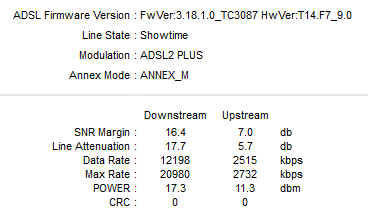

I did follow threads of few members here and the general conclusion is to change port QUICKLY to SOTL based system. Be forceful about it to the exchange guys.
Last edited:
@d5aqoëp
I have yet not faced any issues of random timeouts, perhaps they have fixed the issue that plagued the allegedly malconfigured alcatel multiplexers. Only random timeouts i faced were while FTP'ing files, and i still face those, but its a small inconvinience compared to the 500 kpbs speed i was getting in the day earlier while paying for 8 Mbps
No idea if being on a 8 Mbps plan has made the difference. Latency is down phenomenally and at times down to 5ms

I have yet not faced any issues of random timeouts, perhaps they have fixed the issue that plagued the allegedly malconfigured alcatel multiplexers. Only random timeouts i faced were while FTP'ing files, and i still face those, but its a small inconvinience compared to the 500 kpbs speed i was getting in the day earlier while paying for 8 Mbps
No idea if being on a 8 Mbps plan has made the difference. Latency is down phenomenally and at times down to 5ms

I was transferred frm Ericsson to New Alcatel 182.59.x.x...... after using for more than a month now...... zero timeouts... perfect speed 24x7..... and 23Hrs sessions.....
I still always keep 2 pings constantly running to check timeouts..... one to EU and other to NA...... no problems since port change..... neither have I seen any website timeouts......
YouTube... Play Store updates which had slowed down on Ericsson..... are back to full speeds on Alcatel.....
I still always keep 2 pings constantly running to check timeouts..... one to EU and other to NA...... no problems since port change..... neither have I seen any website timeouts......
YouTube... Play Store updates which had slowed down on Ericsson..... are back to full speeds on Alcatel.....
Yea.... must be....^^ Maybe 182.59 is new server with no timeout problem.
But 182.56 is ugly as f***
Coz even on Ericsson..... 59.184.x.x is good.... rest have some or the other problem....
Port has changed, just 30 mins back. First speedtest:

Just have proof of the problem ready to show them, because sometimes even speedtest shows proper speeds but the net is still bad.
Let them try all the other options first. They will check modem, all the segments of the line etc. and when the problem still persists, they will agree to change the port.
ping went down from 180+ to singapore during peak hours to 69, with no packetloss whatsoever.
My port is in the 182.56 block, but for pings like these, I'm willing to bear with some problems(if they still exist).
A big thank you to all of you for helping me to understand the problem, and telling me how to resolve it.
Just have proof of the problem ready to show them, because sometimes even speedtest shows proper speeds but the net is still bad.
Let them try all the other options first. They will check modem, all the segments of the line etc. and when the problem still persists, they will agree to change the port.
ping went down from 180+ to singapore during peak hours to 69, with no packetloss whatsoever.
My port is in the 182.56 block, but for pings like these, I'm willing to bear with some problems(if they still exist).
A big thank you to all of you for helping me to understand the problem, and telling me how to resolve it.