
I recently got JioFiber connection, so I wanted to share my experience. I will be comparing everything with my previous ISP (i.e., RailWire). My experience with RailWire was pathetic from every angle and recently their services went downhill even locally, so it was really horrible experience with them. And since 4G/5G signal reception is poor in my area as well, I was really in need of a stable ISP. Luckily, Jio finally decided to start serving my area. xD
So, here’s my experience so far-
Booking:
I have been applying for Jio Fiber since a long time. And finally on April, they said that they will be providing connection here in a month or so. They finally came to do booking on 31st May.
Their agent told me that they are only providing Postpaid connection here and I will need to pay for three months in advance. And I can change the plan later from the app.
I said it is fine, since there will always be someone in my home who will be using the connection. So, there won’t be any month when I won’t be using it. Also, it didn’t require security deposit for the connection and STB.
I did the payment and the agent told me that the connection will be installed by tonight or tomorrow.
Installation:
They scheduled the installation for 1st June 11 AM to 1 PM. They arrived at 10:50 AM and started working quickly. It took them like 30 minutes for wiring and then they started setting up the STB with my TV. There was some issue with STB and their router, and they had to change both. After a little while, connection was finally active.
They setup all the apps in Jio STB and then finally left at like 12:30 PM. ;-;
First Day:
I was quite happy with the way it was working. Everything was fast. Download speed might not be full but I was quite happy that I won’t have to deal with disconnections often.
However, after like an hour or so, it disconnected and red light was blinking on Jio ONT. Connection was restored in like 10 minutes.
After like another hour, it disconnected again, and it took like three hours for it to reconnect. I was quite worried after this. I felt like God doesn’t want me to have stable internet. I mean, what else can I think? xD
It disconnected again after a little while and this time, RailWire was also disconnected. So, there was no internet for a long time except slow mobile internet.
At night, I decided to raise service request with Jio. Also, decided to try reconnecting the green wire which connects to the ONT. I did it and then powered on Jio ONT.
After like five minutes, it finally connected again. So, turns out, they didn’t fit the wire properly and that’s why it was having issues.
Next day they arrived (the same people who did installation) and took pictures that internet is working fine. Also gave me their number and asked me to call them directly for at least a month for any issue, as they may face issues if I raise SR right now.
Speed on Jio Fiber:
So, I am having 150 Mbps plan whereI am mostly getting 130-144 Mbps speed. Upload speed is mostly 144 Mbps. Compared to RailWire, it is a bit slower since they usually gave full 150 Mbps when it works. However, I am mainly happy about it simply working all the time.

Also, one thing I found is that Jio have great speed to every server I did speed test on. It is fast in international and Indian servers both.
If you don’t consider the hard capped speed, I don’t have any problem with speed in Jio Fiber.
Update: They are now giving me full speed, as per my plan, or higher. So, there is no downside of JioFiber anymore.

The best part of JioFiber for me have been web browsing experience. It is really fast.
Ping/Latency:
It is fine here. I am getting anywhere around 29ms to 38ms in Mumbai servers. It varies for some reasons. In Valorant, there are matches where I will get 29 ms, 32ms, 35ms and 38ms on average. So, that’s kinda weird. It varies by the match, so if I leave a match and then get into another one, my ping could be different.
For Singapore servers, I get 82ms on some servers and 92ms on the others (like Valorant’s SG server).
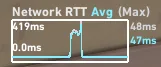
One thing I noticed is that, while the gaming experience is great on JioFiber,ping stability isn’t as stable as in RailWire (though I am talking about the temporary stability, since RW's ping used to be 42ms at one point and 242ms the other). I had only one screenshot of RailWire ping, so used that here.
Here’s the example:
RailWire (on WiFi):
JioFiber:
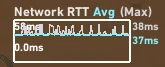
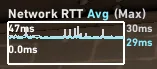
There is a ping spike on RailWire screenshot because of some Windows 11 bug on Wi-Fi. And I took JioFiber ping screenshots over Ethernet. You can see RailWire have super stable ping even on Wi-Fi while there are quite a few Ping jitters on JioFiber. Overall experience is better on JioFiber though.
Update (4 Oct 2023): These ping jitters were due to old ethernet drivers on my laptop. Jio have fairly stable ping
Here’s JioFiber on CloudPing:
Bufferbloat:
This is quite high on JioFiber. I can improve the condition by using my router settings, but I am the only one who downloads big files. So, it doesn’t matter much. However, if you want to use Wi-Fi calling and you’re downloading something big then good luck with your call.
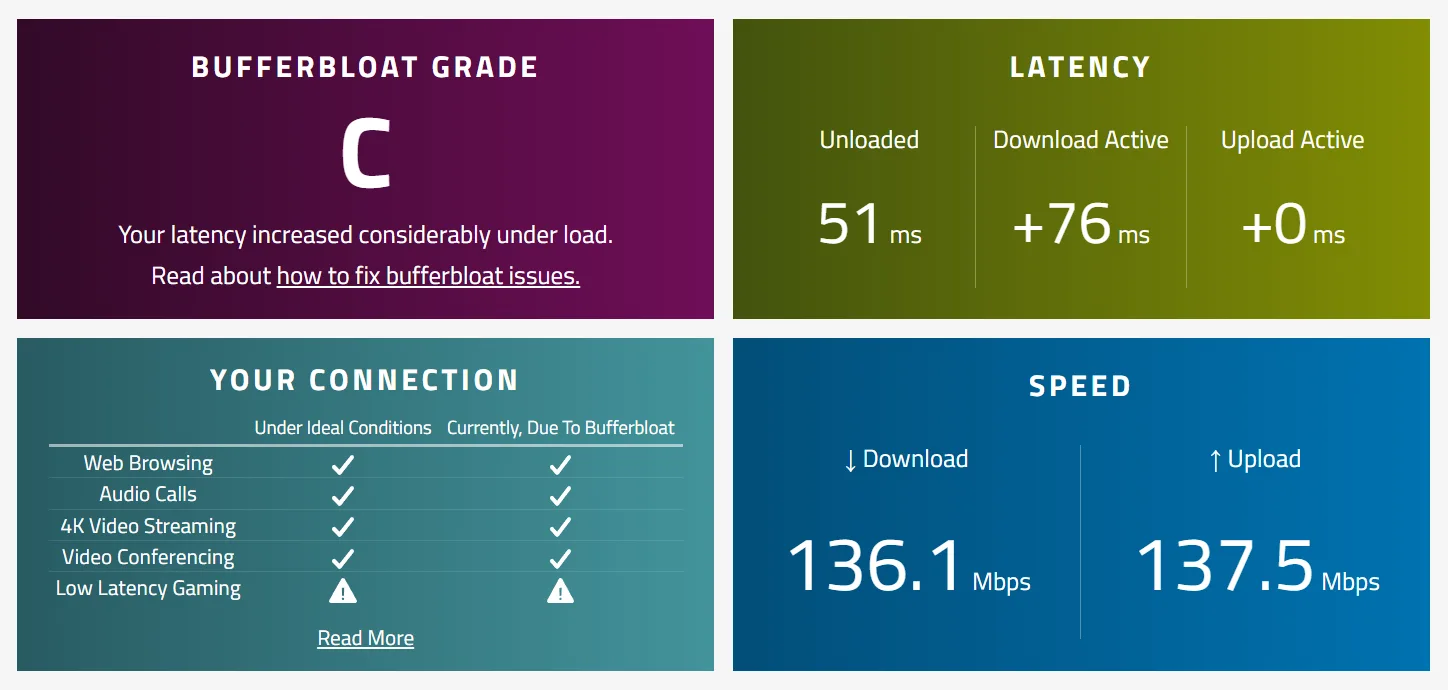
RailWire had quite high bufferbloat ever since they started using Odisha (it was like A+ grade earlier) as my local gateway too. So, I am not really having any worse experience. xD
JioFiber ONT/Router:
I got JCOW414 ONT which is manufactured by Sercomm Philippines. I would say it is kinda shit.
In like three days of use, the experience over Wi-Fi goes downhill badly. Websites and apps like YouTube, Reddit, WhatsApp works sluggishly. I cannot find any difference in ping or internet speed but the responsiveness on those websites and apps become clearly slow. It starts working fast again after I restart it.
While “mobile gaming” over Wi-Fi, I can’t find any difference in ping, but the experience was pretty bad in those “slow responsiveness” times.
At last, I decided to use my Archer A6 for Wi-Fi and everything is working great now.
Conclusion:
Well, this is the only reliable ISP in my locality for now. So, I would say it is working great. Jio has started giving full speed (according to their plan) in some places, so I hope they will start doing that here as well. xD
So, here’s my experience so far-
Booking:
I have been applying for Jio Fiber since a long time. And finally on April, they said that they will be providing connection here in a month or so. They finally came to do booking on 31st May.
Their agent told me that they are only providing Postpaid connection here and I will need to pay for three months in advance. And I can change the plan later from the app.
I said it is fine, since there will always be someone in my home who will be using the connection. So, there won’t be any month when I won’t be using it. Also, it didn’t require security deposit for the connection and STB.
I did the payment and the agent told me that the connection will be installed by tonight or tomorrow.
Installation:
They scheduled the installation for 1st June 11 AM to 1 PM. They arrived at 10:50 AM and started working quickly. It took them like 30 minutes for wiring and then they started setting up the STB with my TV. There was some issue with STB and their router, and they had to change both. After a little while, connection was finally active.
They setup all the apps in Jio STB and then finally left at like 12:30 PM. ;-;
First Day:
I was quite happy with the way it was working. Everything was fast. Download speed might not be full but I was quite happy that I won’t have to deal with disconnections often.
However, after like an hour or so, it disconnected and red light was blinking on Jio ONT. Connection was restored in like 10 minutes.
After like another hour, it disconnected again, and it took like three hours for it to reconnect. I was quite worried after this. I felt like God doesn’t want me to have stable internet. I mean, what else can I think? xD
It disconnected again after a little while and this time, RailWire was also disconnected. So, there was no internet for a long time except slow mobile internet.
At night, I decided to raise service request with Jio. Also, decided to try reconnecting the green wire which connects to the ONT. I did it and then powered on Jio ONT.
After like five minutes, it finally connected again. So, turns out, they didn’t fit the wire properly and that’s why it was having issues.
Next day they arrived (the same people who did installation) and took pictures that internet is working fine. Also gave me their number and asked me to call them directly for at least a month for any issue, as they may face issues if I raise SR right now.
Speed on Jio Fiber:
So, I am having 150 Mbps plan where
Also, one thing I found is that Jio have great speed to every server I did speed test on. It is fast in international and Indian servers both.
If you don’t consider the hard capped speed, I don’t have any problem with speed in Jio Fiber.
Update: They are now giving me full speed, as per my plan, or higher. So, there is no downside of JioFiber anymore.
The best part of JioFiber for me have been web browsing experience. It is really fast.
Ping/Latency:
It is fine here. I am getting anywhere around 29ms to 38ms in Mumbai servers. It varies for some reasons. In Valorant, there are matches where I will get 29 ms, 32ms, 35ms and 38ms on average. So, that’s kinda weird. It varies by the match, so if I leave a match and then get into another one, my ping could be different.
For Singapore servers, I get 82ms on some servers and 92ms on the others (like Valorant’s SG server).
One thing I noticed is that, while the gaming experience is great on JioFiber,
Here’s the example:
RailWire (on WiFi):
JioFiber:
There is a ping spike on RailWire screenshot because of some Windows 11 bug on Wi-Fi. And I took JioFiber ping screenshots over Ethernet. You can see RailWire have super stable ping even on Wi-Fi while there are quite a few Ping jitters on JioFiber. Overall experience is better on JioFiber though.
Update (4 Oct 2023): These ping jitters were due to old ethernet drivers on my laptop. Jio have fairly stable ping
Here’s JioFiber on CloudPing:
| Region | Latency |
|---|---|
| Amazon Web Services™ | |
| us-east-1 (Virginia) | 236 ms |
| us-east-2 (Ohio) | 267 ms |
| us-west-1 (California) | 262 ms |
| us-west-2 (Oregon) | 281 ms |
| ca-central-1 (Central) | 234 ms |
| eu-west-1 (Ireland) | 165 ms |
| eu-west-2 (London) | 158 ms |
| eu-west-3 (Paris) | 150 ms |
| eu-central-1 (Frankfurt) | 161 ms |
| eu-central-2 (Zurich) | 155 ms |
| eu-south-1 (Milan) | 149 ms |
| eu-south-2 (Spain) | 162 ms |
| eu-north-1 (Stockholm) | 169 ms |
| me-south-1 (Bahrain) | 83 ms |
| me-central-1 | 60 ms |
| af-south-1 (Cape Town) | 308 ms |
| ap-east-1 (Hong Kong) | 113 ms |
| ap-southeast-3 (Jakarta) | 101 ms |
| ap-south-1 (Mumbai) | 38 ms |
| ap-south-2 (Hyderabad) | 48 ms |
| ap-northeast-3 (Osaka) | 154 ms |
| ap-northeast-2 (Seoul) | 167 ms |
| ap-southeast-1 (Singapore) | 80 ms |
| ap-southeast-2 (Sydney) | 171 ms |
| ap-southeast-4 (Melbourne) | 190 ms |
| ap-northeast-1 (Tokyo) | 151 ms |
| sa-east-1 (São Paulo) | 332 ms |
| cn-north-1 (Beijing) | 347 ms |
| cn-northwest-1 (Ningxia) | 414 ms |
| us-gov-east-1 | 234 ms |
| us-gov-west-1 | 295 ms |
Bufferbloat:
This is quite high on JioFiber. I can improve the condition by using my router settings, but I am the only one who downloads big files. So, it doesn’t matter much. However, if you want to use Wi-Fi calling and you’re downloading something big then good luck with your call.
RailWire had quite high bufferbloat ever since they started using Odisha (it was like A+ grade earlier) as my local gateway too. So, I am not really having any worse experience. xD
JioFiber ONT/Router:
I got JCOW414 ONT which is manufactured by Sercomm Philippines. I would say it is kinda shit.
In like three days of use, the experience over Wi-Fi goes downhill badly. Websites and apps like YouTube, Reddit, WhatsApp works sluggishly. I cannot find any difference in ping or internet speed but the responsiveness on those websites and apps become clearly slow. It starts working fast again after I restart it.
While “mobile gaming” over Wi-Fi, I can’t find any difference in ping, but the experience was pretty bad in those “slow responsiveness” times.
At last, I decided to use my Archer A6 for Wi-Fi and everything is working great now.
Conclusion:
Well, this is the only reliable ISP in my locality for now. So, I would say it is working great. Jio has started giving full speed (according to their plan) in some places, so I hope they will start doing that here as well. xD
Last edited:


