What to look for when getting an internet connection?

Messages
5
Location
Bhimavaram
ISP
ACT
The Title Seems Very Easy. But The Answer i think isn't that easy.

I will Preface this by saying that i am newbie to Networking, So I don't know a lot. Been Learning Some New things recently. I have put up a Proxmox Server and Hosted some Applications like Tailscale VPN, RustDesk Server and Adguard Home, Pi Hole, Unbound..etc

So basically i realised that Networking is a Rabbit Hole, it's getting bigger the more i dig.

Currently i Have ACT Fibernet 1Gbps Connection. I have a wifi router with other two routers setup as Wifi AP in Mesh mode. So We have three storey House. Each Floor needs wifi, hence i did this setup. All the three wifi routers are in AP mode, with NanoPi R2S SBC acting as router with OpenWRT installed on it.

so off late , i have noticed few issues.

for eg. I am unable to communicate to some players while gaming, When i researched why, I understood that i have a CGNAT. So it's Basically Preventing P2P Connections. I thought using Tailscale to access my Devices outside my home network is Enough, but ACTs CGNAT has been impacting few of my online gaming sessions.

So i was trying to setup unbound, and found that ACT is doing dns hijacking. I guess that is why few websites don't work when i use unbound dns on my network. The Third Test in Unbound Documentation is failing regarding CHAOS Class Test implying DNS Being Proxied.

So I was wondering What other things should i look for while getting a Internet Connection.

Does Static IP solve the issue of CGNAT? ACT is asking some 360₹/month for static ip. I think this is a lot.

and idk anything about firewall, people are telling me that static ip is risky and not suited for home purpose. how true is this?

and I don't want to use ISPs Locked Routers, Is there a way to bypass them? For Eg When i used JIO, i couldn't even use simple WoL apps in my Lan , because the router blocked such packets and there was no other way to solve this issue back then, i just switched ISP then it just worked like that.

and About IPV6? Should i enable it or disable it ? I read that some of isp are basically faking ipv6? I asked ACT if they are using Native IPV6, they told me they don't know. That's what their Technical Team Told me. So i just disabled it on my Router. Currently only using ipv4.

There are not many ISPs in my town as it is a small one.

even if you get could suggest some ISPs, they may not be available in my town

so what are all the things i need to look for?

and Please Enlighten on things that i need to look out for?

and almost forgot does BufferBloat matter in home scenarios?
 
Static IP is worth it especially if you are on CGNAT and are doing homelab kind of stuff... just Tailscale might not suffice for some use-cases. But you also need your ISP to allow/enable bridge mode and allow you full ability to forward whatever ports you want, even lower numbered ports like for email/ssh/web servers, to be able to run your own main router like a TP-Link ER605 (which I do) or a more sophisticated setup like OpenWRT/PF/opnsense etc based router.

You are right static/public IP opens your router to direct DDoS/scans etc which is why bridge mode is highly needed to run your own device with freshly updated firmware/OS etc and your own config to safeguard from such attacks.

I think IPv6 is distant dream unless you are specifically able to make use of it's benefits which I don't think there is much if you already have static IPv4, so I disable it wherever I can.

It should alleviate your gaming connectivity issues unless ISP like ACT is doing some additional blocking at routing level who can say?

bufferbloat matters i believe like gaming packets should not drop if other people are downloading or watching netflix/youtube etc so again your own custom router where you can enable that SQM feature will be needed (I dont have that option with my tplink ER605).

You cannot ask in public/general forum "which is best ISP for me" because it is based on your actual location, so you need to do your own research, ask your society/neighbours whats available, look for posters for ads for either major or local/smaller ISPs... sometimes ISP like ACT will not allow some things but smaller ISP will be more helpful, all depends/changes location to location.

Jio I think is out of the question - I dont think they entertain requests for static-ip nor bridge mode... Airtel/Tata should be possible (I have Tata) and smaller ISPs like say Microscan or local LCO operators may be even better even though they are smaller players.

Good luck, and feel free to ask follow-up questions in this thread, so others can also chime in with their advice...

edit: Static IP will help with gaming scenario and also torrent download performance for sure, compared to shared CGNAT.

edit: Other thing need to look out for? You should get your own domain name and host it somewhere lol, nice address for yourself on the internet, you can go wild hosting services (private or public) like email/website yourself, or thru something like google workspace etc... you mentioned you are not (yet) deep into networking/homelab but like me I am also doing basic stuff and slowly learning and implementing more and more things lol.
 
Last edited:
trying to setup unbound, and found that ACT is doing dns hijacking
Have you configured unbound as a recursive resolver or have you setup a forward zone to ACT?
If answer is fully recursive then I have not heard ISPs in India intercepting DNS requests in path and altering them.
In my personal advice, recursive resolvers are good for one time fun but for home use always prefer DoH/DoQ/DNSCrypt with a reputed upstream resolver like Quad9/Cloudflare/NextDNS.

The Third Test in Unbound Documentation is failing regarding CHAOS Class Test implying DNS Being Proxied.
Assuming Unbound setup in your local network, either you are not querying correctly, or hide-identity is set to true, CH class queries are never forwarded so they should theoretically never leave your unbound instance to Internet.

and idk anything about firewall, people are telling me that static ip is risky and not suited for home purpose. how true is this?
There are script kiddies, botnet operators, dedicated companies e.g. Shodan, Censys that do Internet scanning at scale and with today's compute whole IPv4 address space is scanned within minutes.
IPv6 saves end user from scanning as the address space is too vast to scan.
You should learn about firewalling(most of the times defaults on OpenWRT, OPNSense are good enough) and try not to open ports unnecessaritly if you are getting a public IP.

and I don't want to use ISPs Locked Routers, Is there a way to bypass them?
That is the first thing you should do after getting a connection, there are countless threads on this forum and elsewhere to do so.

and About IPV6? Should i enable it or disable it ?
Yes theres no reason to not have IPv6 connectivity.

I read that some of isp are basically faking ipv6? I asked ACT if they are using Native IPV6, they told me they don't know. That's what their Technical Team Told me.
Have not heard of such dumb folks, better to stay away from such ISPs. Also these so called technical teams are not so knowledgable, so don't their word at face value. You have to experience it firsthand.

so what are all the things i need to look for?
  • Downtime, cable repair time, monthly data cap.
  • Search or ask for ISP's ASN number and check sites likes bgp.tools and bgp.he.net for the upstreams they are using(Tata/Jio/Airtel), local connectivity at Internet Exchanges like NIXI/Extreme/DE-CIX.

and almost forgot does BufferBloat matter in home scenarios?
Yes and to mitigate it enable QoS/SQM on your router.


Theres no single answer to best ISP. You have to look for better than most in your locality. So either ask your neighbours/friends or test them personally for short periods.

Personally what I do is test top 3-5 ISPs one by one by setting up monitoring on them, that way within a month or two looking at graphs and stats I can decide if I should continue with the ISP.
Now that you have also gotten deep into homelabbing rabbithole, you should setup a smokeping instance or grafana+prometheus stack for monitoring what services you use most. It gives you more clarity and you don't have to guess if your youtube not loading or game not connecting is your ISP's fault or local or server issue.
 
Have you configured unbound as a recursive resolver or have you setup a forward zone to ACT?
I was trying to setup unbound as a recursive resolver only.
Assuming Unbound setup in your local network, either you are not querying correctly, or hide-identity is set to true, CH class queries are never forwarded so they should theoretically never leave your unbound instance to Internet.
No, The tests are prior requisite to setup unbound. The Documentation suggests if any of the tests failed, don't use unbound.

always prefer DoH/DoQ/DNSCrypt with a reputed upstream resolver like Quad9/Cloudflare/NextDNS
Currently using cloudflare doh via adguard home.
they are using(Tata/Jio/Airtel)
Mine is Tata , idk what to make of this information though? I just checked after your reply.

smokeping instance or grafana+prometheus
I will look into this

Tq for a lot of information
 
should get your own domain name and host it somewhere lol, nice address for yourself on the internet, you can go wild hosting services (private or public) like email/website yourself, or thru something like google workspace etc... you mentioned you are not (yet) deep into networking/homelab but like me I am also doing basic stuff and slowly learning and implementing more and more things lol.
Thanks for the advice. I will look into this. As of now, i don't really have an idea what to do with a domain. If i were to buy a domain, where should i look and ehat should i look for?
 
No, The tests are prior requisite to setup unbound. The Documentation suggests if any of the tests failed, don't use unbound.
Ok I think it is more of a incompetence issue with ATC deployed resolvers than hijacking, anways DoH is good.

Mine is Tata , idk what to make of this information though? I just checked after your reply.
Tata/Jio Good, Airtel Bad.
 
Yes theres no reason to not have IPv6 connectivity.
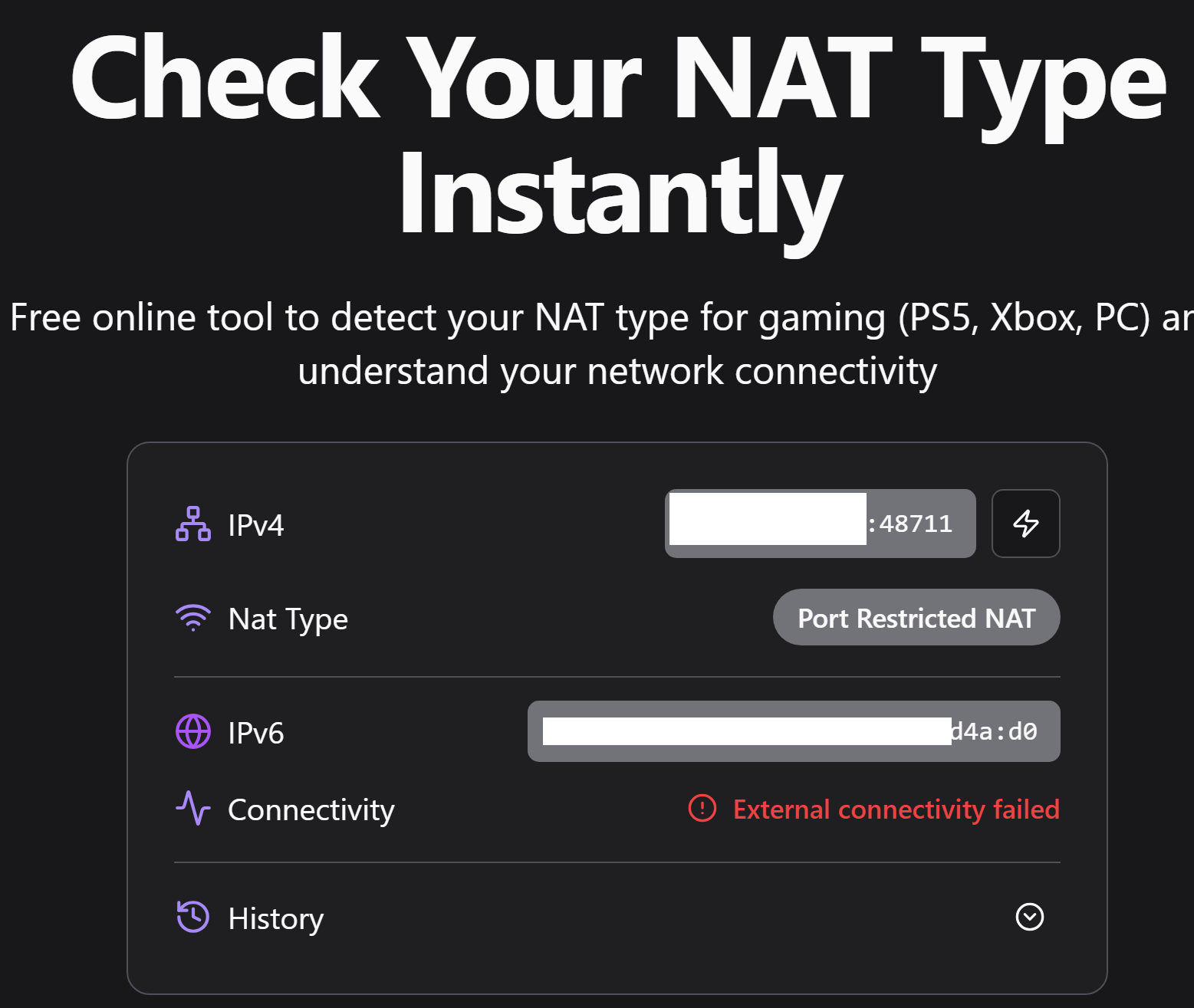
so when i check NAT type, i get the following result for ipv6, what does this mean?

Screenshot-2026-04-08-160952.png
 
That site you are checking from is total bs.
These online sites often have bad choice of words, as IPv6 has no concept of NAT mapping, they shouldn't even show IPv6 as a field and connectivity failed just indicates you have a working firewall.

Use this stun/cmd/stun-nat-behaviour/README.md at main · pion/stun to know your IPv4 mapping and filtering behaviour.
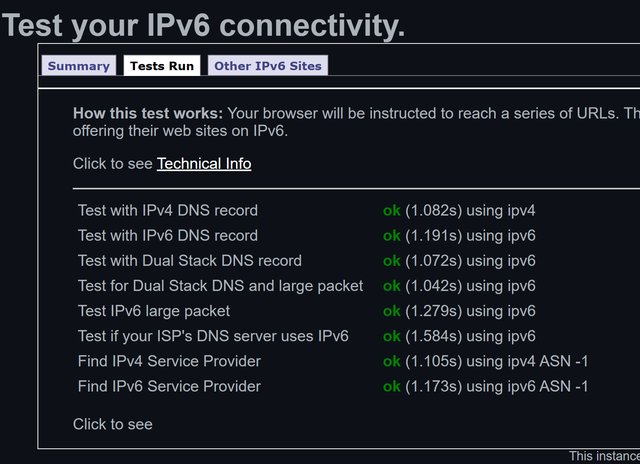
To test IPv6 connectivity use this Test your IPv6.
 
Last edited:
Use this stun/cmd/stun-nat-behaviour/README.md at main · pion/stun to know your IPv4 mapping and filtering behaviour.
i got the following results
  1. NAT mapping behavior: endpoint independent
  2. NAT filtering behavior: address and port dependent
To test IPv6 connectivity use this Test your IPv6.
Screenshot-2026-04-08-232327.png

i got a 10/10 readiness score with the above tests.

I was trying to bypass DNS hijacking of ACT by using httpsdnxproxy server on OpenWRT , but it breaks the internet. It becomes Slow and unresponsive. Ended up Shifting to My TP-Link Archer AX53 AX3000 as wifi router for now
 
Back