Bsnl ftth PS4 NAT Type

  • Thread starter Thread starter abhi9822&
  • Start date Start date
  • Replies Replies 96
  • Views Views 12,670
HI ,
I just realised that this is a BSNL section, my ISP is Seven star .. I am sorry i posted here ...

Can you still help me ??

Are you getting a public IP from them on the FTTH? If yes, can you share a screenshot of port forwarding settings you did?

How do i check that ??

Thanks for the response Marhez Riyad
 
Are you getting a public IP from them on the FTTH? If yes, can you share a screenshot of port forwarding settings you did?

How do i check my this on my setup ??

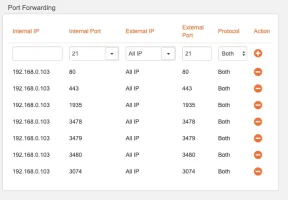
Port forwarding settings on my Tenda Wifi router are as this.
 

Attachments

  • Screenshot 2020-04-08 at 3.25.25 PM.webp
    Screenshot 2020-04-08 at 3.25.25 PM.webp
    20.8 KB · Views: 220
Hello Friends,:)
I am facing a similar problem on my PS4.
The NAT type is Moderate ,where as i need open NAT for multiplayer gamng, reducing the ping and enjoying a better gaming experience.

My connection is as such.

PS4 ( static IP 192.168.0.103) ( LAN cable)> Connected to Tenda WIFI Router ( LAN cable)> Connected to Optilink ONT (Products | MEN SWITCH, MEN SWITCHES, GPON ONT, GPON OLT, GEPON OLT, GEPON ONU)

I tried port forwarding on the Tenda Router but it didnt work.
Then after some research i found out that i need to opn the ports on the Optilink ONT.

Now my main question is how do i enable port forwarding on the Optilink ONT ???

View attachment 1006

The ports i need to forward on the PS 4 are
PlayStation 4 TCP Ports 80, 443, 1935, 3478-3480
UDP ports 3074, 3478-3479


Looking for a positive response and help.
Of course, it won't work. You are putting up Double NAT. Put the ONT in bridge mode. Establish PPPoE over your router. Problem solved.

 
Back