
After hours of fiddling with my ONU and SIP apps, here is a guide on how to get it working.
First login to the ONU/ONT and change these things
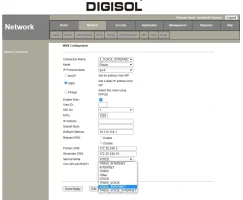
Change VOICE to VOICE_INTERNET.
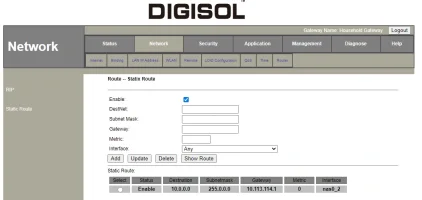
Add a Static Route to the SIP Server. You can add the IP directly like I did in my previous post. But that way you will have to add the return route too which is not there in my previous post. In my case, the return route is 10.x.x.x which is the same with my SIP server so I have to add only one route entry and be done.
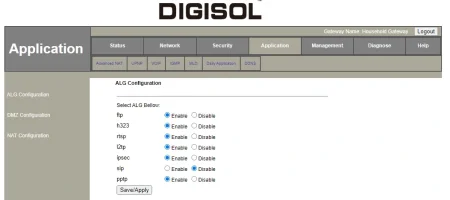
If SIP is disabled, enable it and disable it again. This is necessary because SIP ALG functionality is broken. If it worked the way it was supposed to we could have easily setup softphones on our devices.
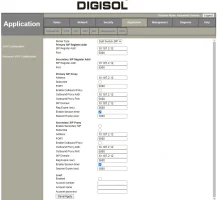
This is your VOIP config page. You wil find your SIP Server IP here. The proxy part isn't really necessary.
Also, you can disable IGMP on Voice. It's unnecessary.
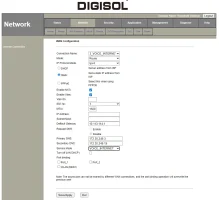
Make sure NAT is enabled. Port Binding isn't necessary as we will be doing the setup on PC for now directly via ONT/ONU without any external router.
Hop to PC
Install YATE or MicroSIP and configure them with your SIP details. These are the two I have used that support NAT.
This goes without saying but just putting it out there. Allow the apps Windows Firewall prompt to connect to public network (or any other firewall you are using).
Configuration Screenshots
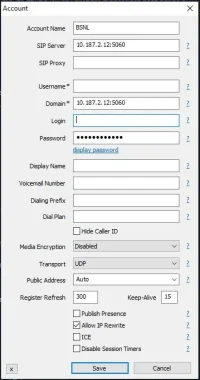
This is for MicroSIP. Click on the top right corner button -> Add Account. Don't forget to tick Allow IP Rewrite.
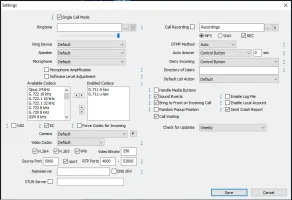
Another one for MicroSIP. Click on the top right corner button -> Settings. RTP ports range doesn't have to be that wide as I have in the Screenshot. 4000-4001 or 4010 is fine.
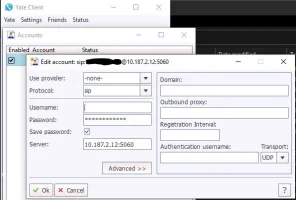
This is for YATE. Go to Settings -> Accounts -> Click on New
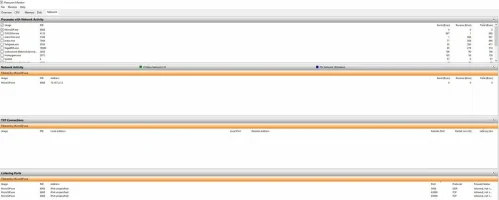
Resource Monitor showing MicroSIP info when it's idle not dialing any number.
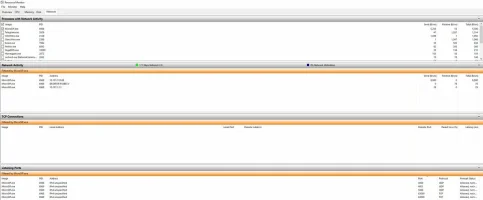
Resource Monitor showing MicroSIP info when I dialed a number. See the change under Network Activity. Now there is another IP which will receive voice and reply which I will receive on my static VOIP IP which NAT will take care of and send to my local IP.
Link to previous failed attempt.
New changes that will let VOIP work on some more apps and platforms.
Tick "Turn off LAN DHCP" on Voice Internet configuration and Enable SIP ALG. Didn't think disabling DHCP makes SIP ALG function properly. Really hard to know which option does what without a proper manual.
Also, those who have DHCP instead of Static in Voice Internet configuration, everything else is same.
First login to the ONU/ONT and change these things
Change VOICE to VOICE_INTERNET.
Add a Static Route to the SIP Server. You can add the IP directly like I did in my previous post. But that way you will have to add the return route too which is not there in my previous post. In my case, the return route is 10.x.x.x which is the same with my SIP server so I have to add only one route entry and be done.
If SIP is disabled, enable it and disable it again. This is necessary because SIP ALG functionality is broken. If it worked the way it was supposed to we could have easily setup softphones on our devices.
This is your VOIP config page. You wil find your SIP Server IP here. The proxy part isn't really necessary.
Also, you can disable IGMP on Voice. It's unnecessary.
Make sure NAT is enabled. Port Binding isn't necessary as we will be doing the setup on PC for now directly via ONT/ONU without any external router.
Hop to PC
Install YATE or MicroSIP and configure them with your SIP details. These are the two I have used that support NAT.
This goes without saying but just putting it out there. Allow the apps Windows Firewall prompt to connect to public network (or any other firewall you are using).
Configuration Screenshots
This is for MicroSIP. Click on the top right corner button -> Add Account. Don't forget to tick Allow IP Rewrite.
Another one for MicroSIP. Click on the top right corner button -> Settings. RTP ports range doesn't have to be that wide as I have in the Screenshot. 4000-4001 or 4010 is fine.
This is for YATE. Go to Settings -> Accounts -> Click on New
Resource Monitor showing MicroSIP info when it's idle not dialing any number.
Resource Monitor showing MicroSIP info when I dialed a number. See the change under Network Activity. Now there is another IP which will receive voice and reply which I will receive on my static VOIP IP which NAT will take care of and send to my local IP.
Link to previous failed attempt.
New changes that will let VOIP work on some more apps and platforms.
Tick "Turn off LAN DHCP" on Voice Internet configuration and Enable SIP ALG. Didn't think disabling DHCP makes SIP ALG function properly. Really hard to know which option does what without a proper manual.
Also, those who have DHCP instead of Static in Voice Internet configuration, everything else is same.
Last edited:


