No internet Airtel PPPoE on Archer C6

  • Thread starter Thread starter gaurishhs
  • Start date Start date
  • Replies Replies 33
  • Views Views 2,313
@Soumil Yeah, that is expected. But the issue I'm talking about is specifically related to TP-Link routers where even after cloning MAC address the router refuses to resolve DNS requests and allows ping only. Airtel doesn't have MAC address binding and hence no need for cloning but I suspect it must be the bug that is causing the issue. If another router is used for testing the doubt can be eliminated and other reasons can be explored.
 
Yesterday my bridge mode was enabled by backend, it worked for 15mins in bridge mode on TP-Link then lost connectivity. Till now connectivity not restored
 
@Soumil Here's the traceroute:

Code:
 1  192.168.0.1 (192.168.0.1)  2.263 ms  1.273 ms  1.178 ms
 2  abts-north-dynamic-001.8.64.182.airtelbroadband.in (182.64.8.1)  6.315 ms  39.218 ms  15.401 ms
 3  122.184.91.249 (122.184.91.249)  5.923 ms  6.504 ms
    125.20.113.213 (125.20.113.213)  6.522 ms
 4  116.119.109.8 (116.119.109.8)  6.989 ms  45.038 ms  6.292 ms
 5  72.14.243.2 (72.14.243.2)  8.432 ms  8.343 ms  8.439 ms
 6  * * *
 7  72.14.234.116 (72.14.234.116)  78.916 ms
    216.239.47.98 (216.239.47.98)  8.618 ms
    142.251.54.82 (142.251.54.82)  8.643 ms
 8  142.251.54.91 (142.251.54.91)  8.340 ms
    142.251.54.93 (142.251.54.93)  8.816 ms
    192.178.83.226 (192.178.83.226)  8.182 ms
 9  192.178.82.237 (192.178.82.237)  8.836 ms
    del11s15-in-f14.1e100.net (142.250.193.46)  8.885 ms  8.550 ms
 
@Rhishav Did you have to configure MAC cloning or something like that? Did you call Airtel to enable bridge mode or you did it by yourself? I enabled bridge mode by myself by some sort of exploit so maybe that could be an issue or maybe not?
 
I did tell Airtel to enable bridge mode on my connection. And man that was a bit of a hassle from their side as well. But yeah after everything was done it works perfectly now. And in terms of configuring the C6, I did all the steps on the Tether app itself. Followed all the steps and it is working fine.
 
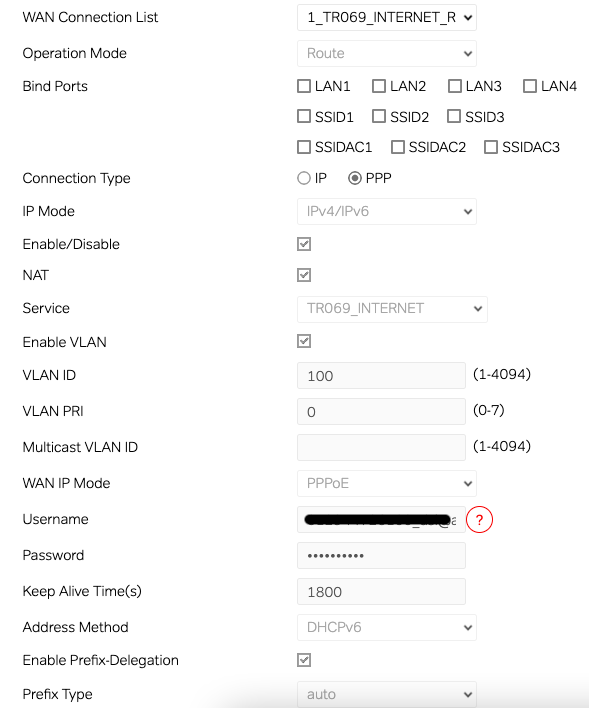
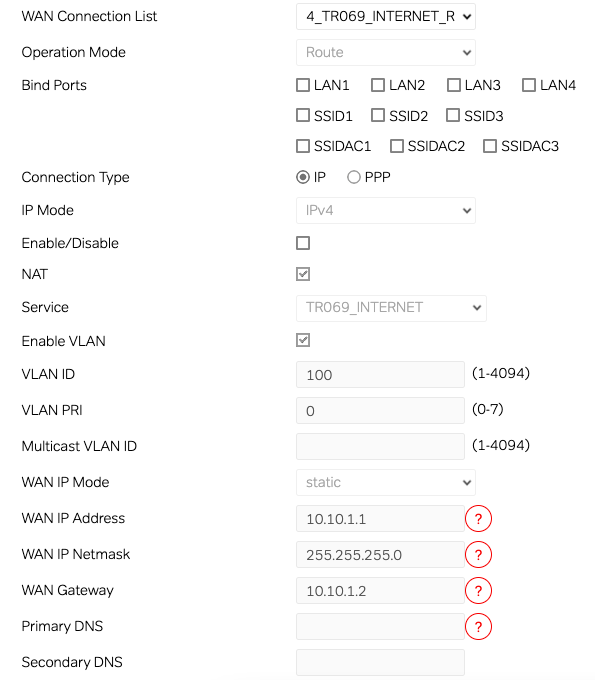
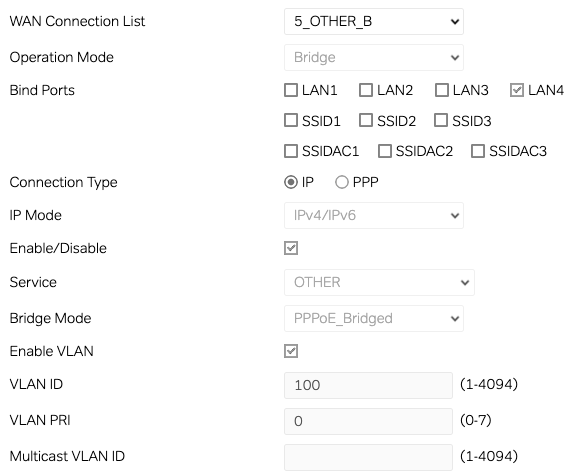
Well i guess then that's the issue. I did not contact airtel to enable bridge mode i did by myself by enabling save button on WAN by inspect element. @Rhishav Can you share WAN config for 1_tr069_internet_r 4_tr069_internet_r and 5_other_b maybe im missing something or if u can check for any dissimilarities between mine and yours:

Screenshot-2024-05-31-at-7-16-32-AM.png

Screenshot-2024-05-31-at-7-16-49-AM.png

Screenshot-2024-05-31-at-7-17-06-AM.png
 
Last edited:
Thanks for informing. I have redacted it now. It wasn't exactly my phone no. but idk what's a DSL ID or whether a phone no. can be retrived via it? Is there anything else i should do? I had set the image to not be deleted so it may never be deleted
 
Last edited:
Back