@opomiyulen You are a saviour . Followed your above steps and was able to configure service name field and finally got PPPOE working on my
Tenda AC10 router. For people who are looking to setup , please follow below steps. Don't need to contact Hathway for enabling Bridge mode and you can do it your self.
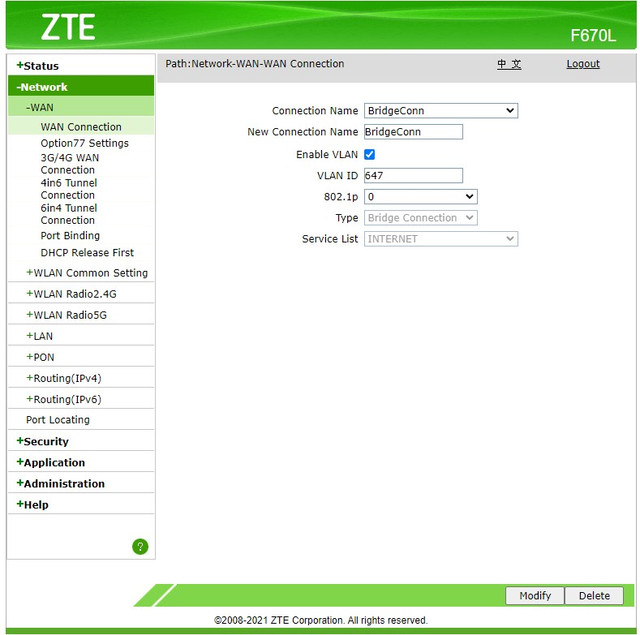
Step 1: Create a Bridge connection as shown below on your Hathway ZTE 670L router's WAN settings.
Step 2: Bind the above created connection to any LAN port ( I have binded it to LAN Port 4)
Step 3: Connect Hathway router's LAN PORT 4 (binded above) to WAN port of your secondary router.
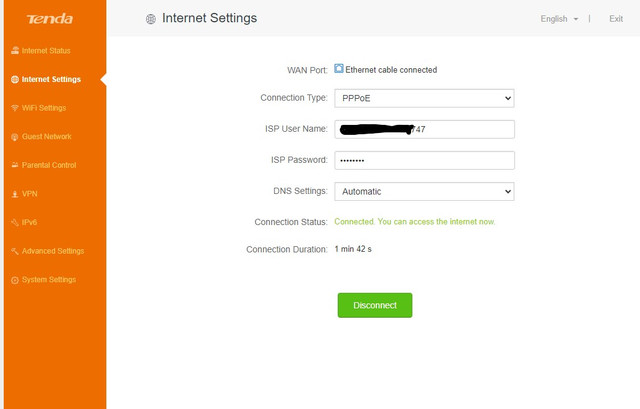
Step 4: This step is router specific , so update config according to your router. My current router is TendaAC10 . Setup PPPOE connection on router as below.
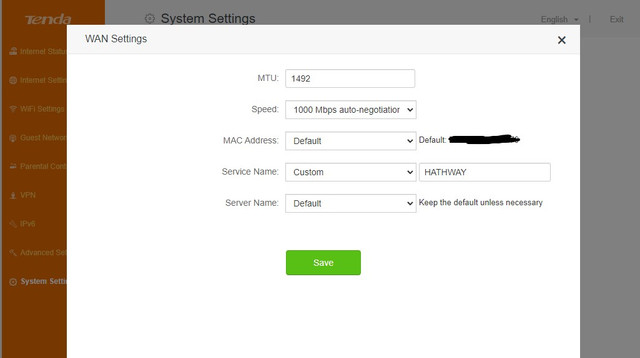
Step 5: (Optional) - Set the service Name field if required by your ISP. In my case Hathway requires service name to be set for PPPOE to work. For Hathway the service name should be exactly spelled "HATHWAY" .
Now your PPPOE should work from your secondary router and your Hathway router will just work as
ONT .
Thanks to all who helped me along to reach this point . Thanks to
@opomiyulen @JB701 @Chip .
With all your help , I was able to prove that Hathway CustomerCare and Technical team is stealing money from customer in the name of static ip.
Tricks that Hathway customercare and their so called technical team tried to make me purchase static ip
1.They said only if I get static ip I can do port forwarding. Which was mother of all lies .
2.They said only if I get static ip I can do bridge mode, without static ip if they setup bridge mode then my internet connection wont work.
Stay away from these fraudulent people and save your money.