Bsnl voip config for new FTTH connections

  • Thread starter Thread starter Tenet
  • Start date Start date
  • Replies Replies 22
  • Views Views 28,070
Messages
102
Location
India
ISP
BSNL
For new bsnl ftth connections static Ip for voip is not provided and we are told to configure voice profile in DHCP mode. Is anyone able to configure voip via dhcp ? If yes please share details/settings
 
Yes for new connections they are not providing static IP for voice , but you need to select DHCP and VLan ID as 1830 or 1831 . My status is up still it always displays registering . I have taken connection 4-5 months back, so i have lost now hopes of using voip. Also when i call my landline no. via cell , it says no. doesn't not exist. BSNL charged Rs250 (one time charge) for voip and confirmed its activated from their end. Only option left is to visit nearby exchange , but its not that urgent so i ignored it.
The operator has set vlan as 1831 and all the sip server configuration is done. I changed the vlan to 1830 and checked whether voice is enabled or not. Changing vlan to 1830 didn't work for me. On telling this issue in BSNL CSC, they asked the operator to check whether they have enabled vlan or not. But still it's of no use. Enable vlan is selected in Syrotech router. I took the router to the operator's place and after connecting the OFC cable to my router in operator's office, FXS light was on but in my home, FXS light is not turning on after connecting. LCO told he'll try to get the issue fixed .. if it doesn't work, he told me not to expect voice services.

In August, on some day voice was enabled for 10 minutes max using DHCP. After that day, voice is not there(FXS light off).

I will try the last chance by escalating this issue to BSNL FTTH Nodal officer.. This is the last hope.

Can anyone suggest me the tricks to check VoIP status as last try?
 
Upvote 0
I live in Raipur, Chhattisgarh. For my FTTH connection, BSNL have given me these settings:
Server: cg.ftth.ims.bsnl.in
VLAN :1849
Primary DNS: 172.30.249.11
Secondary DNS: 172.30.249.33
Username: +91771(landline number)

The VoIP WAN profile is in DHCP mode.
I am wondering how do I use these to configure Voice on my IP Phone / IPPBX.
It would be a lot of help if someone here could guide me.
I have even started a detailed thread regarding my issue in this forum. Here
Anyone @sloj , @varkey ...please, if you could shed some light.
Thanks in advance.
 
Upvote 0
whoever suffering from an error number does not exist, they should call their operator from which they are trying to call their landline number and told them you getting number does not exist. I had a similar issue when I got my connection and trying to call my landline via airtel prepaid sim. Then I called to bsnl they told me everything is fine from their end and I also know this because if I try to call my LL from a Vodafone sim it tells me the number is switched off. So at that point, it was clear that there is something wrong from the airtel side. Then I call airtel cc and told them the whole situation, at first they denied acknowledging the issue then I ask the cc guy to connect me to some senior executive and explained everything to him and in 24 hrs I was able to call my LL.
And whoever asking for config I will share how to configure VOIP in a later post.
 
Upvote 0
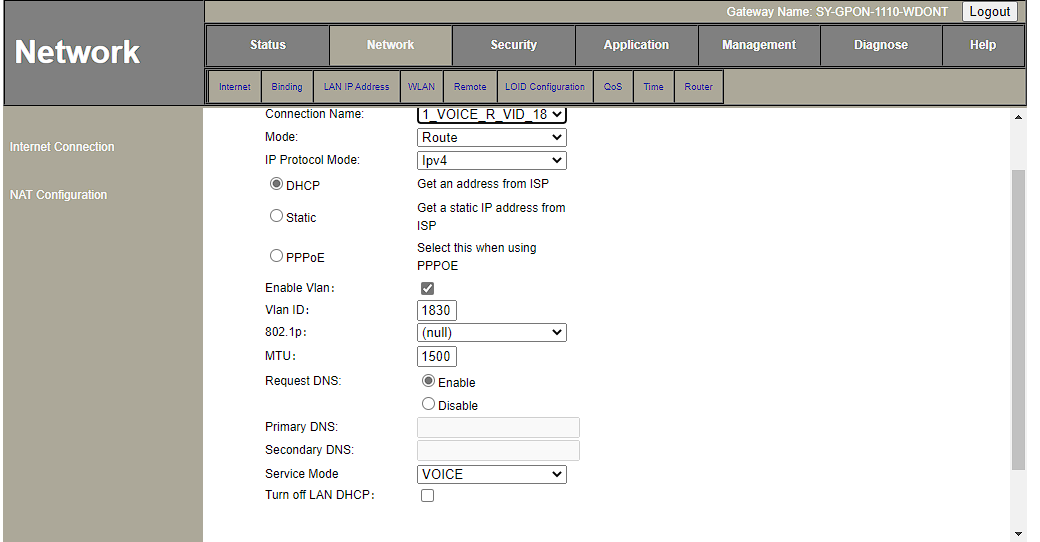
First, create a profile for voice in network tab of ur ont like this.
image.png
 
Upvote 0
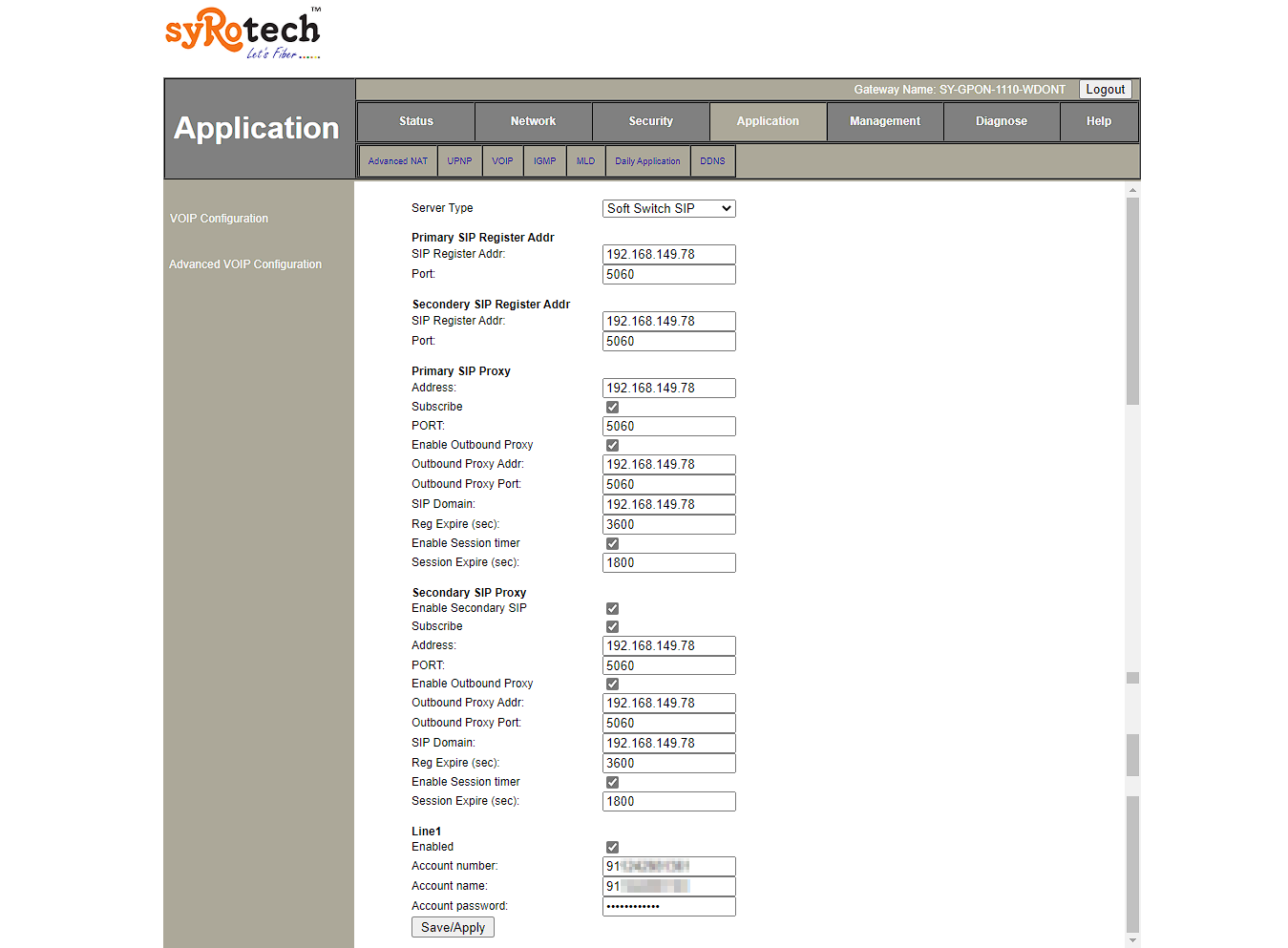
now goto application tab then VoIP and config just like i did
account number should be: 91xxxxxxxxxx ur std code and LL number after 91
account name: same as a/c number
a/c password: same as above.
Now save the config
image.png
 
Upvote 0
I live in Raipur, Chhattisgarh. For my FTTH connection, BSNL have given me these settings:
Server: cg.ftth.ims.bsnl.in
VLAN :1849
Primary DNS: 172.30.249.11
Secondary DNS: 172.30.249.33
Username: +91771(landline number)

The VoIP WAN profile is in DHCP mode.
I am wondering how do I use these to configure Voice on my IP Phone / IPPBX.
It would be a lot of help if someone here could guide me.
I have even started a detailed thread regarding my issue in this forum. Here
Anyone @sloj , @varkey ...please, if you could shed some light.
Thanks in advance.
Mine is so similar to your config except that I am from Kerala, Did you get it working on your IP Phone or IPPBX
 
Upvote 1
Back