Kerala Vision Broadband FTTH - User Experience

  • Thread starter Thread starter varkey
  • Start date Start date
  • Replies Replies 346
  • Views Views 98,651
Now that I am evaluating Kerala Vision broadband, thought I would create a thread to share my experience. My LCO provides broadband services from BSNL and Kerala Vision, so thought would be good to evaluate Kerala Vision as well.

Getting the account setup was pretty easy, cause there was no need for additional cabling or ONT etc. I shared a photo and ID/address proof doc to the LCO, and the same day evening he setup my account and shared the credentials. The LCO shares the same OLT for all services, so on my end, I just needed to configure my OpenWRT device appropriately.

Initially I didn't get the Kerala Vision VLAN, so I had to reach out to the LCO's tech guy who shared the id. I added the VLAN to the switch (my ONT is a transparent bridge, so I needed no change on the ONT) which created an interface and all I needed to do was add the necessary interface configuration with the PPPoE credentials.

Screenshot 2020-03-06 at 7.47.29 PM.webp


Screenshot 2020-03-06 at 7.48.05 PM.webp


As you can see, they use CG-NAT which is disappointing but other than BSNL and few others nobody else gives public IP addresses. Also I liked the fact that things just worked on first try 😆 (the above screenshot is from my first try to connect)

Will add more details as I explore more.
 
okay , cool.. One thing i noticed is that when I try to scan the WAN IP , it says the SIP port is closed :
Code:
pi@raspberrypi:~ $ nmap -Pn 117.201.6.219
Starting Nmap 7.70 ( https://nmap.org ) at 2020-04-19 08:52 BST
Nmap scan report for 117.201.6.219
Host is up (0.00086s latency).
Not shown: 998 filtered ports
PORT     STATE  SERVICE
500/tcp  closed isakmp
5060/tcp closed sip

Nmap done: 1 IP address (1 host up) scanned in 41.51 seconds
 
Code:
root@bumblebee:~# mtr -w 192.168.149.78
Start: 2020-04-19T16:57:06+0530
HOST: bumblebee.varkey.io Loss%   Snt   Last   Avg  Best  Wrst StDev
  1.|-- 10.104.92.1          0.0%    10    2.1   3.5   1.3  14.4   3.9
  2.|-- 172.16.103.246       0.0%    10    2.9   3.0   2.4   3.9   0.4
  3.|-- ???                 100.0    10    0.0   0.0   0.0   0.0   0.0
  4.|-- ???                 100.0    10    0.0   0.0   0.0   0.0   0.0
  5.|-- 192.168.149.78      30.0%    10   52.0  54.1  52.0  55.7   1.7
root@bumblebee:~# ping -c 4 10.105.200.1
PING 10.105.200.1 (10.105.200.1): 56 data bytes
64 bytes from 10.105.200.1: seq=0 ttl=64 time=2.453 ms
64 bytes from 10.105.200.1: seq=1 ttl=64 time=2.986 ms
64 bytes from 10.105.200.1: seq=2 ttl=64 time=2.698 ms
64 bytes from 10.105.200.1: seq=3 ttl=64 time=2.373 ms

--- 10.105.200.1 ping statistics ---
4 packets transmitted, 4 packets received, 0% packet loss
round-trip min/avg/max = 2.373/2.627/2.986 ms
root@bumblebee:~#
 
Code:
pi@raspberrypi:~ $ mtr -w 192.168.149.78
Start: 2020-04-19T14:34:40+0100
HOST: raspberrypi                       Loss%   Snt   Last   Avg  Best  Wrst StDev
  1.|-- RTK_GW.domain.name                 0.0%    10    0.8   0.8   0.7   0.9   0.1
  2.|-- static.bb.ill.59.92.184.1.bsnl.in  0.0%    10    5.5   2.7   1.7   5.5   1.2
  3.|-- 218.248.125.2                      0.0%    10   33.2   6.1   2.2  33.2   9.6
  4.|-- 218.248.255.6                     30.0%    10    2.3   3.0   2.2   6.3   1.5
  5.|-- ???                               100.0    10    0.0   0.0   0.0   0.0   0.0
pi@raspberrypi:~ $ ping -c 4 10.105.200.1
PING 10.105.200.1 (10.105.200.1) 56(84) bytes of data.

--- 10.105.200.1 ping statistics ---
4 packets transmitted, 0 received, 100% packet loss, time 51ms

pi@raspberrypi:~ $
 
Code:
pi@raspberrypi:~ $ mtr -w 192.168.149.78
Start: 2020-04-19T14:34:40+0100
HOST: raspberrypi                       Loss%   Snt   Last   Avg  Best  Wrst StDev
  1.|-- RTK_GW.domain.name                 0.0%    10    0.8   0.8   0.7   0.9   0.1
  2.|-- static.bb.ill.59.92.184.1.bsnl.in  0.0%    10    5.5   2.7   1.7   5.5   1.2
  3.|-- 218.248.125.2                      0.0%    10   33.2   6.1   2.2  33.2   9.6
  4.|-- 218.248.255.6                     30.0%    10    2.3   3.0   2.2   6.3   1.5
  5.|-- ???                               100.0    10    0.0   0.0   0.0   0.0   0.0
pi@raspberrypi:~ $ ping -c 4 10.105.200.1
PING 10.105.200.1 (10.105.200.1) 56(84) bytes of data.

--- 10.105.200.1 ping statistics ---
4 packets transmitted, 0 received, 100% packet loss, time 51ms

pi@raspberrypi:~ $

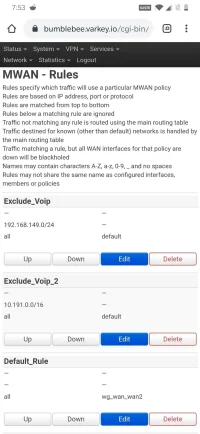
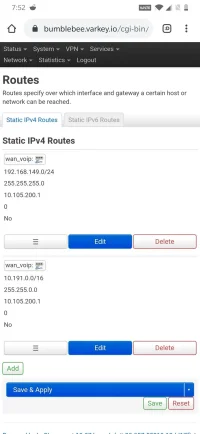
You cannot ping that IP address from the internet interface. It is accessible only from the voice interface.

I have routes configured separately so it works, but the same may not work for you.
 
You cannot ping that IP address from the internet interface. It is accessible only from the voice interface.

I have routes configured separately so it works, but the same may not work for you.

Please elaborate the details for us noobs, this got me curious 🙏
 
thanks @varkey for your help. Not sure what happened in between , voice is working fine since this morning :-) Incoming , outgoing all working fine.

Btw , how can I see the usage etc , is there any portal available ?
 
Back